10 Funktionen, die Looker von anderen BI-Tools abheben!
Management Summary
Ja! Looker hilft, den Erfolg Ihres Unternehmens zu beschleunigen, und übertrifft Erwartungen!
Looker ist eine cloud-basierte Enterprise-Lösung für Business Intelligence. Sie wurde entwickelt, um durch intelligentere datengesteuerte Erfahrungen bessere Entscheidungen zu treffen. Wir nennen Ihnen zehn Gründe, warum Looker ein perfektes Tool für Ihr Unternehmen ist und ein Investment lohnenswert ist.
Quelle: e-dialog
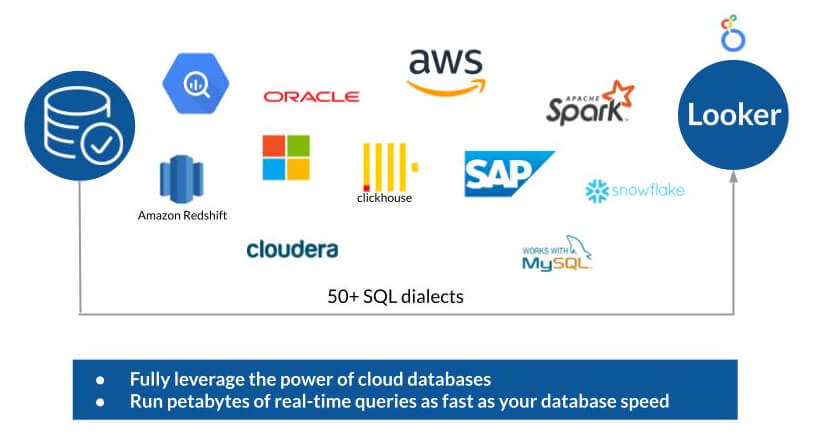
Looker baut auf der Cloud auf und ist daher schnell.
Looker unterscheidet sich architektonisch von anderen BI-Tools. Looker ist direkt mit der Datenbank verbunden und das bedeutet, dass die Leistungsfähigkeit von Cloud-Datenbanken wie Big Query voll ausgeschöpft werden kann. Das heißt, wenn Petabytes in Big Query abgefragt werden können, können auch Petabytes in Looker abgefragt werden, ohne etwas Besonderes tun zu müssen. Looker ist in der Cloud. Alle greifen auf dieselbe Version zu. Ein Download ist nicht erforderlich.
Mit Looker können Dashboards ohne die Hilfe von Data Scientists erstellt werden.
Benutzer erkunden heutzutage nicht mehr nur Daten aus einer Quelle, sondern aus verschiedenen Quellen, wie Werbedaten, sozialen Netzwerken, YouTube und Transaktionen. Daten kommen in verschiedenen Formen und Größen und müssen zusammengeführt werden.
Für Data Engineers ist es kein Problem, diese Daten zu verknüpfen, aber für die meisten Menschen ist dies nicht möglich. Sie verstehen möglicherweise kein SQL, wissen möglicherweise nicht, wie Daten in Datenbanken strukturiert sind und haben möglicherweise auch keine Zugriffsberechtigung. Looker hilft Benutzern, die benötigten Daten zu erhalten, ohne die Hilfe eines Data Scientists einholen zu müssen, um einen Bericht für sie zu erstellen.
10 Funktionen, die Looker von anderen BI-Tools abheben
1. Keine Notwendigkeit SQL zu schreiben
Looker ermöglicht vertrauenswürdige automatisch generierte Abfragen (kein Coding)! Looker ist ein Self-Service-Produkt. Das bedeutet, Endbenutzer ohne SQL-Kenntnisse können Änderungen an den Dashboards vornehmen, ohne Abfragen in SQL schreiben oder ändern zu müssen. Denn alle Abfragen werden in Looker automatisch generiert. Dies bringt ein Höchstmaß an Vertrauen in die Visualisierungen und Erkenntnisse.
2. Dashboards werden basierend auf einem zentralen Geschäftsmodell erstellt, und nicht anhand einzelner SQL-Abfragen
Die zentralisierte Geschäftslogik wird einmal definiert und Dashboards bauen auf einer zentralen Logik auf! Mit Standard-BI-Tools ist das Ändern oder Aktualisieren eines Dashboards, das von jemand anderem erstellt wurde, eine Herausforderung. Möglicherweise ist die Logik hinter der Abfrage nicht verständlich oder die Person, die die Abfrage geschrieben hat, nicht bekannt. Jedenfalls müssen auch alle Dashboards geändert werden, wenn eine Geschäftslogik aktualisiert wird.
In Looker gibt es dieses Problem nicht, da anstatt einzelner SQL-Abfragen ein Datenmodell eingesetzt wird. Looker bietet eine Modellierungssprache namens LookML. LookML wird verwendet, um die Geschäftslogik einmalig in einem Format zu definieren, das in den entsprechenden Dashboards verwendet werden kann. Es spielt keine Rolle, wie aktuell die Logik hinter den Dashboards ist, da eine Änderung des Modells alle Dashboards betrifft.
3. Drilldown der Diagramme für weitere Dimensionen
Quelle: e-dialog
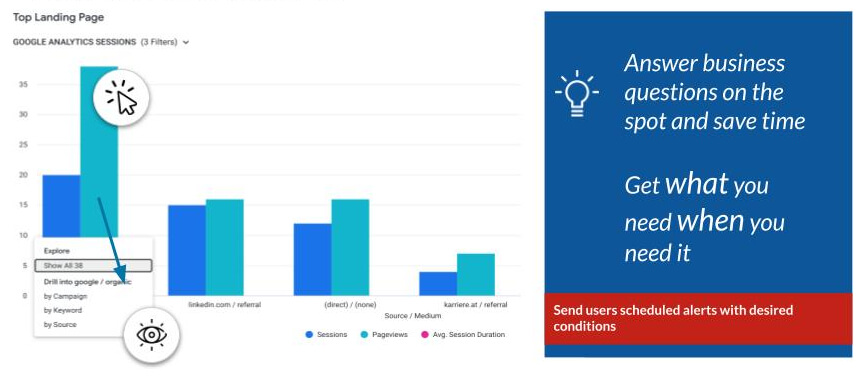
Ad-hoc-Analysen können mit nur einem Klick durchgeführt werden (kein Coding)! Die Ad-hoc-Analyse ist einer der Hauptgründe, die Looker so beliebt gemacht haben. Da der Kern von Looker automatisch SQL-Abfragen generiert, kann einfach durch Klicken und ohne Coding tiefer in weitere Metriken und Dimensionen eingetaucht werden.
4. Zielgruppenaktivierung in Google Ads, Facebook & mehr
Quelle: e-dialog
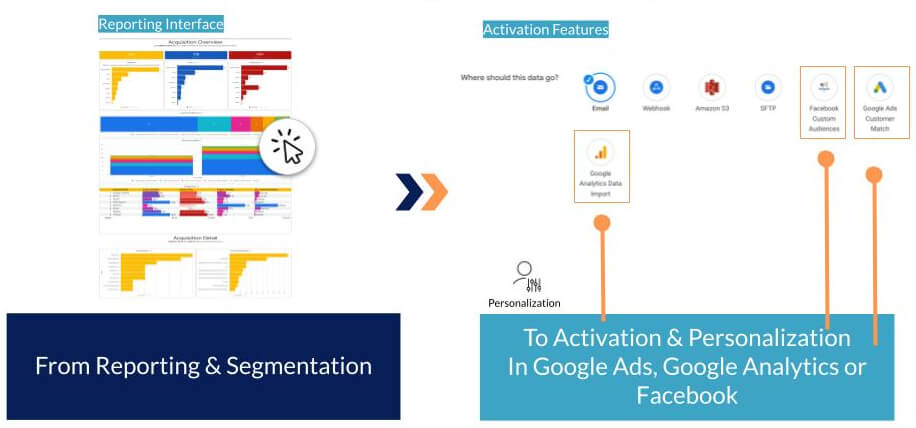
Looker sendet die gewünschten Kundenzielgruppen – die zuvor einfach über Analyse und Segmentierung erstellt wurden – per Kundenabgleich (kein Coding) an Google Ads!
So können auch benutzerdefinierte Dimensionen für Facebook-Anzeigen oder benutzerdefinierte Google Analytics-Datensätze hochgeladen oder direkt von Looker aus in einen Bucket geschrieben werden.
5. Vereinfacht komplexes Cloud-Engineering (kein Coding)
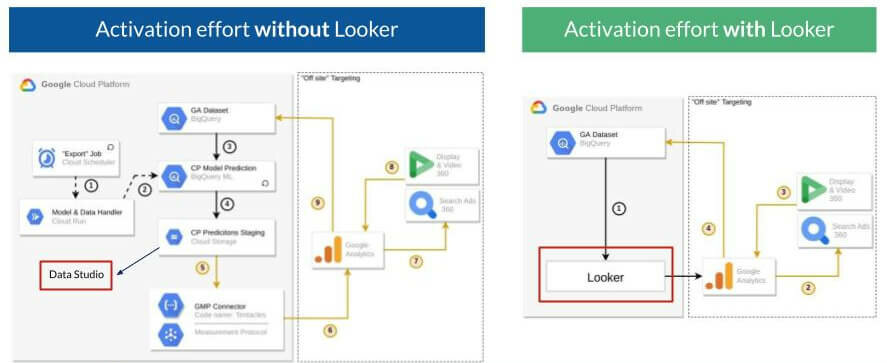
Einer der Hauptvorteile der Verwendung von Looker besteht darin, dass der Programmieraufwand minimiert wird. Es ist nicht nötig, einen Data Scientist hinzuzuziehen, um einen Bericht anzufordern, sondern der technische Aufwand kann in vielerlei Hinsicht übersprungen werden, z. B. können Segmente in Google Ads mithilfe des Kundenabgleichs direkt in Looker aktiviert werden..
Quelle: e-dialog
Das obige Beispiel vergleicht die technischen Schritte für einen Anwendungsfall zu Kaufneigung (Purchase Propensity), Targeting und Gebotsabgabe. Wie auf der linken Seite gezeigt, erfordert die Verwendung anderer BI-Tools wie Looker Studio (ehem. Data Studio) mehr Schritte und Coding in der Cloud. Andererseits wäre Looker Studio die Sackgasse. Wohingegen Looker auf der rechten Seite die Daten in einer Schleife von der Segmentierung zur Aktivierung und zurück zu BigQuery zur erneuten Segmentierung in einfachen Schritten und ohne Coding ermöglicht.
6. Looker ist mehr als nur ein BI-Tool
Wird Looker als API eingesetzt, können benutzerdefinierte Anwendungen erstellt werden und die API kann im ML- und KI-Workflow eingesetzt werden. Looker verfügt über ein vollständiges Setan APIs, die mit anderen APIs kommunizieren und Daten problemlos in andere Tools übertragen können.
7. Looker ist versioniert – Git-Repository
Änderungen werden nicht beeinflusst, bis sie in die Produktion übertragen werden. Um veröffentlichte Blöcke von Entwicklern kostenlos zu klonen, kann die Open Source Git Community verwendet werden.
8. Looker-Funktionen
Viele Funktionen existieren nicht ohne Weiteres in SQL und ihre Programmierung ist manchmal schwierig oder nicht möglich. Looker bietet eine umfassende Liste nützlicher Funktionen! Zum Beispiel intercept, rank, covar_samp (Korrelation), small (kth kleinster Wert), ttest, z test (zur Analyse der Ergebnisse von AB-Tests), pivot_where (bedingtes Pivotieren).
9. Mehr als 100 vorgefertigte Blöcke und Vorlagen verfügbar
Quelle: e-dialog
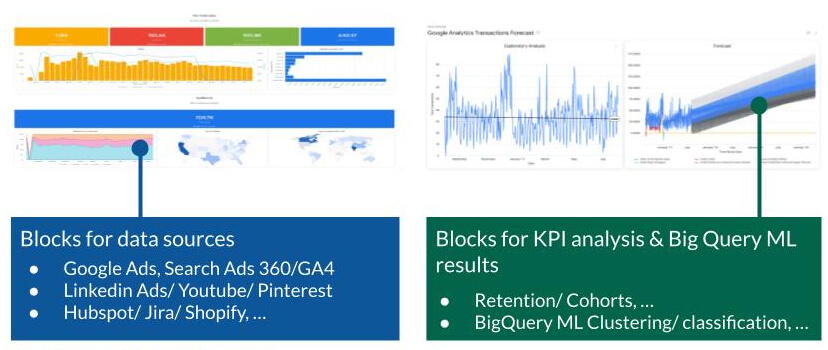
Looker führt in Sekundenschnelle von der Datenbankverbindung zu den Erkenntnissen! Dabei unterstützen mehr als 100 vorgefertigte Blöcke für die Aufbewahrung, Kohorte, Analyse der Ergebnisse von BigQuery ML usw.
10. Einzigartige Visualisierung
Quelle: e-dialog
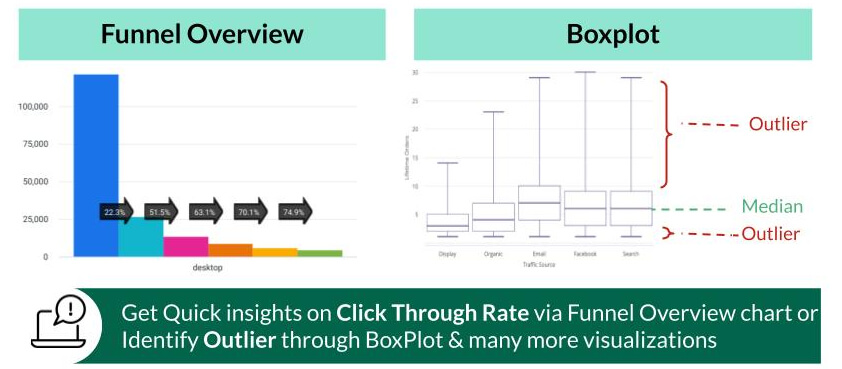
Looker bietet Möglichkeiten der Visualisierungen, die es in anderen BI-Tools nicht gibt! Looker ermöglicht eine Reihe vollständiger Visualisierungen zur Entfernung von Ausreißern, Trichter-Übersicht usw.
Fazit
Wir haben 10 Hauptfunktionen von Looker vorgestellt, die es von anderen verfügbaren BI-Tools abheben. Looker ist möglicherweise alles, was Sie brauchen, um das Beste aus Ihren Daten herauszuholen, Segmente zu erstellen und wichtige Entscheidungen vor Ort zu treffen. Looker ist mehr als nur ein BI-Tool. Es ist ein komplettes Paket von Self-Service-Funktionen, das die Punkte in verschiedenen Abteilungen eines Unternehmens zum Erfolg verbindet, ohne Programmieren erforderlich zu machen, und mit null bis geringstem Engineering-Aufwand.
Sehen wir uns einige wichtige Erkenntnisse für heute an. Looker kann
- das Potential moderner Datenbanken voll ausnutzen
- schnelle und vertrauenswürdige automatisch generierte Abfragen erstellen
- in Sekundenschnelle von der Datenbank zu Erkenntnissen führen
- Ad-hoc-Analysen ohne Data Scientists durchführen
- Segmentierung, Aktivierung und Personalisierung ohne Data Scientists durchführen
Looker bietet Live-Support für das Produkt. Aber auch bei Fragen zur Definition oder Entwicklung des Geschäftsmodells und der Dashboards sind wir für Sie da. Kontaktieren Sie uns unter kontakt@e-dialog.group.
Wenn Sie neu bei Looker sind und mehr über die ersten Schritte mit dem Tool erfahren möchten, senden Sie uns bitte eine E-Mail an kontakt@e-dialog.group.
Wenn Sie mehr erfahren möchten, besuchen Sie direkt meinen Blog zu Looker und Looker Studio (Pro).