Data Studio heißt jetzt Looker Studio, was hat sich geändert? Ab sofort heißt es doch wieder Data Studio!
Management Summary
UPDATE: Google hat per April 2026 Looker Studio wieder in Data Studio umbenannt. Ebenso wird Looker Studio Pro nun Data Studio Pro heißen. Lass dich von der Bezeichnung im Text also nicht verwirren! Die Informationen in diesem Artikel bleiben weiterhin gültig.
Was ist Data Studio / Looker Studio?
Looker Studio (früher bekannt als Data Studio und nun wieder zurück umbenannt) ist das neueste Google-Produkt mit einer zusätzlichen Verbindung zu Looker, daher gilt der Unterschied zwischen Looker Studio und der alten Version Data Studio nur für Unternehmen, die sowohl Zugriff auf Looker als auch auf Data Studio haben. Sie können diese beiden Tools jetzt verbinden, um das Beste aus beiden Tools herauszuholen.

Looker ist eine Business-Intelligence-Software und Big-Data-Analyseplattform, mit der Sie Business Analytics in Echtzeit einfach untersuchen, analysieren und teilen können. Looker ist Teil der Google Cloud-Plattform.
e-dialog ist Looker Partner
Kontaktieren Sie uns. Als zertifizierter Google Cloud Partner setzen wir optimale, skalierbare und zukunftssichere Systeme auf.
Nutzer von Data Studio wollten die Backend-Möglichkeiten von Looker nutzen, das Modell in Looker einrichten und in Data Studio erstellen. Nutzer von Business Intelligence (BI) mögen Self-Service-Funktionalität. Sie möchten mit allen Daten arbeiten und nicht darauf warten, dass irgendein Team Abfragen schreibt und Berichte für sie erstellt. Auf der anderen Seite mögen Führungskräfte regulierte BI. Sie möchten Vertrauens- oder Sicherheitsprobleme vermeiden, wenn sie nicht wissen, von wem und wie ein Report erstellt wurde.
Wenn Looker mit Looker Studio verbunden wird, ermöglicht dies die Nutzung der Vorteile des Modells hinter Looker in Looker Studio, d. h. das Modell (Geschäftslogik) wird in Looker definiert und in Looker Studio in Form von Tabellen verwendet. Da eine Verbindung zu einem Modell hergestellt wird, verhalten sich Data Studio-Tabellen und -Diagramme wie in Looker. Wenn beispielsweise eine Tabelle in Data Studio gefiltert wird, werden alle verknüpften Tabellen (durch eine Mapping-Beziehung und Verknüpfung in Looker) ebenfalls gefiltert.
Der Konnektor zwischen diesen Tools basiert auf der Looker-API. Looker Studio kommuniziert mit Looker und Looker kommuniziert mit dem Data Warehouse.
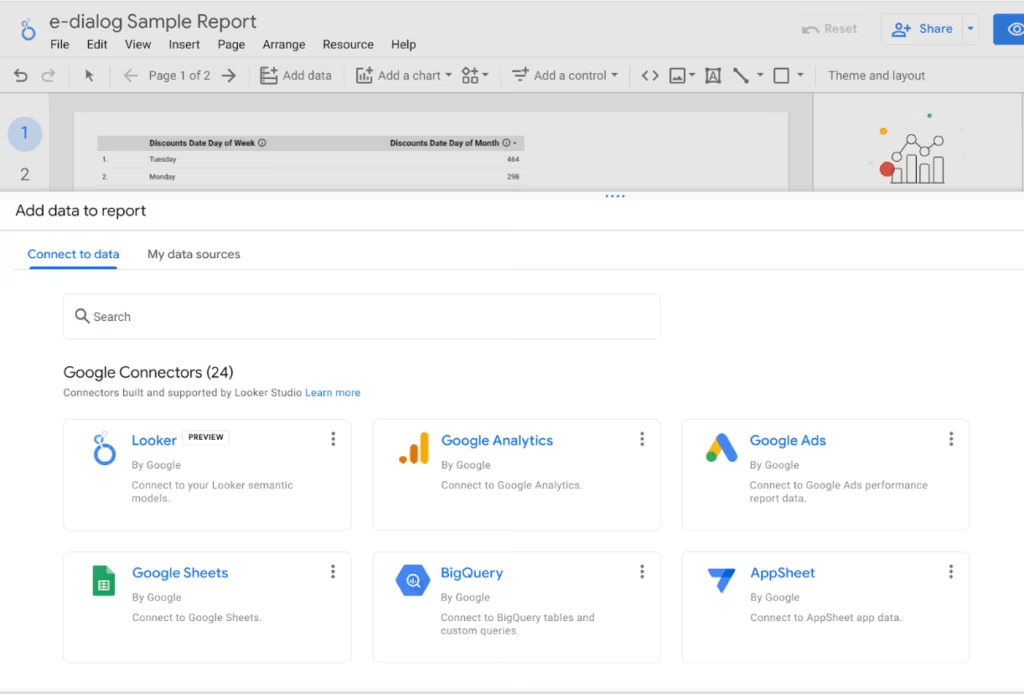
Google Konnektoren in Looker Studio (Quelle: e-dialog)
Das Verbinden Ihrer Looker-Instanz mit Looker Studio erfolgt durch das Ausfüllen eines Formulars, welches an Google gesendet wird. Wenn die in Data Studio nicht verfügbar ist, kann sie bei Google angefordert werden.
Nachdem die Looker-Instanz mit Looker Studio verbunden wurde, kann die Häufigkeit der Datenaktualisierung in Looker geändert werden.
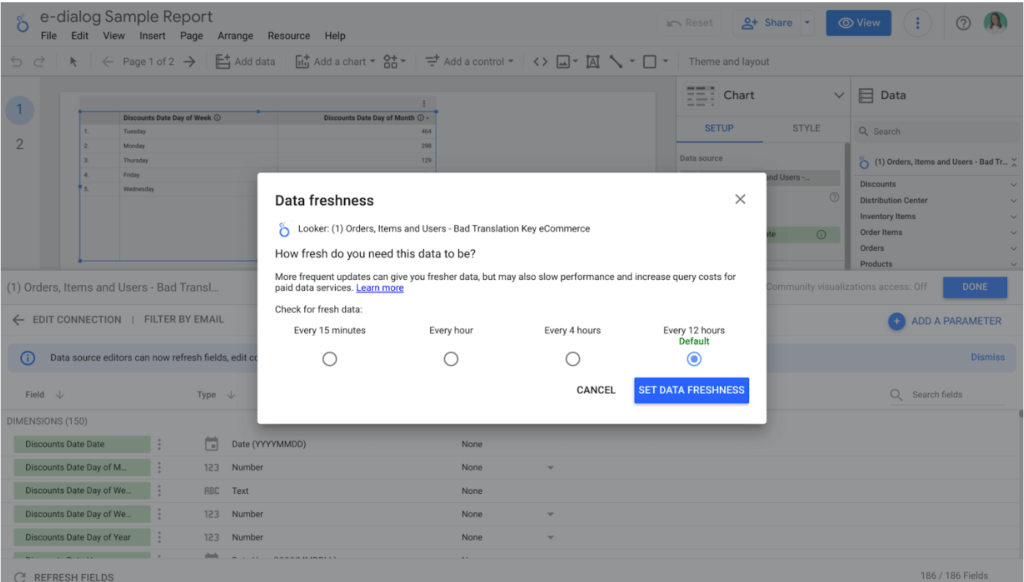
Data freshness Einstellungen in Looker Studio (Quelle: e-dialog)
Änderungen an der Datenquelle in Looker Studio wirken sich nicht auf Looker aus. Sie können das Looker-Modell nicht kaputt machen, indem Sie mit Looker Studio herumspielen.
Vorteile der Verbindung von Looker und Looker Studio
Looker-Nutzer möchten
- Drag-and-Drop-Optionen für Visualisierungen
- auf Daten von mehr als 600 Konnektoren direkt zugreifen
- in der Lage sein, Looker mit anderen Datenquellen wie CSV-Dateien, Google Sheets und Anzeigen zu kombinieren.
Looker Studio-Nutzer möchten
- über ein zentrales Modell und eine Geschäftslogik verfügen, um Vertrauen in die Abfragen und Visualisierungen aufzubauen
- versionierte Modelle über Git entwickeln
- Anwendungen und innerhalb von Produktintegrationen erstellen
Die Verbindung von Looker Studio und Looker macht all das möglich.
Unterstützte Anwendungsfälle
Durch die Verbindung von Looker mit Looker Studio werden die folgenden Anwendungsfälle unterstützt;
- Benutzer können das Looker-Modell verwenden und hochgradig anpassbare Dashboards in Looker Studio erstellen
- Daten in Data Studio können mit Daten aus Looker zusammengeführt werden, um Erkenntnisse zu gewinnen
- Nutzer können mit Nutzern außerhalb des Unternehmens zusammenarbeiten und Echtzeit-Dashboards erstellen
Preise für Looker Studio
Looker Studio ist kostenlos verfügbar und bleibt für Ersteller und Betrachter von Berichten kostenlos. Looker Studio Pro ist eine kostenpflichtige Version von Looker Studio. Das Upgrade zu Looker Studio Pro liefert Support- und Verwaltungsfunktionen wie verbessertes Content-Management, neue Funktionen für die Zusammenarbeit im Team und Zugang zum technischen Support.
Was kommt als nächstes?
Looker Studio plant eine Erweiterung des Produkts in den folgenden Aspekten;
- Looker Studio wird verbessert, um das Looker-Modell vollständig darzustellen
- Looker-Administratoren erhalten Einblicke in die API-Aktivität in Looker Studio
- Das Vertrauen zwischen Looker und Looker Studio wird sich weiter verbessern
Fazit
Wenn Sie Zugriff auf die Looker-Instanz haben, können Sie Looker mit Looker Studio verbinden und die Vorteile beider BI-Tools kombiniert nutzen. Wenn Sie Looker in Ihrem Unternehmen nicht verwenden, ist Looker Studio dasselbe wie Data Studio mit denselben Funktionen und kostenlos. Looker Studio Pro ist jedoch eine kostenpflichtige Version mit mehr Funktionen in den Bereichen Inhaltsverwaltung, technischer Support und Teamzusammenarbeit.
Looker bietet Live-Support für das Produkt. Aber bei Fragen zur Definition oder Entwicklung des Geschäftsmodells und der Dashboards sind wir gerne für Sie da. Kontaktieren Sie uns unter kontakt@e-dialog.group.
Wenn Sie neu bei Looker sind und mehr über die ersten Schritte mit dem Tool erfahren möchten, senden Sie uns bitte eine E-Mail an kontakt@e-dialog.group.
Wenn Sie mehr erfahren möchten, besuchen Sie direkt meinen Blog über 10 Funktionen, die Looker von anderen BI-Tools abheben!