
7 Tips For The Google Ads Setup In The B2b Environment How Do I Deal With My Own B2c Competition

Management Summary
In the area of Google Ads, there are only limited options for separating B2B and B2C. We have 7 tips for a possible setup to separate B2B and B2C within the campaign setup.
Tip 1: Consciously address your target group
The first tip goes into the creation or individualization of the ad texts. It is important that we define our target group in advance and address them correctly in our advertisements.
There are numerous combinations that should be taken into account when setting up keywords later. The following target groups cover the majority of users in the B2B sector:
- Business
- Business customers
- Self-employed people
- and much more.
This list can certainly be expanded to include countless combinations, but it already offers a small insight. In the second tip we will go into more detail about the different keyword combinations.
Does your brand already have an established name for the B2B sector? Super! Because then this should definitely be used in the advertisements across all channels. This unique selling point, especially when differentiated from B2C, can significantly ensure that a search query leads to the right business area of your company.
If a permanent name for the B2B sector has not yet been established, this should be considered. Based on the search queries, certain brand business combinations emerge that are suitable for this and that can be relied upon more heavily in the future.
If this is now taken into account across all channels such as Display, Social and YouTube, it can have a positive effect on the development of specific brand search queries in Google Ads.
But what exactly does that mean?
Let’s assume that we have a B2B and B2C department at e-dialog. The different business areas pursue their own goals and each have different budgets – this is something similar in most companies at the moment.
Most search volume is generated via B2C, as the B2B environment is known to be more manageable in many cases.
How do we get search volume for B2B brand searches?
One idea is that we, for example, establish “e-dialog business” to consciously direct users into the B2B area. This way we don’t compete with B2C and still get qualified B2B traffic. If this is used over a longer period of time via other channels as already described, the brand traffic for “e-dialog Business” can grow.
Both B2B and B2C benefit from the separation, as users become more aware of the respective area over time.
Of course, this brand combination “e-dialog Business” should also be included in the advertisements.
But what if B2B users continue to search for e-dialog?
We will address this question and a possible approach in Tip 7.
Tip 2: Deal with the keyword setup and combinations based on the target group
Because most keywords that consist of 1-2 words are usually in the B2C environment, the focus in the B2B environment is relatively strong on long-tail keywords.
Everyday life in the Google Ads Business account often shows “Not active: Low search volume” because the combinations that were taken into account during setup simply do not receive any traffic. Experience shows that these keywords no longer change this status over time and that index corpses remain in the setup.
As a rule, a keyword combined with the corresponding B2B combinations mentioned in point 1 makes the account grow very large.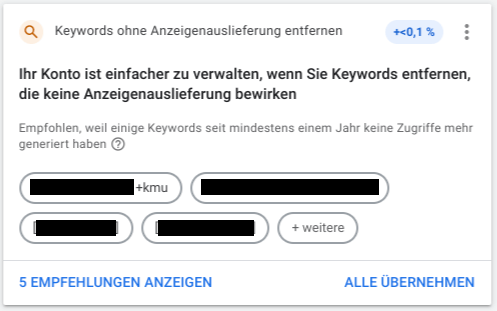 At this point it’s worth taking a look at the recommendations tab within Google Ads. To ensure a clear setup, you should check from time to time whether keywords can be removed. Especially when it comes to newly created setups, not every recommendation should be implemented blindly.
The motto “Trust is good, control is better” applies here. Because it has been shown that behind every algorithm, no matter how good it is, there is still a human being.
Tip 3: Track B2B conversions correctly
Every B2B account depends on the success or tracking of the campaigns. In this case, it is important that the conversions can be divided into B2B or B2C conversions so that the success of a campaign can be better assessed.
For conversions such as “purchase”, you need to ensure that this is due to a B2B or B2C conversion. In this way, the conversion can also be better taken into account in the respective bidding strategy in conjunction with corresponding soft conversions and pursues the goals of the division.
A certain overlap of B2B and B2C conversions within the respective account cannot be prevented, but the goal can be to reduce B2C conversions in the B2B account and increase B2B conversions. There are different approaches here, such as conversion action groups or appropriate weighting within SA360.
In the best case scenario, the budget is distributed in favor of B2B.
Tip 4: Consider soft conversions
In the B2B sector, conversions are not always present in sufficient numbers for the algorithm to deal with them really well. In this case, it makes sense to help the algorithm take into account all conversions relevant to the purchasing process and to include soft conversions in the bidding.
Our recommendation is that “Add to Cart”, “Time on Site” and other similar features that show increased interest are stored as soft conversions. In this way, the algorithm has additional signals that it can use to better assess purchase intentions and set the respective bids. Source:Giphy
Tip 5: Target group targeting
Google Audiences
With the help of different target groups, it is possible that only users within these target groups are addressed. This makes sense, especially in the B2B environment, in order to consciously limit the reach. This can quickly drive up costs, especially for terms that have both a B2B and B2C reference.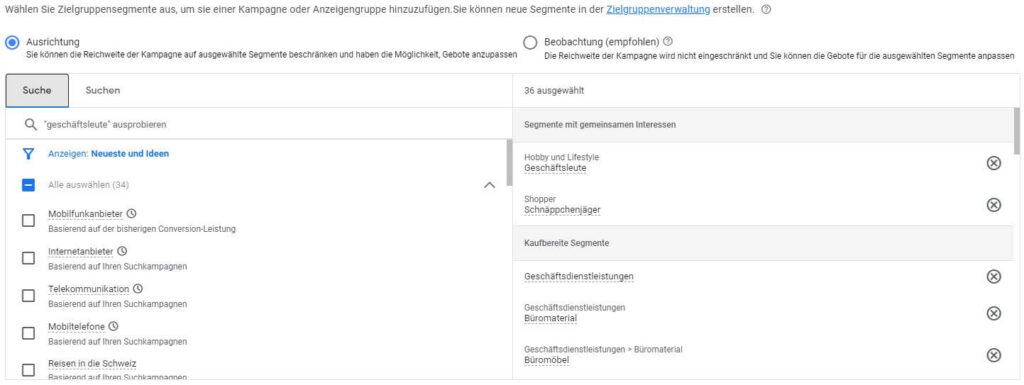 Source: e-dialogue
Using target groups such as “business services” or “business people”, the reach of a campaign can be very limited, but used in a much more targeted manner. This requires that the targeting of a campaign be changed from “Observation” to “Alignment”.
Google Analytics Target Groups
Google Analytics target groups also offer an even stronger option for segmentation. Criteria such as visit duration, B2B-specific URL components and many more can be combined to build your own B2B target group.
Similar Audiences
In addition to these target groups, similar audiences usually appear in the account, which can also be used for targeting and increasing reach.Tip:There should always be an agreement between B2B and B2C so that the competition is not in-house and you overbid yourself unnecessarily.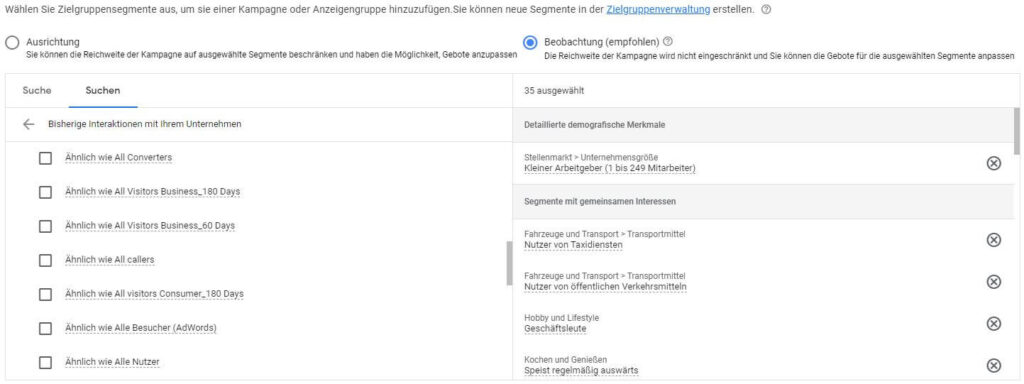
Tip 6: Use Customer Match negatively and exclude B2C
The topic of customer match will become increasingly important in the future and should therefore be taken into account in every B2B setup. Whether the focus is on your own target groups and upselling, the exclusion of your own users or dealing with B2C users, the options are diverse.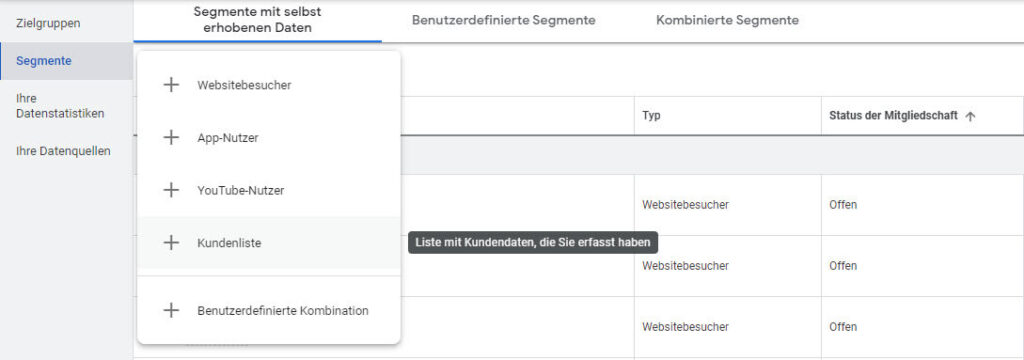 Source: e-dialogue
We would now like to look at these options in detail:
B2B target groups and cross-selling or upselling
Campaigns for your own target groups can especially make sense when it comes to cross-selling or upselling. Taking a customer to the next level in order to bind them to the company for as long as possible should be the goal of every company. If customer match lists are used for this purpose, targeting of new or complementary products can be used even more intensively.TIP:Customer match lists should always be updated regularly so that ex-customers are not continued to be advertised to. Source:Giphy
Exclude B2B users
If you use the customer match lists as negative targeting and create similar audiences, you can reach new customers who are very similar to our existing customers and may also have similar purchasing behavior.
Exclude B2C users
Another big advantage of customer match lists is the exclusion of B2C users. In this way, it is possible to differentiate relatively strongly from B2C, as the focus here is increasingly on B2B users and B2C can be excluded relatively easily.
Due to the ever-increasing resolution of keyword match types, separating the company areas becomes a challenge in the setup.
It is becoming increasingly difficult to integrate special B2B keywords into your account because Google is significantly weakening the targeting with Broad Match.
With the help of B2C customer match lists, it is at least possible for your own users to be excluded. Source:Giphy
Tip 7: Brand search queries
Tip 1 already discussed the separation of B2B and B2C search queries based on target group targeting using the example “e-dialog Business”.
But what about the term “e-dialogue”? Aren’t B2B people also looking for “e-dialog” and how should it be handled?
In this case, it has proven to be a good idea to include the keyword in the B2B setup, as there are also general search queries. Especially in the fast-moving digital world, you can save yourself long searches with special business combinations and access a website directly via the brand.
There are different approaches to this topic.
One possibility, for example, is Google’s own target group “business services” or “business people”, which has a very strong B2B connection. Using these lists and targeting specific keywords, it is possible to get additional B2B traffic.
The other option is a specially set-up Google Analytics Audience, which excludes the entire B2C area of a website.
If you use one of the two target groups as a focus instead of observation and exclude this from B2C, the B2B target group can be addressed more specifically with appropriate offers.TIP:It must be ensured that B2C conversions are also tracked in the B2B account in order to contribute to the holistic goals of a company.
Conclusion:
Using these seven tips should ensure that targeting of the B2B target group can work more precisely and that conversions are achieved in the right part of the company. Source:Giphy
Do you have any questions or want to get started with the Google Ads setup in the B2B environment yourself? We are happy to support you:kontakt@e-dialog.group




