
Bigquery Exporter In Cm360 038 Dv360

Management Summary
In this article, we explore this powerful combination of BigQuery and Looker Studio, looking at the technical requirements and benefits.
What is BigQuery?
BigQuery is a fully managed, scalable database service from Google Cloud designed to analyze large amounts of data in real time. With its fast query performance and seamless integration with other Google Cloud services, BigQuery provides a robust platform for processing and analyzing data.
Integration with Looker Studio
Integrating BigQuery with Looker Studio gives data analysts easy-to-use access to powerful analysis tools. Looker Studio allows users to create interactive dashboards, perform complex data queries, and generate powerful visualizations, all directly from the intuitive interface.
What are the advantages of linking?
- BigQuery makes it possiblePerformance datafrom tools such as an ad server or a DSP (Demand Side Platform)long termin the cloudsave. These tools often only store the respective performance data for a short period of time – with Google’s Campaign Manager 360 and Display & Video 360 storage period is 2 years. If the data is not stored elsewhere, this data will be lost after 2 years. In the Google Cloud, models can be created based on this data, such as models for predictive audiences.
- Using BigQuery we can collect data from the DSP (e.g. Google’s Display & Video 360) and the AdServer (Campaign Manager 360).collect in a data sourceand use it in Looker Studio. Without BigQuery, this would only be possible through complex data blends in Looker Studio and these are often very error-prone and result in longer dashboard loading times. Furthermore, BigQuery enables the import of conversions from Campaign Manager 360 based on different attribution models.
- Theoretically, you could also create a single BigQuery data source that contains all performance data from other channels (Paid Social, SEA, GA) – however, the implementation is not so easy to accomplish as it sometimes requires “stitching” the data. This requires a data scientist with the necessary know-how. (*Stitching = merging 2 different data sets into a new data set)
- Using BigQuery we canDynamic Creatives datafrom Campaign Manager 360 in Looker Studioreport(Reporting Labels, Reporting Dimensions etc.). Without BigQuery, you can only enter this information into Looker Studio using Google Sheet Upload (offline), as the necessary dimensions are not available there – this is tedious and does not provide real-time data compared to BigQuery.
How does the link work?
There are different ways to transmit performance data from the tools to BigQuery. One of them is thisExporter function: DV360 and CM360 can be linked directly to the BigQuery Exporter.
DV360 link with BigQuery Exporter
UnderPartner Settings →Linked Accounts →Link New Account, the BigQuery Exporter can be selected. The following must be specified:
- the BigQuery Project ID
- the BigQuery Dataset ID
- the DV360 Advertiser ID(s)
More detailed information about the link can be foundhere. The export function is then available in DV360 under Instant and Offline Reports.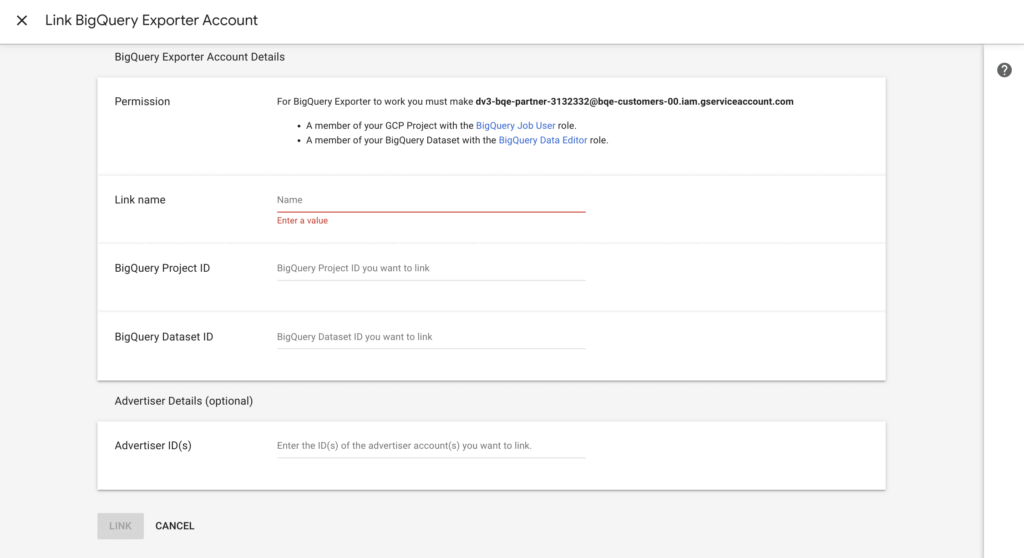
CM360 linking to BigQuery exports
UnderAdmin → Account → BigQuery Exporter → On → Save, the BigQuery Exporter can be activated. Next you need to specify the following:
- BigQuery Project ID (is entered into Link ID)
- BigQuery DataSet ID
You can find detailed information about the linkhere. The export function is then available in CM360 under Instant Reports.
It is important that the BigQuery DataSet is released to the service account beforehand (see screenshot).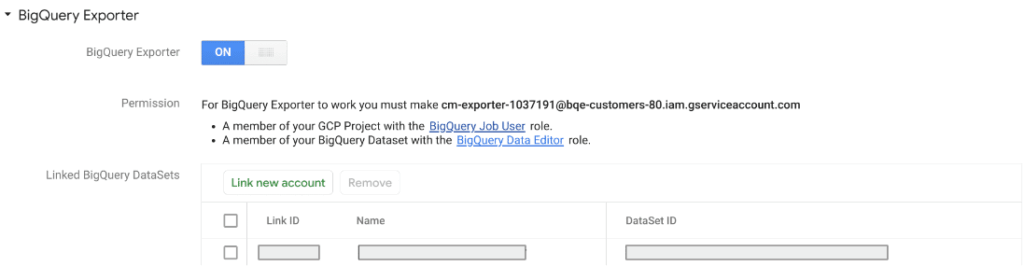 Once the link between the tools is established, you need to create a report with the desired data. To do this, you select either an instant report or an offline report (only with DV360). The creation looks very similar in both cases: you have to specify BigQuery as the format (instead of CSV or Excel) and you select the previously created BigQuery link under “BigQuery Link”:
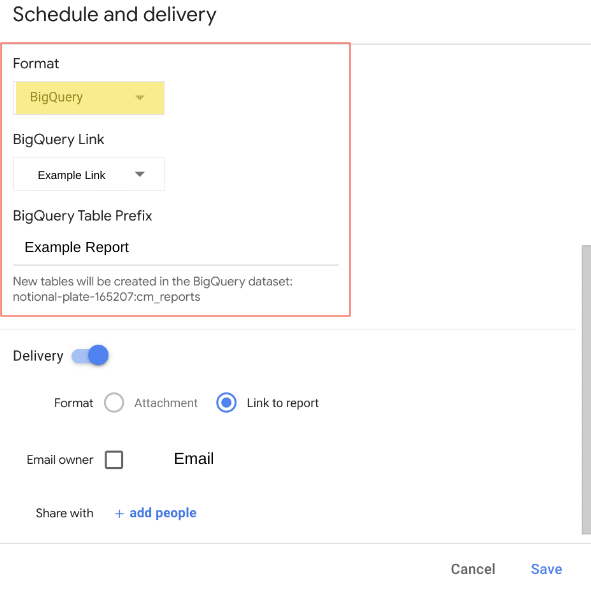 The following must be taken into account:
- Reports may only be created retroactively for a maximum of 14 days – a longer period is not supported by the export function
- It needs to be filtered to the advertiser that is linked to BigQuery. Even if several advertisers are linked to BigQuery, you have to create a report per advertiser.
- It is not enough to simply import the data into BigQuery and then use it in Looker Studio. In any case, it is necessary for a data scientist to control the so-called pipeline and ensure that the data is processed correctly. Only then should they be linked to Looker Studio.
Best practice:
- It is advisable to always create the report for the last 14 days and then run it into BigQuery every day. Reason: The conversion data can change significantly over the period of the lookback window
Conclusion
Linking BigQuery with Looker Studio makes it easier to display large amounts of data in Looker Studio and also enables different data sources to be linked without complex data blends. Dashboard loading time is significantly minimized and it enables the display of data that is not normally supported by Looker Studio.
In any case, simply linking the tools to BigQuery is not enough – it requires a data scientist to ensure that the data is processed correctly in BigQuery before deploying it to Looker Studio.




