
Click Tracking For Iframes 8211 Share Buttons Banners And Affiliate Widgets
Management Summary
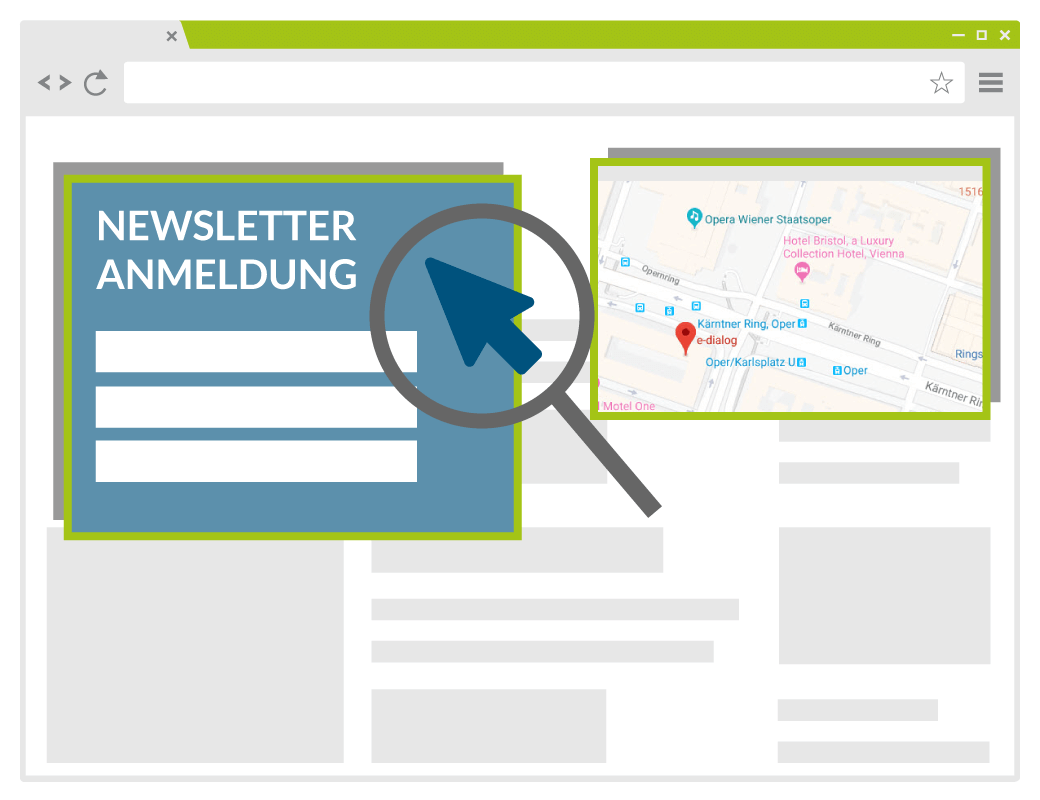
Everything that happens within these iframesremains hidden from the actual page. That’s why you can’t see when the form has been sent if you have a framed newsletter registration form. Or which fields are focused and/or filled out. With an affiliate widget or Facebook share button, a click event on the iframe – not its contents – would be sufficient. Unfortunately, the iframe element does not have an onclick attribute. But there is a way out: we take advantage ofthat when you click on an iframe, the framed file gets focus or, more precisely: that the framing file loses it. Then we can use the onBlur event. So the idea is this: When the framing file loses focus, we check for all iframes whether the mouse cursor (or finger, for touch displays) is over the iframe. If so, we report a click event for this element to the GTM. This is implemented in GTM with a tag of the type custom/user-defined HTML with a little JavaScript code. First, let’s define a variable that points to an iframe element when the cursor is over it.var iframe_element = null;Using a for loop, we now attach two event listeners to each iframe. When the mouse is over the iframe, we reference the iframe_element variable to this iframe. If the mouse cursor leaves the iframe again, the variable should point into space. We do the same for touch clicks:
var iframes = document.getElementsByTagName("iframe");
for (var i = 0; i < iframes.length; i++) {
  iframes[i].addEventListener('mouseover', function() {
    iframe_element = this;
  });
  iframes[i].addEventListener('touchstart', function() {
    iframe_element = this;
  });
  iframes[i].addEventListener('mouseout', function() {
    iframe_element = null;
  });
  iframes[i].addEventListener('touchend', function() {
    iframe_element = null;
  });
}
And finally we write the event listener for the framing file. If this loses focus and the cursor is over an iframe, i.e. the iframe_element variable is not null, an “iframe click” event is sent and the clicked iframe is sent to the GTM via the DataLayer.
window.addEventListener('blur', function() {
  if(iframe_element) {
    dataLayer.push({ event : "iframe_click", "iframe_element" : iframe_element });
  }
});
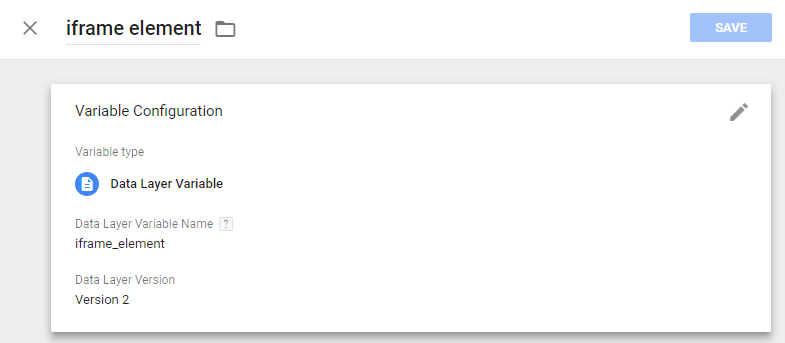
Now we can use this event to react to it. We can use the linked iframe element to check whether it is the correct element, e.g. an iframe with an Amazon Affiliate Widget. Both classes, IDs and the linked file (src attribute) can be used for this. We therefore create a DataLayer variable in the GTM in which we store the reference to the clicked iframe.
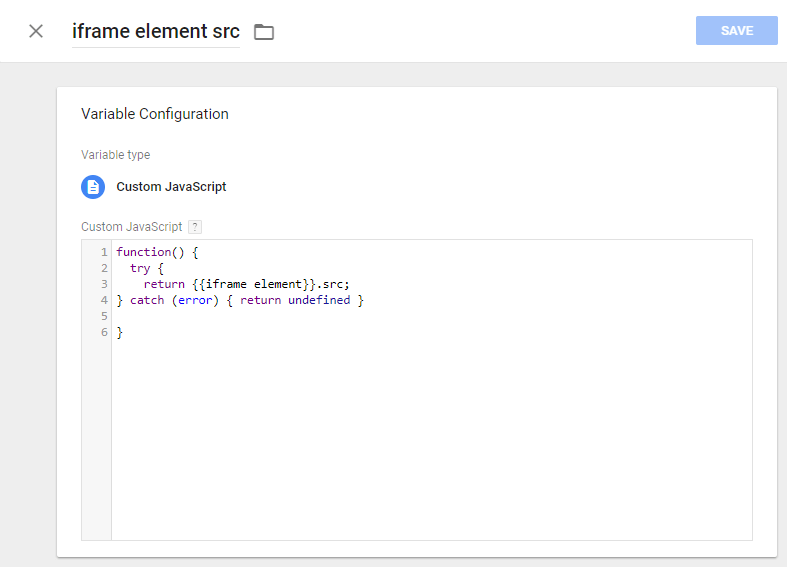
In a second variable of type custom/custom JavaScript, we get the src attribute of this element:
And now we can define our trigger:
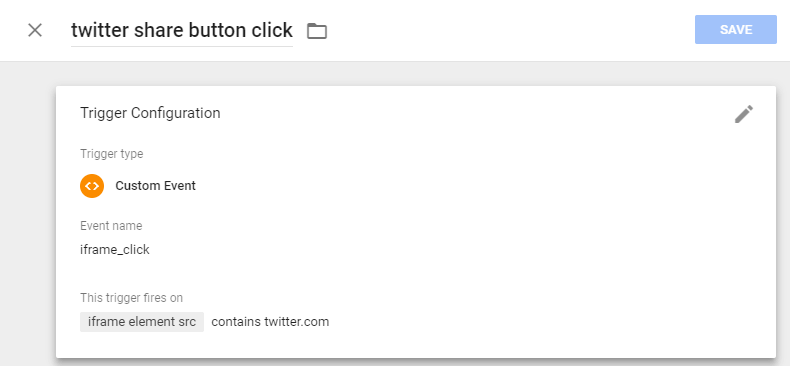
Et voilá, with this trigger we can now trigger our tracking or conversion tags, or a popup message like in the following example. Experiment a little in the following two demo areas to see which behavior triggers a click and which doesn’t. You can tell whether iframe tracking is working by the alert popup that appears when a click is detected.
Variant 1: without window.focus()

Integer bibendum ligula et ex consectetur laoreet. Quisque faucibus mi ex, aliquam sollicitudin metus vulputate eu. Curabitur dapibus tincidunt ullamcorper. Nullam vel tortor leo. Duis nisl mi, ultricies eu placerat ac, blandit id dolor. Aliquam pharetra, tellus in faucibus mattis, quam turpis feugiat odio, id auctor risus sapien tincidunt eros. Vivamus semper fermentum purus, eu consequat libero. Aliquam tristique viverra odio eu finibus. Ut bibendum arcu in metus vulputate, in efficitur elit faucibus. Ut blandit lacus quis arcu vestibulum consectetur. Vestibulum porta ut velit a bibendum. Present scelerisque dictum urna, ut posuere lorem molestie vel. Morbi sit amet velit justo. Donec eleifend, sem non imperdiet lobortis, ipsum enim porttitor sem, vitae accumsan massa nisi quis quam.
Variant 2: with window.focus()
Integer bibendum ligula et ex consectetur laoreet. Quisque faucibus mi ex, aliquam sollicitudin metus vulputate eu. Curabitur dapibus tincidunt ullamcorper. Nullam vel tortor leo. Duis nisl mi, ultricies eu placerat ac, blandit id dolor. Aliquam pharetra, tellus in faucibus mattis, quam turpis feugiat odio, id auctor risus sapien tincidunt eros. Vivamus semper fermentum purus, eu consequat libero. Aliquam tristique viverra odio eu finibus. Ut bibendum arcu in metus vulputate, in efficitur elit faucibus. Ut blandit lacus quis arcu vestibulum consectetur. Vestibulum porta ut velit a bibendum. Present scelerisque dictum urna, ut posuere lorem molestie vel. Morbi sit amet velit justo. Donec eleifend, sem non imperdiet lobortis, ipsum enim porttitor sem, vitae accumsan massa nisi quis quam.
Restrictions:
With this workaround you canreally only capture clicks on the iframe. What happens within the frame remains obscure. In the case of the Amazon Affiliate Widget, this also means that the click is reported, regardless of whether a link was clicked within the widget or on one of the few unlinked areas. A second problem: Once the framing file has lost focus, further iframe clicks are no longer recorded. For example, if you first click the Facebook share button and immediately afterwards the Twitter button.In order for you to be able to capture both events, the framing file must be given focus again between the two links. This can happen if the framing file is clicked between the two button clicks. As a developer, you can also help by returning focus to the framing file during the mouseout event with window.focus().However, you should definitely not do this if you want the visitor to interact with the framed content, for example filling out a registration form. The text cursor would jump out of an input field during filling if the mouse cursor leaves the iframe. This can quickly become frustrating. However, it would not be possible to track multiple clicks on the same button. Under no circumstances should window.focus() be triggered by the touchend event. This would make filling out a framed form not only tedious but impossible. Another problem: the blur event in the framing windownot only triggered by the left mouse button, but also by the right one. We also cannot tell from the blur event whether the left or right mouse button was clicked and the click event is not available to us if the click occurs on an iframe.
Conclusion:
The solution is not perfect. Especially when multiple iframe elements are captured on the page. Or if the exciting thing isn’t the click itself, but you’d like to know more about what’s happening in the iframe. For example, submitting a form. Nevertheless, this solution allows you to track clicks on advertising banners, share buttons or affiliate widgets. And you would really like to know whether visitors make use of these functions.




