
Consent Mode For Google Ads Google Marketing Platform 038 Ga4 8211 What To Do

Management Summary
In this blog article we will now look at how consent mode is activated.
Consent mode in the adtech stack
The activation of theConsent fashionis necessary because this means that the respective status of the consent can be passed on directly to Google via supported CMPs (consent management platforms such as Usercentrics, Cookiebot, Onetrust, etc.) via the Consent Mode API.
We have an overview of consent management platforms and their respective features in thisWhite papersummarized.
When we talk about consent mode here, it is up to the company whether in the future they only send the data after the user’s consent (Basic Implementation) or also without consent (Advanced Implementation).
However, companies that do not want to implement either mode will no longer be able to measure personalized advertising or conversions in the future. Therefore, for a smooth continuation of all campaigns, it is essential to decide on one of the two implementation types as quickly as possible.
Anyone who uses GTM can activate the feature quite easily:
- Implementation of the so-called consent default
- Activation of consent mode in the CMP interface
Here again in detail:
- Implementation of the so-called consent default
A code must be inserted before the GTM that reflects the basic status of the consent:
gtag('consent', 'default', {
  'ad_storage': 'denied',
  'ad_user_data': 'denied',
  'ad_personalization': 'denied',
  'analytics_storage': 'denied',
}); Herethere is the documentation.
- The activation of the consent mode depends on the respective consent tool; please study the respective documentation of the relevant CMP.
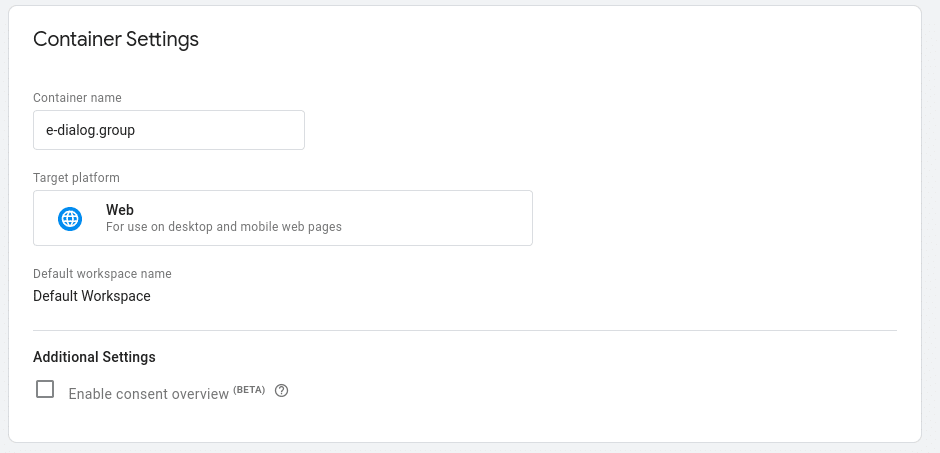
- In order to check the changes in the GTM, the “consent overview” would first have to be activated in the container settings.
This symbol then appears in the tag overview:

It then shows which tags the different storages automatically record or where you would have to configure a consent:

A new tab then appears in the preview:

If the CMP does not yet support consent mode or it is not implemented, the message “Consent not configured” appears.
If implemented correctly, the Consent States should be displayed and also appear in the Event Consent Configuration Status “Detected”.
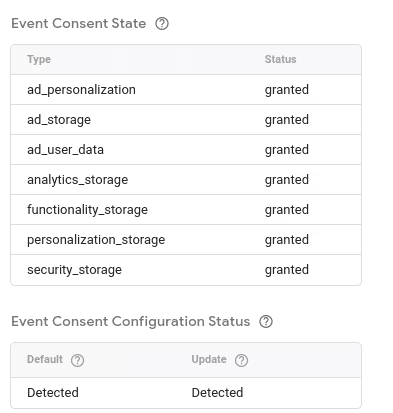
A new parameter should also appear in the tag in the preview:

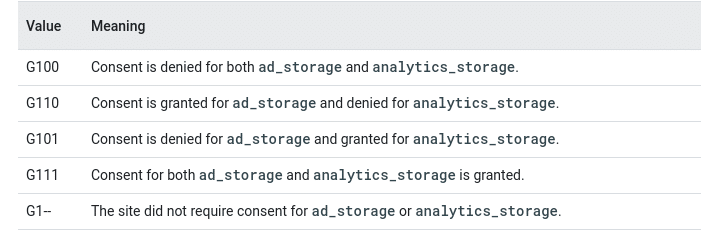
The GCS parameter.
This simply transfers the consent status. G111 means that all storages have been accepted.
If that’s not the case, it would be G100.
Here all states:
Depending on the CMP, a special configuration may also need to be made if custom services are used.
Heresee the example from Usercentrics.
Conclusion
Google’s innovation basically doesn’t change much for advertisers. The fact is, however, that if you want to continue to use the Google Marketing Platform tools for advertising activities, you must implement Consent Mode in the basic version.
The implementation is quite simple and only has a positive effect on conversions in Google Ads or the Google Marketing Platform.
When it comes to switching off the advertising features in Universal Analytics 360, anyone who is not already using GA4 should implement it immediately if it is to serve as the basis for audiences or bidding. Alternatively, you can switch to native Google Ads tags or remarketing tags.
If you have any questions or suggestions, please feel free to write to usconsulting@e-dialog.group
We have more information about regulations and changes in digital marketing in 2024in this articlesummarized for you.




