
Conversions Tracking On The Server Side 8211 An All Round View

Management Summary
With the elimination of 3rd party cookies, tracking is moving further and further towards the server side. But what hurdles are lurking and what is the point of it all?
The word pixel should be familiar to every marketer and developer. But there is more to it than just a transparent 1x1px image, which is loaded somewhere hidden in the web browser on websites in order to store data about the visit to a website in the background. At the same time, almost every pixel also likes to set one or more cookies – now only at the first party level, see thePost cookie era.
How does traditional tracking work?
When a website is accessed, JavaScript pixels can be built into the source code of the page, which load an image or an iFrame from an external domain. This pixel is sent information, such as unique client IDs, which are stored in cookies and other user characteristics.
The pixel call is aimed directly at the tracking provider. So the browser sends this information directly to the servers of Google Analytics, for example, when the pixel is accessed.
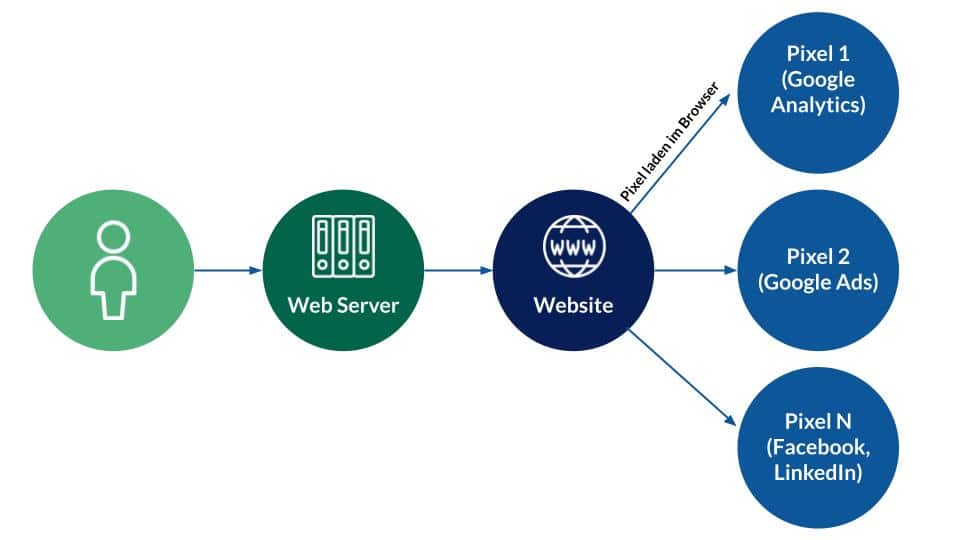
Traditional tracking, source: e-dialog
As you can see, a detour is taken here:
- User accesses a website
- The website returns the HTML code with JavaScript pixels
- The JavaScript code must be executed in the browser and a URL must be generated for the pixel call
- This URL is accessed in the browser and the data is stored by the tracking provider
- 1st party cookies can be set in the user’s browser by the JavaScript code
The server that delivers the website could load the pixels itself – without a browser! All of the above could also be done in the background during or after page loading by the server instead of the browser.
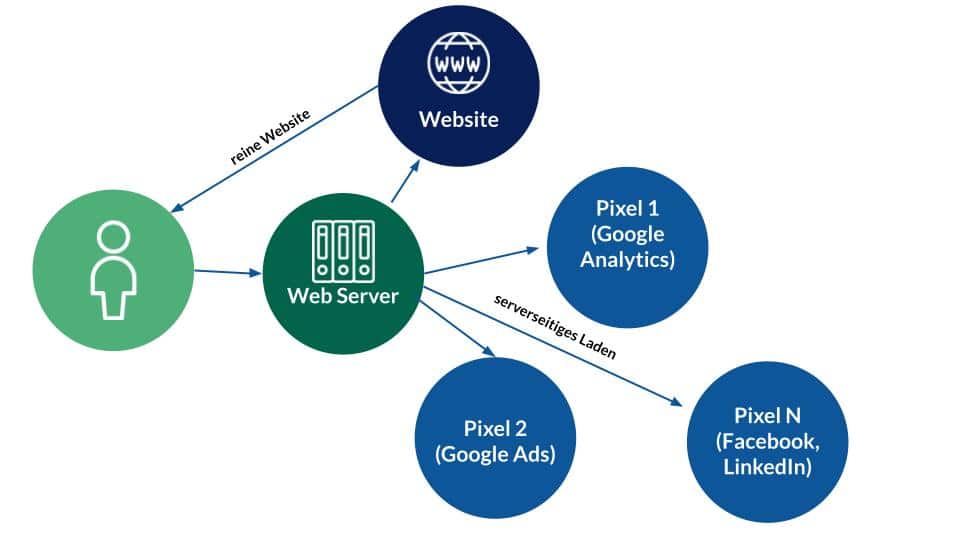
Alternative tracking, source: e-dialog
Why do we even have pixels on the page if the actual initial call to the server of a website would be enough to retrieve all the information needed for marketing?
Why can’t we just track “only” on the server side?
It started with JavaScript…
Tracking via JavaScript arose historically. From a web developer’s perspective, these factors play an important role:
- Limited web developer resources from website operators
–for example, because concentrating on the core business is more important or
–There is no appropriate know-how to implement a different tracking system - Lack of access to your own server
–so technical limitations
– For example, if a simple web hosting package is used where no own programs can be run
If we go back even further, there were the log files. However, the analysis of server log files was very inefficient. This data is also not suitable for automatic advertising campaigns. This is how the first tracking pixels were created via JavaScript. Pure server-side tracking would have been difficult to implement in the early days of the Internet.
The reason for implementing pixels via JavaScript has been established from the very beginning simply because JavaScript requires the least effort.
It is currently still the case that the largest tracking and marketing pixel providers, such as Google Analytics 4, Meta (Facebook Pixel) and many others, offer their pixels by default as a JavaScript snippet for the front end (i.e. to be executed in the browser).
This circumstance can be explained by the points mentioned above and also by the fact that this type of installation is the easiest from a global perspective.
JavaScript pixels have these serious disadvantages
- The browser can partially suppress the pixel, manipulate it (change the data) and not display it at all (block it completely). A prime example of blocking tracking pixels is Safari ITP (Intelligent Tracking Prevention). Firefox (Mozilla) also blocks tracking if, for example, pages are accessed using an incognito window.
- Another disadvantage of client-side JavaScript tracking is that everything that is tracked can be tracked via the browser.
- And if there is no consent (cookie consent), in the worst case scenario we receive little to no data, which can be remedied with server-side tracking. However, the compliant tracking according to user consent should still be adhered to here. However, with server-side tracking, you can control what is captured much more precisely. This makes GDPR compliance easier.
- A large number of tracking pixels on the website slows down the loading of the page and can lead to more bounces and fewer conversions. (Especially on mobile devices.)
One advantage of JavaScript tracking, however, was that 3rd party cookies could easily be set and read, allowing global audience tracking to be implemented. This is no longer the case and JavaScript tracking is now being supplemented by server-side tracking due to the elimination of 3rd party cookies, or even completely replaced in the future.
- For this reason, the numerous conversions APIs (Facebook & other social networks with ad managers) have emerged.
- Google Pixel can be tracked on the server side.
So instead of loading pixels on the website and slowing down the website, the same processes could take place in the background (on the server) during or after the website is actually loaded. There are already several options for this today.
The server-side Google Tag Manager
When something does not take place in the user’s browser, but communication takes place directly between two servers, it is called a server-side interaction. For some time now, Google has been offering a server-side tag manager (sGTM) in addition to its client-side (standard) JavaScript tag manager for websites, which can also enrich marketing tools with data in server-side communication.
To repair an sGTM, hosting is required, for example in the Google Cloud. The sGTM is a program (Docker Image) that must be executed on a server.
The processes that take place in the sGTM cannot be traced via the browser and its developer console, since the processes only take place on the server. At least in theory.
The approach proposed by Google is that the tracking pixels are set up using JavaScript in the GTM client as before, but these pixels are sent to the sGTM instead of to the tracking tools directly.
Calling up a GA4 pixel, for example, will no longer be possiblehttps://region1.google-analytics.com/instead, but at the sGTM, for example underhttps://sst.e-dialog.groupwas set up.
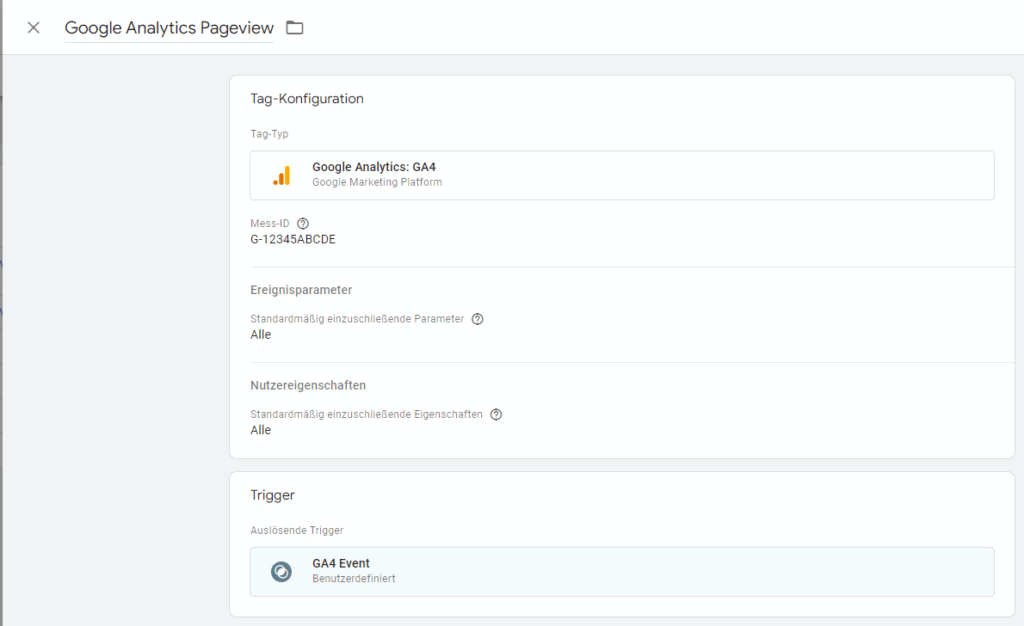
Server Side GTM can display pixels quite normally, source: Google
The sGTM then has the option of forwarding this one pixel call to Google Analytics 4.
And that’s not all.
The sGTM can also use exactly the same call, for example to inform a Facebook pixel, floodlight tags and other marketing pixels about the website visit. Data can be manipulated, enriched and adjusted as desired. It is also possible to check whether consent was given for other tools.
So just using the sGTM in this configuration has the advantage that one pixel can be used for multiple tools.
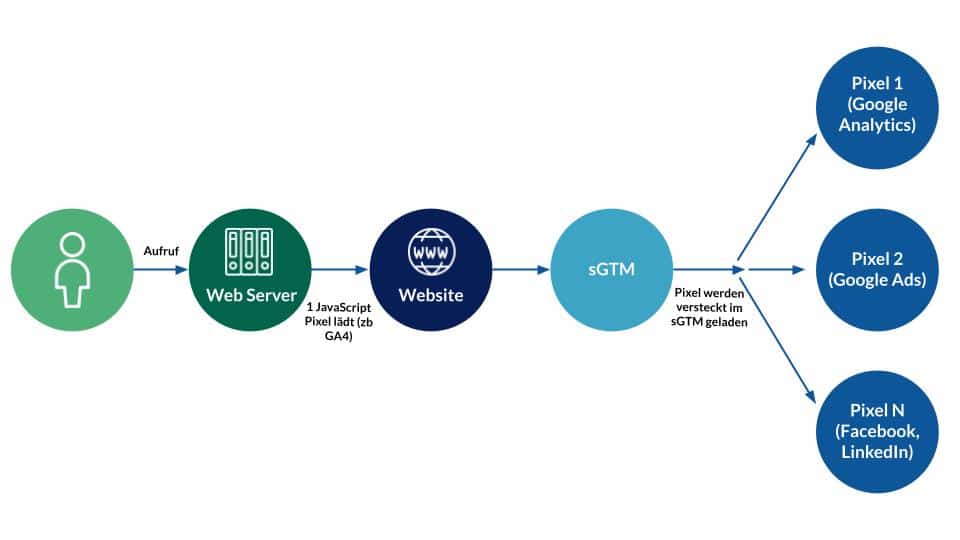
Recommended implementation variant, source: e-dialog
However, if the GA4 call is blocked by the browser, the sGTM will not help.
This is the recommended, simple implementation variant. A further step would be to implement completely server-side tracking without a single client-side pixel on the website. However, this requires two points: (1) developer capacity, (2) access to the server.
What could pure, server-side tracking look like?
When the page is accessed, there would have to be a program in the background that carries out exactly the same processes that the JavaScript pixel does on the website. Using Google Analytics as an example, the Analytics JS library is first loaded in the browser and a so-called Measurement Protocol call is generated. This call contains all the tracking information that Google Analytics requires.
Not all information can be accessed on the server side. An example is screen resolution. So there should be a few small JavaScript functions that can return this information to the web server when you visit a website.
Another crucial factor in tracking is the key with which the user of the website can be identified. Here your own IDs would have to be set in cookies. If cookies fail, local storage or another bridging method would have to be developed so that server-side tracking can recognize the user.
Once everything has been compiled, the tracking call generated by the server can be sent directly to the Google Analytics servers or, for example, to the sGTM and further processed from there. When a page is accessed, the user is no longer tracked via a pixel – the route via the web browser is now avoided and the data is immediately sent to the tracking tool.
In the way described, tracking can never be disturbed by a tracking blocker or other interference.The only case in which a page view could not be tracked would be a server failure on the part of the tracking tool provider.
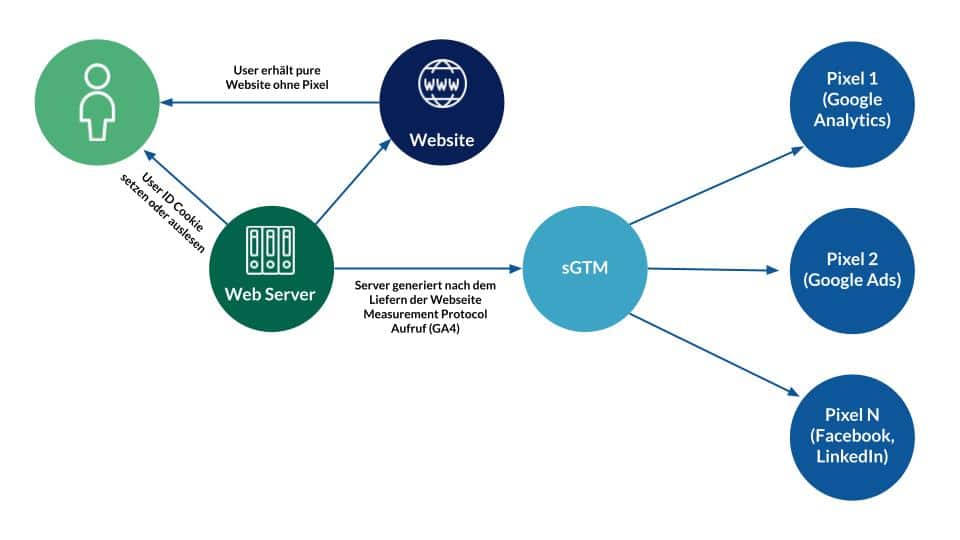
Server-side tracking, source: e-dialog
In order to remain compliant, compliance with consent for data collection would still have to be implemented on the server side. Here the developer then gets full control over the data flow and can control what exactly should be transferred.
Would that also work with Facebook & Co?
The biggest problem with a pure server-side tracking implementation is replicating the processes that take place in JavaScript libraries. With Meta, i.e. the Facebook Pixel, things look a little more complicated.
Various cookies (__fbp, __fbc) are created here and used for every Facebook event. These cookies can also be generated yourself with a few lines of code and then sent to the sGTM. This would make it possible to use the Facebook Conversions API purely on the server side. But this only affects the Conversions API and not the JavaScript Facebook Pixel.
However, Facebook requires that the Facebook JavaScript Pixel (fbq) be displayed on the site and would also like to be displayed via the Conversions API (cAPI). I would describe this variant as hybrid because both data from the client (browser) and data from the server (e.g. sGTM) are sent to Facebook. In order not to count twice, events and conversions must then be deduplicated.
A pure server-side solution is not possible with Facebook, except when using offline conversions.
Conversions API’s and offline conversions
TheConversions APIfrom Facebook and other providers also offers the import of offline conversions. Uploading offline conversions allows users’ interactions (events & conversions) to be analyzed outside of the website. But there has to be a key. In the case of the Conversions APIs on Facebook or TikTok, the key must be the email address hashed with SHA256 or the user’s phone number.
The tracking then takes place entirely without JavaScript and the data must be uploaded from a server to the Conversions API.
What are offline conversions?
A possible use case for offline conversion tracking is a contract that was generated online as a lead, but was only signed in a business location with a delay. After the contract has been concluded, the offline conversion with the key (SHA256 email address) would then have to be uploaded.
If offline conversions are sent to Meta, for example, it can be found out how many customers clicked on or even saw advertisements in the Meta advertising network before the actual conversion. This offers an amazing insight into the offline world.
If the integration via the Offline Conversions Conversions API is too complex, Facebook, for example, also offers oneCSV importto.
More tracking options with the sGTM
If an sGTM is being planned or already in use in your company, server-side conversions can be sent to the following networks:
- Facebook Conversions API (Meta)
- X Conversions API (formerly Twitter Conversions API)
- LinkedIn Conversions API
- TikTok Conversions API
- Pinterest Conversions API
- Snapchat Conversions API
- AWIN Server to Server (S2S) conversion tracking
- Bing offline conversions (Microsoft ads)
The big advantage of using Conversions APIs is that the advertising budget is used much more efficiently because the audiences become more precise thanks to the advanced server-side tracking.
If the interfaces for the offline conversion upload of the Conversions API are still used, it can be determined how many offline conversions have occurred with the advertising budget, which can then provide a holistic overview.
How does Google handle server-side conversions?
As can be seen in the previous section in the list, Google does not have a Conversions API. The conversion APIs of many providers are characterized by the hybrid implementation variant. So a JavaScript pixel has to fire on the page and a server-side request has to go to the Conversions API. Both the website pixel and the conversions API must pass an “event_id” so that the views can be associated with each other and deduplicated.
Things are different with Google Pixels. Only the server-side integration needs to be present here. For example, if a Google Ads Pixel is displayed via the sGTM, the same pixel does not have to be configured again in the GTM client. The same applies to the DoubleClick floodlights. All you have to do is send the “signal” to the sGTM that the conversion should be tracked.
However, if Google’s pixels in the sGTM are analyzed more closely, it can be seen that Google also displays additional pixels on the client side, although these should only be on the server side.
Conclusion:
Pure server-side conversion tracking is currently difficult to implement. The advantage of server-side tracking is increased data quality. A pure server-to-server setup could be implemented with Google Analytics. However, it requires more effort than the traditional JavaScript pixel installation. But just using the server-side Google Tag Manager in combination with the client-side Pixel brings a lot of advantages.




