
Cookies Outside Of Gtm 8211 Not A Good Idea

Management Summary
Why do I need the GTM for my tags?
With Google Tag Manager you can manage tags very easily and quickly. It offers a good overview and with the search function you can quickly find the tags you want. This is a big advantage, especially for large websites with a lot of tags. The GTM also works excellently with various consent management platforms, which makes work in this area much easier.
What happens to the cookies that don’t come from the GTM?
First you have to clarify which cookies come from the GTM and which are set on the site by third parties. The Google Chrome extension provides an overview of all cookies set on the site“EditThisCookie”.
This tool displays all relevant information, such as the name or value, about each cookie set on the site.

If you now find unknown cookies or cookies that were not created in Google Tag Manager in the list, you have two options to deal with them:
Option 1: Migrate the tags to GTM
The cookie, which was set on the site by a third-party provider, can usually be easily added to the Google Tag Manager and fired from there.
This has the advantage that all tags come from one tool and you can easily make changes via GTM.
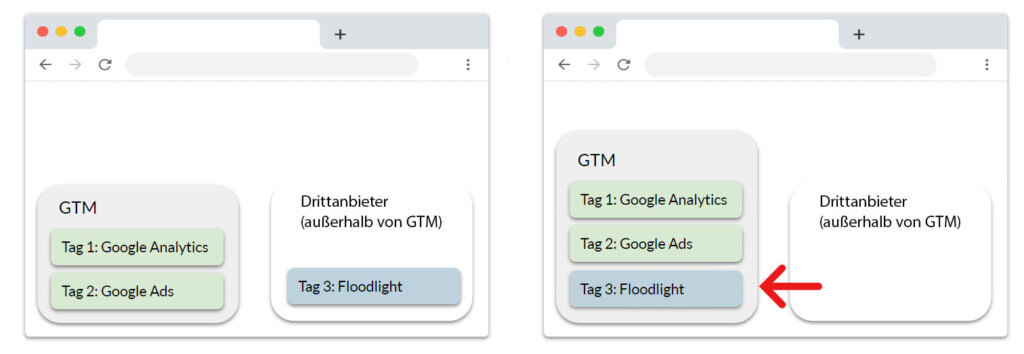
Option 2: Query consent outside of the GTM
If you do not have the opportunity to migrate the tags to Google Tag Manager, you can obtain separate consent using the chosen consent management platform.
To do this, the third-party cookie must be identified and added to the consent list as described above.
There are now some tools that automatically recognize cookies that are outside the GTM and also put them on the consent list.

In practice, the consent management platform asks for consent to the tag. If this is present, the tag may be executed. Unless consent is given, the tag may not be executed.
Conclusion
If you have the opportunity, all tags should be integrated into the GTM. This ensures a better overview, easy maintenance and a clean implementation of the consent management platform.
You can make a comparison with real cookies:
If I want cookies, I would rather eat them from a tin than have to laboriously find them from various boxes and packages.
Therefore, use the virtual cookie jar called Google Tag Manager.




