
Custom Bidding Made Easy 8211 The Goal Builder In Dv360

Management Summary
Tailored campaign management with the Goal Builder
To make the whole thing a little clearer – an example:
Siegfried wants to promote participation in an event and has the main goal of selling tickets. Since not every impression leads to a sale, Siegfried thought about measuring several conversions along the customer journey. In addition to ticket sales, simply visiting the landing page, staying for 30 seconds, playing an embedded video from the previous year’s event, registering (which is necessary to purchase) and adding tickets to the shopping cart are also measured.
If Siegfried creates a campaign without custom bidding and lets the algorithm optimize for conversions, it doesn’t know what is more important – visiting the website or completing the purchase. To prevent this, Siegfried uses custom bidding.
Since November 2021, creating a custom bid in DV360 has never been easier thanks to the Goal Builder. Floodlights and their u variables, sales goals, GA360 goals and branding goals can be included. For advanced use cases (such as weighting brand lifts) a custom script can be written; this requires basic knowledge of Python and willhereexplained.
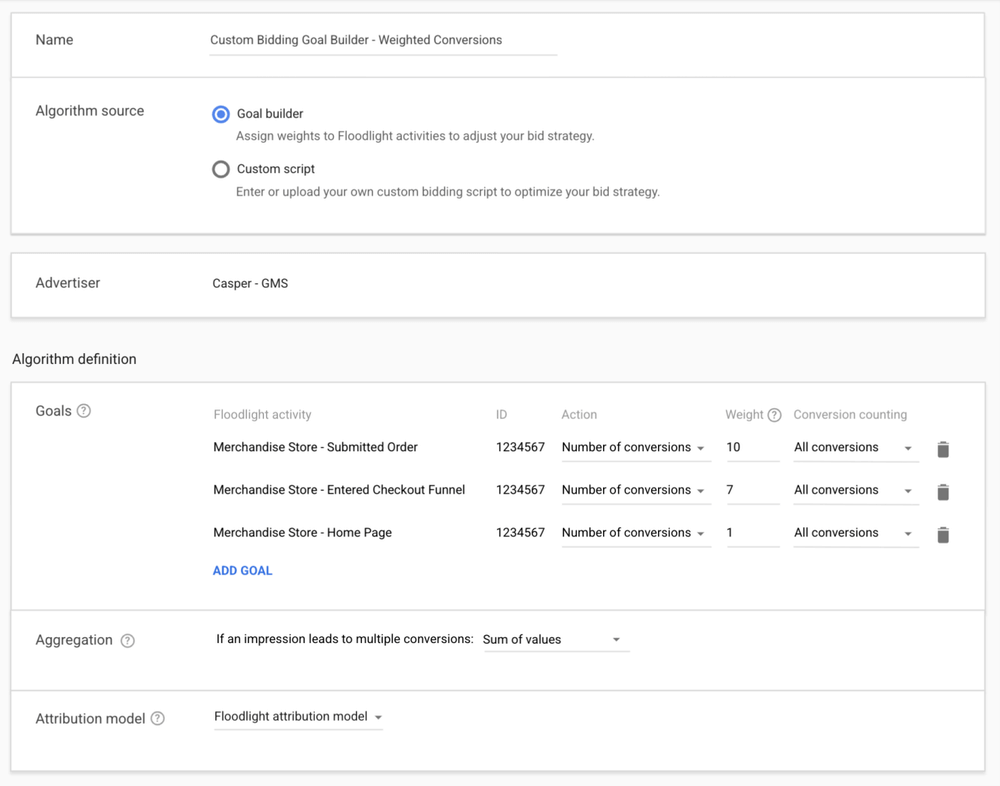
The principle of both creation options is the same; Conversions are weighted to show their different importance. In our example, Siegfried would weight the conversions as follows:
Visit the landing page1
30s duration on the landing page2
Play the embedded video3
Registration4
Add ticket(s) to cart5
Completion of purchase10
The weights of a conversion are relative to the sum of the weights, so completing a purchase would be 10 times as important as visiting the landing page. Numbers from 0.1 to 1000 can be used for the weights; the relative ratios to the total are used for bidding anyway.
You can find custom bidding at the advertiser level under the resources. For example, this is what the creation in DV360 looks like:
Special case sales target
Suppose Siegfried now wants to go one step further and tell the algorithm that if the user’s shopping cart value is higher and thus the possible sales for him, he should bid higher.
For this purpose, sales revenue can be measured using a Floodlight sales tag in order to be optimized accordingly. If you store these quantifiable conversions in the Goal Builder, a value of 1 is assigned. However, a value of 1 does not mean that impressions are weighted with 1. This number is just a placeholder for the value of the possible transaction. If a user plans to buy four of Siegfried’s tickets, the impression would be weighted, for example, 100. For a user who just wants to buy a ticket, the same impression would be weighted 25.
A combination of the two bidding strategies should therefore be carefully considered, as high shopping cart values make the weightings for other goals (e.g. registrations) appear low. To counteract this problem, Siegfried could set the average transaction value of the past as the weight for a transaction, so that impressions for users with above-average shopping cart values receive higher bidding.
The bidding could look like this with an average shopping cart value of €50:
Visit the landing page5
30s duration on the landing page10
Play the embedded video15
Registration20
Add ticket(s) to cart25
Completion of purchase50
Sales1 (placeholder for transaction value)
Since Siegfried’s product range is small, he can create different custom bidding strategies for different product lines. However, if his product range gets larger, he knows that he would be limited with the maximum of 10 custom bidding strategies and would then be better off considering the sales target and the conversion target (visit to the landing page, 30s stay, etc.) separately in two separate bidding strategies.
Prerequisites before use
If the conversions are weighted and the goals are defined, the following requirements apply so that the script (left half of the table) or the bid strategy created with the Goal Builder (right half of the table) can be used.

These requirements must be met within a time window of the last 30 days, so campaigns that have been paused for a longer period may have to meet them again. If the requirements are met, the custom bidding overview will show that it is ready to be used.
There are other limitations thathereare listed.
Usage recommendations (experiment – A/B test)
In general, it is advisable to first test the created custom bidding in an experiment so that the performance is comparable, and after a sufficient test phase (depending on the budget used and the number of impressions) the experiment is ended. In general, the custom bidding created can be stored at all campaign levels under “bid strategy”. Here it is advisable to set a maximum for the average CPM so that the bids do not become too high. However, this should not be too conservative, so that custom bidding has leeway to target really interesting users with a higher bid.
Evaluation of custom bidding:
How does Siegfried know how the bidding is developing? A report in the Campaign Manager should provide information about whether the number of desired conversions or ROAS has increased or has increased since custom bidding was used. Furthermore, in DV360 there is the possibility to see how the average value of an impression changes.
This is possible here: Advertiser level > Resources > Custom Bidding > Overview
The metric shows the average value (weight) of an impression divided by its cost. The higher this value is, the better, as more value is generated depending on the cost. In the same view you can also see how many impressions actually have a value (>0). After the custom bidding has been created, you can also see how many impressions are still needed before it can be used at all.
Special case sales target:
If a sales target is part of the custom bidding, it must be noted that when evaluating the sales achieved, not the specified weight of 1, is divided by the costs used for the impression. Instead, the average revenue generated per impression would be divided by the cost of it. If quantitative conversion goals (e.g. number of visits, registrations, etc.) and sales goals are combined, this can make the evaluation based on the average impression value in relation to the costs more difficult. In this case, it makes sense to look at ROAS.




