
Custom Funnels 4 Genius Application Tips For Google Analytics 360 Users
Management Summary
In this blog article we focus purely on the application areas and insights of custom funnels.You can find out more about where in Google Analytics and how custom funnels are createdGoogle Analytics Custom Funnel Guide by LunaMetrics.
Custom Funnel #1: Registration
Above all, with custom funnels you can:Processes that consist of several steps, like registration, are presented in a wonderfully clear manner. This means you can see at a glance how successfully individual steps or phases were completed – and where there is still an obvious need for optimization.
In my example, registration consists of 3 steps that are tracked differently:
- Click on the register button (event)
- Contact form sent (event)
- Registration confirmed (URL, page view)
The custom funnel looks like this:
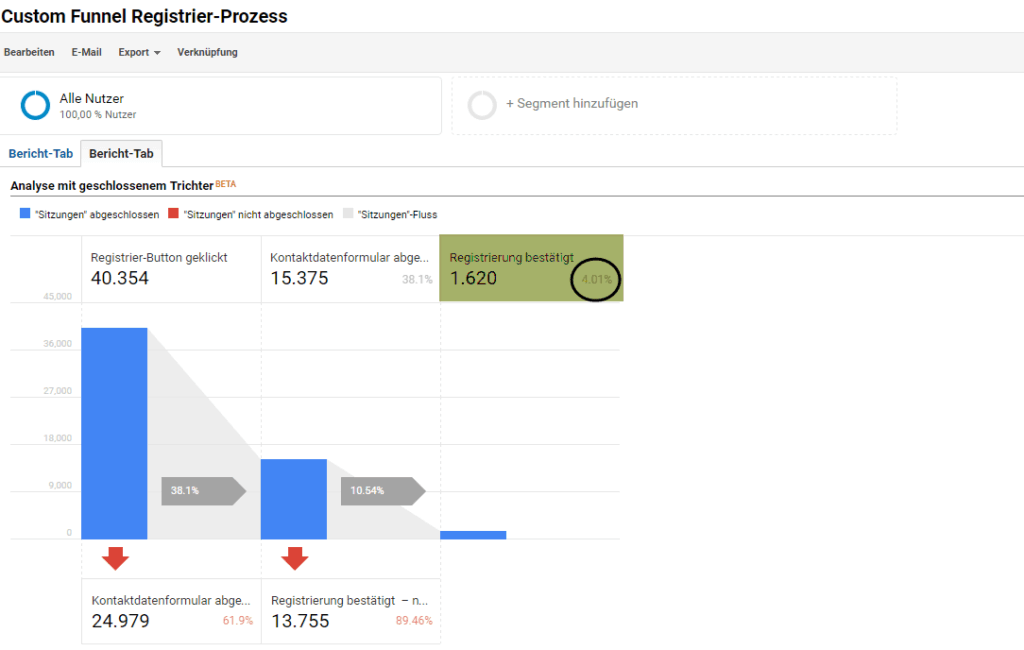
And I didn’t promise too much:At first glance you can see that the entire registration process still needs a lot of optimization.At second glance you get the details: Of 40,354 users who clicked on the registration button, only 4% actually completed the registration. The rest was lost during the journey: a large part (62%) after the 1st step. However, an even larger proportion (89.5%) after the 2nd step, i.e. after the users have already done most of the work and only have to click on the link in the email.
Custom Funnel #2: User paths on the website
Not just typical processes butevery possible path on the websitecan be represented as a custom funnel.
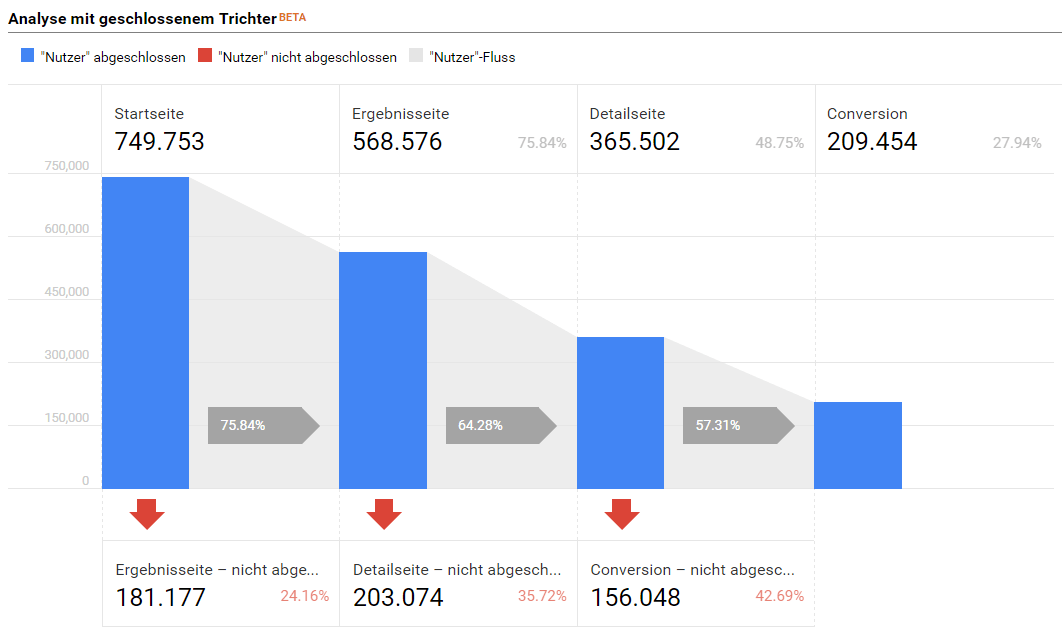
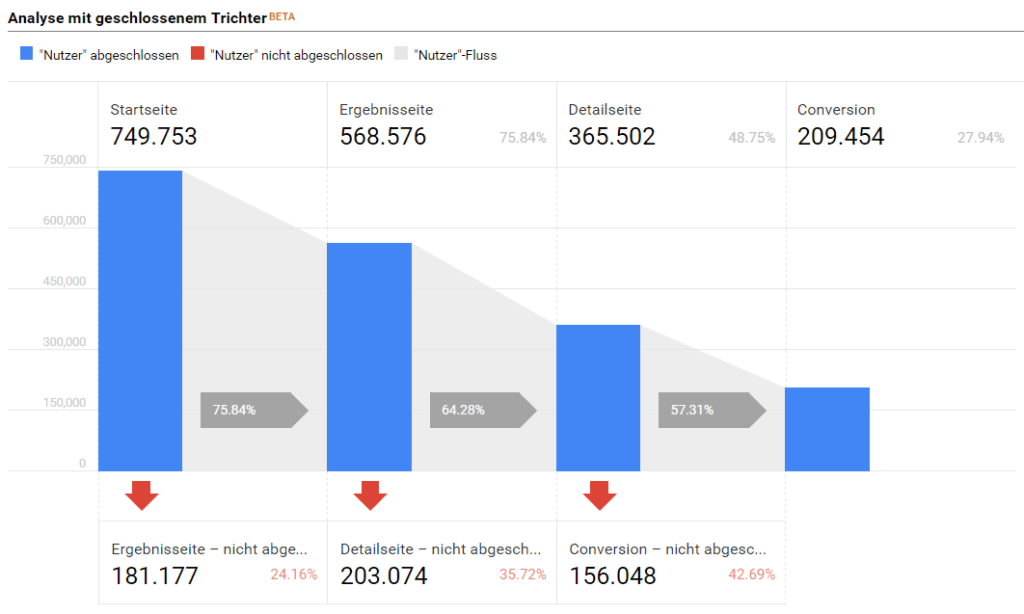
In this example we look at how many users of theHome pageon theList of results after the search, then on oneDetail pagego and finally convert. And here too you can clearly see where most of the jumps happen(Step 3, detail page with ~43%)and therefore potential for optimization measures is available(e.g. draw more attention to the action, carry out A/B tests,…).
The possibilities for paths on your website are almost limitless: Think, for example, of users who…
- go from the homepage to category pages, then to detail pages and convert.
- Navigate from the homepage to the blog and sign up for the newsletter.
- do a search, go to the contact page and send a message.
- click on a teaser that, for example, leads to a product detail page, goes through the checkout process and finally buys.
- come from AdWords campaigns, have seen page X and converted.
- …
Custom Funnel #3: Scroll Tracking
Using a small extra script on your website, you can analyze whether, for example, your long-tail website, blog articles or product detail pages are actually scrolled to the end – or whether users only ever move in the visible area.An excellent analysis for anyone who likes thisUser engagement on the websitewant to measure.
For optimal presentation, a custom funnel can be created, e.g.for the home page shows whether users are scrolling and, above all, to what extent. For simplicity, I have presented the values clustered in increments of 20:
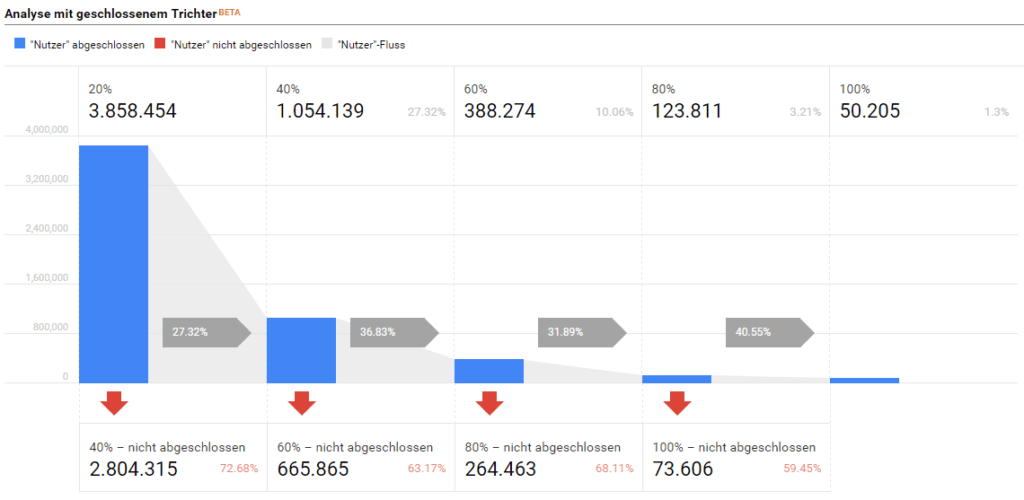
Here, too, the result is again clear: Extremely many users do not scroll at all or at least only scroll to the first fifth (20%) of the website. Only very few users (1.3%) scroll to the end of the page. Most users (around 73%) are lost between the first and second phases. Even in the remaining phases, only around 35% can be motivated to continue scrolling.
Analysis tip:It would now be extremely exciting to analyze in detail those users who have not completed the first phase: How do these 72.68% behave on the rest of the website? Custom funnels offer thisingenious feature for creating segments: With a simple click on a completed (blue bar) or incomplete phase (red arrow), a new segment is created that can be applied anywhere in GA.This means that as soon as “strange” behavior is identified in custom funnels, further research can be carried out very easily.
Custom Funnel #4: YouTube Videos
YouTube videos can also be evaluated in Google Analytics using a small extra script:Details about YouTube tracking and analysis can be found here.This makes it possible to analyze whether your usersHave watched videos entirely, not at all, or at least partially– and which videos perform better than others.
This can also be beautifully presented with a custom funnel:
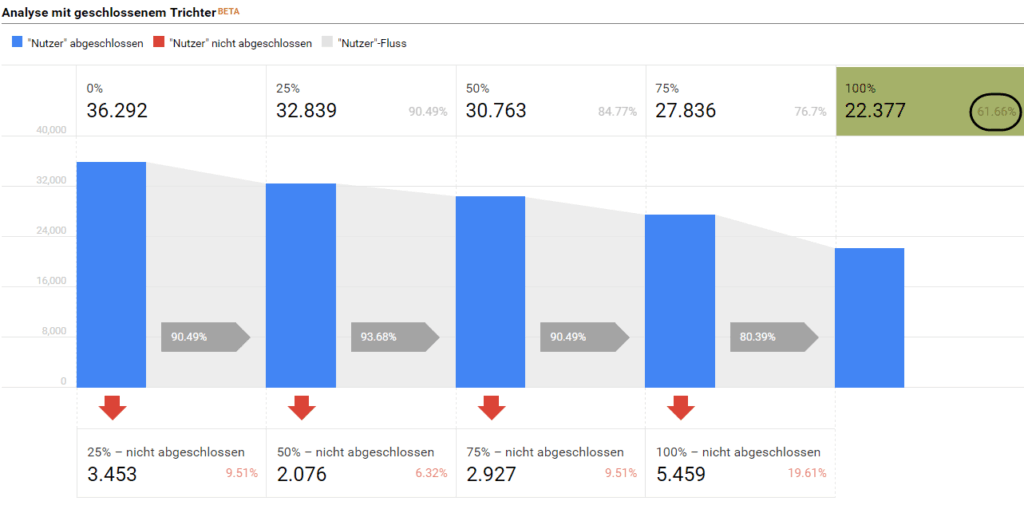
In this case, we analyze whether YouTube videos were generally viewed. And the result is actually very nice: of the 36,292 users who started a video, around 62% watched to the end.A good sign – the videos seem interesting!In a next step, you could create another funnel and analyze in detail whether, for example, videos in category A perform better than in category B, whether shorter videos are more likely to be seen to the end than longer ones, etc.
Optimization tip:If you have users who have only seen 20% of a video from category AretargetIf you want to, you can do that very easily with Custom Funnel. Clicking on a completed (blue bar) or incomplete phase (red arrow) opens a new oneTarget groupcreated, thefor remarketingcan be used. Then submit this target group to AdWords and use it for retargeting.
Summary: All the benefits of custom funnels
So with custom funnels you canlots of brilliant analysisto help you better understand user behavior on your website. All the advantages summarized here:
- Custom funnels arefreely definable based on any user behavior(Pageview, Event, Transaction, and a mix of everything) and all available dimensions.
- Custom funnels areretroactiveand can therefore be applied retroactively to historical data.
- You can onSession and user scope levelbe created. Session scope means that all phases must occur within one session. User scope means that individual phases can occur in different sessions.
- New ones can emerge from the individual phases of the funnelSegmentsbe created orTarget groupsfor remarketing in AdWords.
- Custom funnels are based on a minimum of one and a maximum of five phases. Up to five rules (filters) can be defined per phase.
Would you also like to use custom funnels? Or need help setting up your custom funnels? We are happy to help you! Contact us viakontakt@e-dialog.group
A notice:Custom funnels are currently only available for Google Analytics 360 users (the paid version of GA) available.




