
Data Driven Attribution In Google Analytics 4

Management Summary
Google has thatData-Driven Attribution Modelset as default in all Google Analytics 4 properties. What can this attribution model do? What information is taken into account? What are the differences to the standard attribution model in Universal Analytics? This blog article provides answers to these questions.
What is the Google Analytics 4 Data-Driven Attribution Model?
The data-driven attribution model (DDA for short) in Google Analytics 4 is a cross-channel attribution, which enables attribution across all channels recorded in GA4.
The DDA model is calculated using machine learning and uses the data from the respective Google Analytics 4 property as a basis. The algorithm therefore also changes depending on which data (e.g. number of different channels) is available in the property. Additionally, the model is calculated differently for each conversion because user journeys look different depending on the conversion. In summary, one can say that the data-driven attribution model is unique for each property and each conversion.
Data-Driven Attribution in Google Analytics 4 offers numerous advantages
The DDA model is available in all GA4 properties – whether standard (free) or 360 version (Enterprise).
No preparation or minimum number of conversions are necessary to use the DDA model. Therefore, it can also be used for smaller accounts or conversions with low volume.
The DDA model is set by default in the attribution settings in the GA4 admin area. If necessary, this setting can be changed at any time. There is more information about this hereBlog article.
With DDA, a lot of information is processed through the cross-channel approach, which of course benefits a model that is based on machine learning. It can currently process up to 20 touchpoints per customer journey – in Universal Analytics only the last 4 touchpoints were taken into account here.
What information does the data-driven attribution model in GA4 take into account?
The basis for the DDA model is a regression analysis. One of the main pieces of information is the influence of the individual touchpoints. This influence is calculated using a comparison between converting and non-converting paths.
The inclusion of non-converting paths is also a special feature of DDA that provides valuable information. With rule-based models, such as last-click or time decay, the focus is purely on the touchpoints of converting paths.
In addition, the timing of the touchpoint within the customer journey also plays an important role. Touchpoints are weighted differently in DDA in GA4, depending on how long it takes from the click to the conversion.
Different ad features and format types are also analyzed and their influence on conversion is determined. This information also flows into the DDA model.
Another important point that is taken into account in the DDA model is the so-called incrementality. This calculates how likely the interaction will lead to an incremental conversion – i.e. a conversion that would not have happened without this marketing activity? So it shows how valuable this marketing activity was.
Evaluation of the DDA model in GA4
Since the data-driven attribution model takes into account and evaluates multiple touchpoints, the conversion value is divided among them. Shares of the conversion are awarded based on the influence of the respective touchpoint within the customer journey.
The individual touchpoints are weighted differently and different proportions of the conversion are assigned to the channels or campaigns. For this reason, the report also shows decimal numbers for the number of conversions that are attributed according to DDA.
For example, a customer journey could look like this: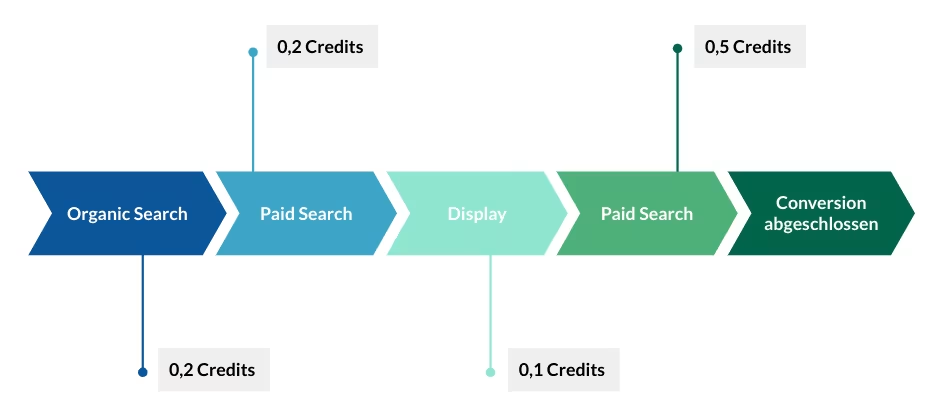 Weighting of the touchpoints of a customer journey for the evaluation of the DDA model in GA4, source: e-dialog
Provided the data-driven attribution model is selected in the GA4 property, then you can see the results of the DDA model in the Explore Report when selecting acquisition dimensions without a prefix in combination of conversions and revenue. There is more information about thishere.
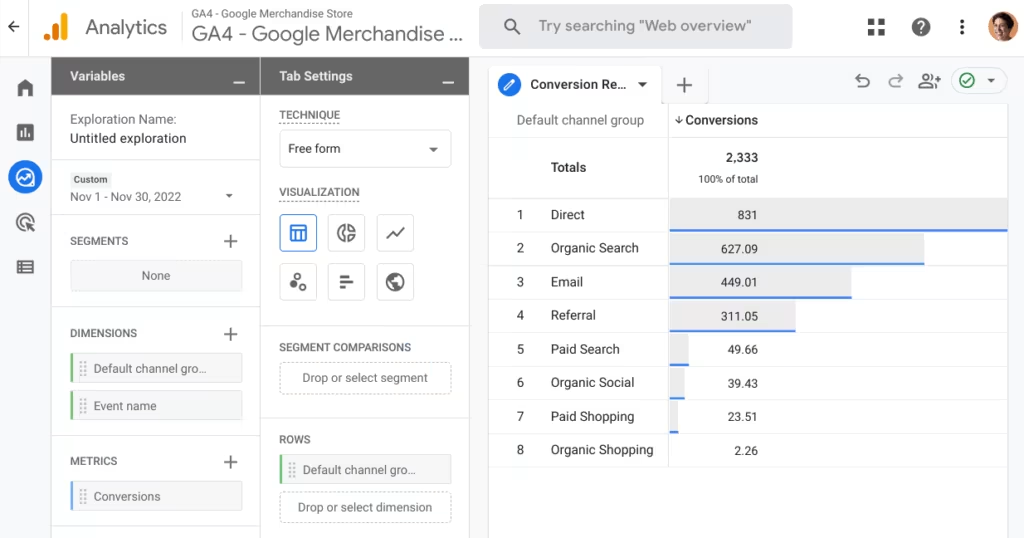 Screenshot GA4 Conversion Report, source: e-dialog
Even in the standard reports in the conversion report, when you click on an event name, you will be redirected to a detailed report where the conversions are reported according to the DDA model (if selected in the settings).
Please note that the “Traffic Acquisition” and “User Acquisition” acquisition reports use different attributions. More information about these reports is availablehere.
The new attribution model in GA4 – familiarize yourself now
In Universal Analytics, only the Last-Non-Direct attribution model was available in the standard reports. Of course, this now means a change in reporting if a different attribution model was selected in Google Analytics 4.
With the help of the Model Comparison in the Advertising area in Google Analytics 4, you can familiarize yourself with the new DDA model and analyze what differences there are compared to Universal Analytics. In this report, the last-non-direct attribution model (called “cross-channel last click model” in GA4), which was the standard in Universal Analytics, can be compared with the new data-driven attribution model. This way you can see which channels, campaigns, sources and media are rated higher or lower than before as a result of the change.Please notethat by defaultall marked conversionsbe included in this analysis. Here you should first select a specific (or a few) conversions in the drop-down before starting the interpretation.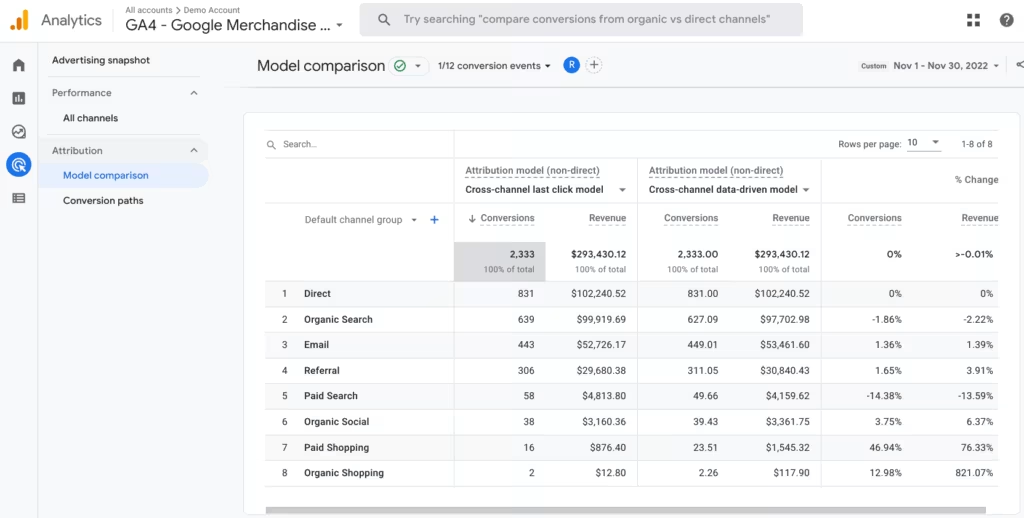 Source: e-dialogue
Limitations
The data-driven attribution model in Google Analytics 4 does not include display impressions. This means that pure visual contacts (views) with a display advertising medium within the customer journey are not taken into account.
The calculation of the data-driven attribution model in GA4 started on November 1, 2021. Therefore, only data from this point in time should be used for reporting.
Conclusion:
The data-driven attribution model in Google Analytics 4 is currently Google’s DDA model, which incorporates most of the information and takes many touchpoints into account. So what are you waiting for – it’s best to just try it out and analyze what results the specific DDA model of your property brings.




