
Data Transfer Of Third Party Content 8211 Who Is Liable

Management Summary
The reasons for the heavy use of third-party content are clear:
- The content is easy and quick to add.
- Almost no programming effort is required for sometimes quite complex content.
- They use few site resources. This makes the website load faster.
- By loading the page faster, you have a positive effect on search engine optimization.
- The content of third parties is already technically and visually optimized, so developing such content yourself would usually be too time-consuming and therefore not profitable.
- In most cases, this content can be used free of charge.
And especially when it comes to the last point of advantages, most people should think: “But what’s the catch here?”. Of course, Google, Facebook and Co. do not make their content available completely without their own benefit or without costs:
Data from website users is collected via the content provided, which in turn can be used to display individually tailored advertising – the main business of Google, Facebook and Co.
What options are there for third-party content to be added?
And what does that look like from a data protection perspective?
Iframes
TheInline frames(Short form: iframes) are separate areas (windows) on a website whichOutput content from another, third party website. This can only be small areas of the third website, or the entire page.
The so-called iframe is created with the HTML tag <iframe> called up, in which the exact link to the displayed content is located.
MostSocial media plugins, or YouTube, for example, work with this method. Facebook has had a new format (XFBML) for some time now, but the majority still uses the “Iframe” solution.
The advantages of iframes are great becausewithout any programming effortHave great functions integrated into a website. All you have to do is install the iframe code and videos, calculators, complex forms or other content can be accessed via it.
Out offrom a data protection perspectivemust be checked whether the integrated iframecollects and shares data. Technically speaking, it is possible to collect and process data such as the user’s IP address or the URL of the target page.
About an already previously setCookiesinformation can be read out. Here is a small example to make it clearer:
A user watches a video on YouTube. From there, a cookie is placed on the user’s computer, which normally always happens. If the user then visits another website and a YouTube video can be found on it, the information from the cookie can be retrieved.
From a legal point of view, the ECJ has interpreted the concept of responsibility broadly, which is whyshared responsibilitywithin the meaning of Article 26 GDPR.
However, the joint responsibility ends when the operator of the website has no influence on the third party’s data processing.
Nevertheless, it should always be checked whether personal data is obtained from the third party and, if so, what and how it is used.So it’s crucial to know whether the iframes are collecting, processing or sharing information. If this is the case, further steps must definitely be taken:
- In any case it shouldPrivacy Policybe adjusted so that the user of the site is informed that content is used by third parties and that they may also collect data.
- With oneCMP (Consent Management Platform)Consent should be obtained for data collection. If consent is not given, all third-party content should not be loaded so that no data can be collected.
- Agreement on shared responsibility according to Article 26 GDPR
HTML fragment or client-side script code
Client-side script code is a more modern way to include external content on the website. Functions can be displayed on the page with an HTML fragment or a JavaScript code.
Similar to the iframe, the third-party content is retrieved from another web server, which has various advantages, such as:
- Use great functions without your own programming effort
- Protecting your ownWeb server resources
- Always updates and new functions
- Faster loadingthe website through optimized code
Of course you give itcontrolabout parts of your own website (the third-party content). In addition, it must be in the web browserJavaScript activatedso that the content can also be displayed. In this case, the all-clear can be given because JavaScript is deactivated in only around 1%.
The most common technologies that are integrated using this method are Google Analytics, Google AdSense, Google Fonts, Google Maps and sometimes also videos from YouTube and Vimeo.
Most popular services and recommendations
Google Fonts
Google Fonts has now gained an incredible presence on the Internet. Almost every small and medium-sized business website uses Google’s service. It’s easy to explain why Google Fonts is so successful. The website operators receive a huge fundvarious web fontsin all possible weights and styles (bold, italic) and free of charge.
In addition, Google Fonts is veryeasy to integrate. A distinction is made between the “online” variant and the “offline” variant.
The easier and faster way is the online version. Here you just have to choose any font and then click on the website with a <link> or an @import tag. This means that the font is retrieved from the Google server and thus integrated online.
The second way is to download the file from the Google Fonts website and embed it on your own website like any other web font. With this method, the font is loaded directly from your own web server.
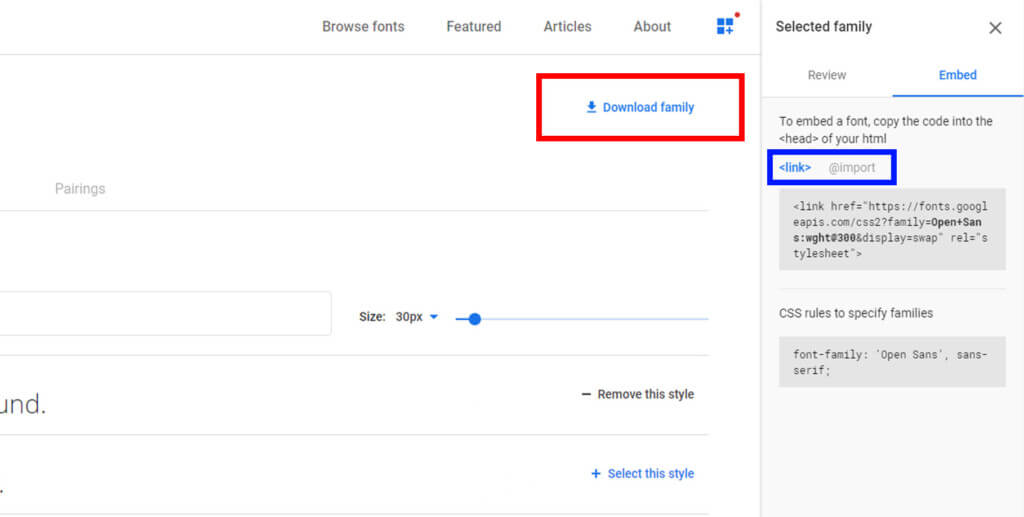
From a data protection perspective, Google Fonts must be treated specifically. Google collects data from website users and Google Fonts is used in most caseseven before consentloaded. There is no court ruling on this yet, but it is strongly recommended to use the offline version, as the fonts are then loaded from your own web server.
If you absolutely want to use the online version, you should definitely add a note in the data protection declaration and also try to use the CMP to block Google Fonts before giving your consent.
Google Maps
To use Google Maps, you can either choose the iframe version (see above) or you can integrate it via the Google Maps API. At theAPI methodGoogle’s map accesses are determined via an API key. With a certain number of views, Google’s service is subject to a fee.
AbsolutelyScreenshots of Google Maps are not allowed. This is strictly prohibited and will also be legally punished by Google.
From a data protection perspective, it’s the same as with Google Fonts. Google also collects data from users who are on the website. For this reason, consent should first be obtained using the CMP. There should also be a note in the data protection declaration that Google collects data. Since there is no offline method here, the steps mentioned above are strongly recommended.
YouTube
As with the two examples of Google Maps and Google Fonts mentioned above, the problem here is that YouTube collects data as soon as the user is on a website in which YouTube videos are embedded. There are now several options to prevent the collection of data or to make it more difficult:
Advanced data protection mode
To enable enhanced data protection modeactivate, you simply have to open the desired video on YouTube. Then click on “Share” and select the “Embed” function in the next step. Now you have to scroll a little. In the “Embed options” you will find the desired “enhanced data protection mode”, which must be activated. With this option the link of the iframe changes from “www.youtube.com” to “www.youtube-nocookie.com”.
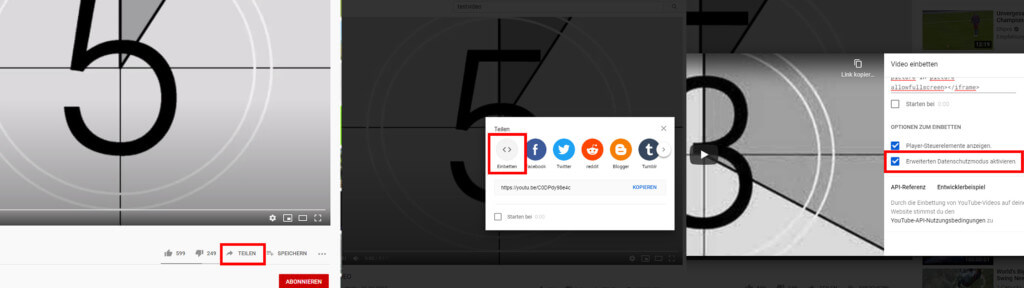
With this method, data is still transferred to YouTube, but no personal data. This option must be activated for every video on the website.
Consent for YouTube
With this method you can embed the videos as usual, but consent for YouTube must be obtained again via the CMP. If you don’t have consent, the video may not be loaded.
Just add a link
The last method and a rather uncharming solution is to insert a link. This directs the user to the desired video on YouTube. However, this has the big disadvantage that the user leaves the page and the link can easily be overlooked.
In the first two cases (enhanced privacy mode and consent for YouTube), it is strongly recommended to add a note in the privacy policy.
Conclusion
As you can see, the different tools have to be treated very similarly and basically the same steps are always recommended:
- Correct use of a CMP
- Information in the data protection declaration
- If possible, load everything via your own web server
In most cases there is oneshared responsibilitywithin the meaning of Article 26 GDPR. On the one hand, this can be interpreted very differently and on the other hand, you don’t want to bother with Google & Co. create. Also for the reason that these services are secured with various contracts.




