
Dynamic Ads In Dv360 Or Studio 8211 A Comparison

Management Summary
Dynamic Ads & Google Marketing Platform
Dynamic display adsenable oneTargeted display of individual messages. They are therefore an important part of programmatic marketing, not only reducing the time and costs of creating advertising materials, but also increasing the performance of the campaigns at the same time.
In recent years, numerous tools have appeared on the market that enable the creation of dynamic display ads. In this article, we would like to mention two of the most used tools – namelyFormat Gallery in Display and Video 360(abbreviated as DV360) andstudio– compare them and present the respective pros and cons.
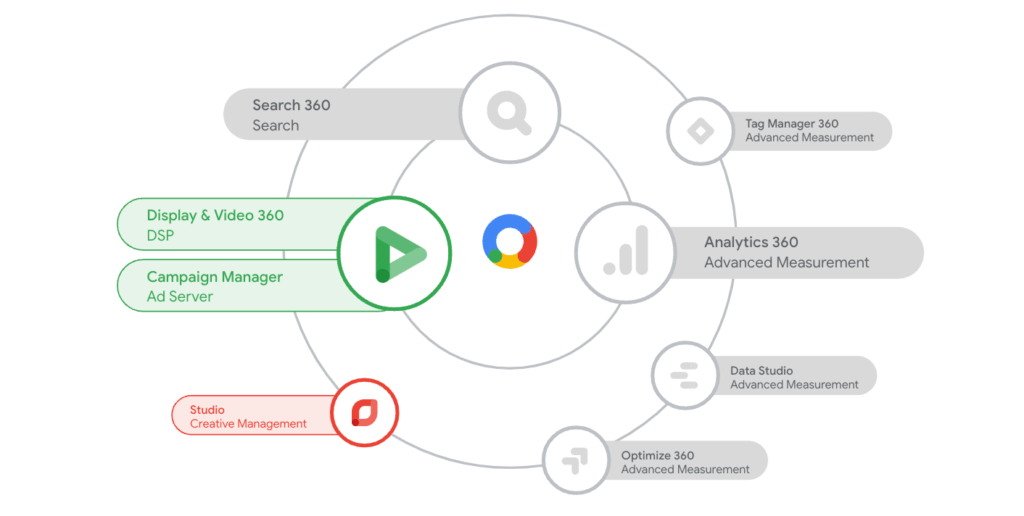
Google Marketing Platform: Display Video 360 and Studio for creating advertising materials
Format Gallery in DV360
The younger tool of the two – Format Gallery – was already included in thisArticlepresented. In addition to the user-friendly interface, we can offer numerousready-made templatesuse that are ready to use with slight adjustment. Thanks to the new platform, collaboration between creative and media teams is easy and possible. The dynamization happens entirely in the “AdCanvas” – from adapting the template to rule management of the individual variants.
However, custom templates can only be created with Google Web Designer. If you use Adobe Animate or prefer to program from Scratch, you will have to turn to Studio. AlsoVideo integrationis currently not possible (if I can “nag” personally, dynamizing svg files is not allowed either :) ) So if you’re used to Studio, you’re missing a few features here, but for youEntryFormat Gallery is the clear winner due to its simplicity.

Display and Video 360 vs Studio
studio
Studio – formerly known as DoubleClick Studio, and not to be confused with Data Studio – is the older tool of the two. Explained in one sentence: Studio ismore complex, butmore powerful.
When we talk about a “macro” perspective, the feature that is often the deciding factor for Studio isdynamic remarketing. It is therefore possible in Studio to use floodlights (u variables) as remarketing values and thus create a product remarketing campaign, for example. What also helps is importingexternal sources. This means that current data can always be displayed, which is essential for a product feed regarding availability or price. Furthermore, the feeds can not only be defined themselves, but several can also be used at the same time.
An additional feature that clearly differentiates Studio from DV360 is the handling of creatives. The advertising materials are physically uploaded to Studio, from there toCampaign Managerpushed further. Depending on whether it is a classic or programmatic campaign, the journey then continues. On the other hand, the creatives in DV360 can be published and used directly (at least programmatically). Hosting in Studio also creates additional costsFees.
Advantages and disadvantages at a glance
DV360
+ Easy setup to get started
+ Everything in one tool: creative, bidding, reporting
+ Ready-made templates for immediate use
+ Responsive templates
+ Direct targeting with Google Audiences (affinity, in-market) possible
– Custom template only via Google Web Designer
– No classic booking possible
– No remarketing with Floodlights possible
studio
+ Custom feeds (also xml & csv)
+ Several feeds can be used at the same time
+ Remarketing variables (Floodlight)
+ Video integration
+ Classic booking possible
– Additional hosting fees
– Complex process with more intermediate steps
– Responsiveness limited
Conclusion
We would definitely recommend DV360 to advertisers who are just starting out with Dynamic Ads. Getting started there is much easier and even with (compared to) “more limited” options, data-driven campaigns can be implemented.
Nevertheless, these points can speak for Studio: if you want to use video in banners or plan dynamic remarketing campaigns.
Finally, I would like to mention that Google has already announced a new address for the implementation of dynamic advertising, namely thisAds Creative Studio. e-dialog was one of the few agencies to receive beta access, and after testing the new tool I can say that the direction is clearly towards DV360’s Format Gallery. This means that if we want to warm up to the new tool, DV360 is the recommendation.




