
Facebook Ads 8211 Advanced And Programmatic
Management Summary
Advanced Facebook Ads – What is possible in Business Manager
1. No Facebook campaign without a goal
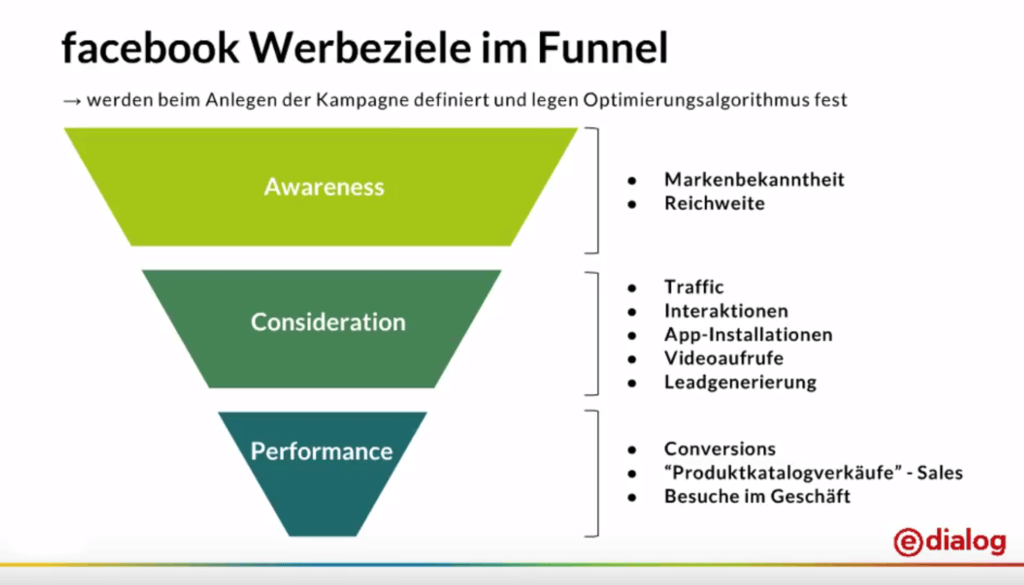
First and foremost – there is no campaign without a goal! For us, a funnel strategy is essential for a successful Facebook campaign. We recommend a funnel with at least 3 stages. At each stage, the goals are clearly defined and evaluated with appropriate KPIs. This gives us the opportunity to adapt the advertising message, targeting and bidding to suit the goal of the funnel step.
2. Implementation of the Facebook Pixel
The campaigns are tracked using Facebook pixels. On the one hand, the data obtained is used for conversion measurement and can also be used for targeting and optimizing the advertisements. The more granular events and goals are recorded, the better the data basis for analysis and optimization.
Attention: Implement Facebook Pixel before the campaign starts! Data measurement is not possible retroactively!
3. Custom audience targeting with 1st party data
Anyone who has ever run Facebook campaigns is familiar with core audience targeting. Here they areBasic targetingOptions such as location, age, gender and languages defined. AlsoAdvanced targetingaccording to demographic information (education, life events, etc.), interests (shopping, hobbies, activities, …) and behavior is possible.Disadvantage:This data is available to everyone. 1st party data brings decisive competitive advantages!Possible 1st party dates:
- Email lists and telephone numbers: from your own CRM data, newsletter systems, … (click here for oursGDPRinfo page)
- Website traffic: all website visitors, visitors to specific websites, …
- Interactions: video, completed lead form, events, …
- App activities: opening an app, most active users, …
1st party data is the most valuable! This also applies to Facebook!
4. Lookalike Audiences
Creating a lookalike audience means finding visitors who are similar to previous users from the customer audience (base). This way you can reach people who behave very similarly to previous users or customers. The probability of achieving the set goals increases with the quality of the base audience.Requirements for a Lookalike Audience:
- at least 100 people in the basic audience
- the larger the base, the more precise the users are that are found as a lookalike audience
Be careful when setting the target group size! Our recommendation 1 or 2% of the total population to find really similar lookalikes!
5. Creatives
One of the most important building blocks of a successful campaign is the creatives used. Because they have to attract the user’s attention.
There are:
- Link Ad
- Video/slideshow video
- carousel
- Canvas
- Collection Ad
But how do I find the right creative for my target group? What works best? As a first step, we recommend testing and analyzing as much as possible. Multiple creative types and different subjects within an ad group give the algorithm leeway and lead to better performance.
Advanced: feed-based, dynamic creatives
Google Shopping Feed can be created automatically. They are particularly popular in remarketing: the user is shown products that are relevant to them – for example, the most recently viewed products and other relevant articles. Experience has shown that this form of advertising is extremely successful due to its high relevance for the user. In the case of New Audience Targeting, product sets can be defined for specific target groups and dynamically distributed to suitable audiences (e.g. lookalike audiences).
Remarketing can annoy users – our tip: set the frequency cap correctly
6. Optimization and bidding
optimization
The best results come with ongoing optimization and targeting refinement. It is worth constantly “sticking with it” to increase efficiency. There’s nothing like continually analyzing the results and deriving test scenarios. Basically, the more testing is done, the better insights you gain for optimization!
Testing does not only refer to the advertising media (in addition to the creatives themselves, texts and CTAs should also be tested), but also to targeting, placements, devices, bidding settings, etc.
It is also important for different target groups → show the same ad
Furthermore:Not only test the creatives themselves but also texts and CTAs!
Bidding – Bid Management
Bid management has a significant impact on the cost efficiency of campaigns. Depending on the campaign type, different optimization goals are available. It is advisable to choose the one that is closest to the actual campaign goal. For example, if the campaign is intended to bring traffic to the site, it is recommended to select landing page views as the optimization goal.
Further tips for bid management:
- Use manual bids adjusted to the funnel stage
- Set bids realistically, based on current data
- Goal:Increasing results with the same budget and decreasing costs/results
Using Facebook Ads programmatically – What’s not possible in Business Manager!
1. Audience Enhancements
Manual data uploads and updates cost valuable time. If data changes often or different data segments want to be used, we recommend automating data updates such as automated integration of CRM data. This saves time and the data pool is always up to date.
Automatic creation of new audiences for retargeting
Based on CRM data that is automatically uploaded, algorithms recognize valuable users. Had users viewed products or perhaps already had products in their shopping cart? This is a decisive advantage over classic remarketing because the system automatically recognizes clusters and potentials and acts on them.
Google Analytics integration
With the Google Analytics integration you can connect data collected in Google Analytics with that from Facebook.
This creates the opportunity to optimize not only within the Facebook data silo. A larger and more comprehensive database is available.
Bonus of the analytics integration: Bidding optimization on complex key figures such as ROI segments!
Advanced retargeting
Algorithms and automation can also make the retargeting process easier and more efficient. There are also extensive additional options for upselling and crosselling. For example, buyers of a specific product group can be offered suitable additions.
Bulk uploads of product data using Google Sheet Upload
Various feeds can be created manually here and edited at any time via the sheet. This information can be used both for display and within automated advertising media.
2. Control and bidding
Bid control and bidding can work automatically! Budget pots distribute the available budget among the individual campaigns and/or ad groups according to the defined KPIs. In this way, it can be ensured without manual intervention that the best-performing campaigns and ad groups are pushed and those with less good performance receive a smaller share of the budget.
It is crucial that the setup is clean and takes the company’s goals into account. Different KPIs should be set for the individual stages in the sales funnel:
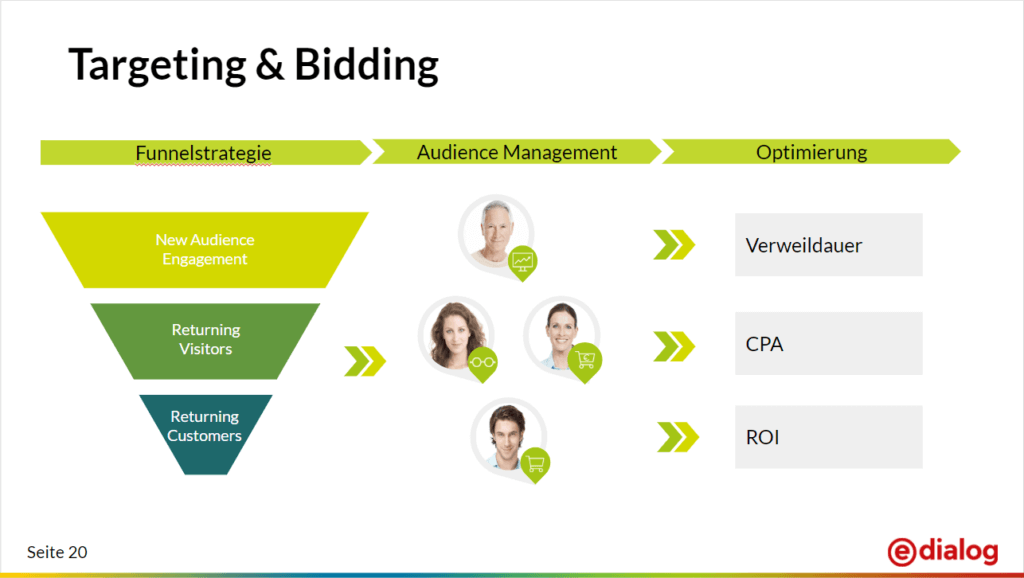
In addition, different strategies and rules can be created based on the KPIs to be optimized (e.g. target CPA, ROI, …). An example: If-then rules for automatic bid and budget control! If this or that scenario occurs, pause a campaign!
3. Creative optimization
Automatic A/B testing
Test scenarios are automatically created based on targeting variables such as location, age, interest, custom audience, etc. The time-consuming UTM tagging in order to be able to measure and analyze the campaigns in Google Analytics happens fully automatically.
Image editing using template editor
Using the template editor, dynamic elements such as frames, titles, CTA buttons, etc. can be added to images from the product feed. Experience has shown that you can achieve an increase in CTR, better ROIs and more transactions without much effort!
Our conclusion: Data-driven Facebook campaigns and targeted data integration save valuable time and bring decisive competitive advantages!The best for lastThe data from Facebook also flows into DoubleClick Search via the interface to DoubleClick Social. In addition to a cross-channel view, this provides additional advantages for tracking, remarketing, attribution and reporting.Related to the topic – our webinar Facebook Ads – now programmatic:https://www.youtube.com/watch?v=6kSN8WPWsgw




