Floodlight Conversion Tracking

Management Summary
How does Floodlight work?
Floodlight works – just like other tracking systems –with tags, which collects activity on websites. It also contains reporting functions with which the conversion data is processed into reports. Many still know it as “DoubleClick floodlight“, the forerunner name of today’s Google Marketing Platform (GMP).
Why do you need Floodlight (in addition?)
Measurement and reporting
By using Floodlight Tags, visits and events such asConversions (goals)recorded on the website and assigned to a campaign.
Based on this, comprehensive reports on advertising material and campaign performance can be drawn and insights can be generated.
Customer journey and attribution analysis
This stack includes its own customer journey analysis including cross-device measurement, which also allows attribution modeling – from static models to data-driven models based on machine learning.
Targeting
Further canAudiences (target group lists)based on Floodlight conversions. Here, users are included in a target group list, which, through a corresponding action – for example website visit, purchase, shopping cart abandonment, etc. – creates a so-calledFloodlight pixelstrigger.
Given optimization
Using the measured successes, the bidding algorithms can achieve the ideal bid prices, be it based on CPA (Cost per Action) or ROI (Return on Investment). There is a lot of additional optimization potential here by enriching the data (e.g. on contribution margin instead of sales, men instead of women, …)
Raw data
The real treasure for the modern online marketer these days is raw data. Before the GDPR, the view and clickstream data was made available in raw form as files and this meant that, for example, advanced attribution models or particularly long customer journeys could be mapped, the data could be matched with internal systems or insights could be drawn to optimize the frequency cap. As of May 25, 2018 this is no longer available, but the solution is with theAds Data Hub (ADH)already in beta. We already have the first accounts with it and will report promptly in this blog.
What is a floodlight pixel?
In order to make certain activities on a website measurable or to be able to create audience lists based on them, you first need a pixel – a coder, so to speak – that records data.
This pixel is always set in a cookie when a previously defined action takes place and this triggers the “firing” of the code.
What exactly this promotion is depends very much on the website and the advertiser’s goals.
The most commonly defined Floodlight Activities are typically:
- Website visit
- purchase
- Online form filled out
- Newsletter subscription
Creation of a tag concept
To be able to create a Floodlight tag, you first have to think about what activities actually arewhen, how and whereshould be triggered and tracked in sequence.
Practical tip:Create appropriate documentation with an exact detailed description of the individual tags! This document can be shared internally and helps the team, for example, to correctly install the tags.
1. Theoretical planning and lookback window
After you do thatFloodlight concept theoretically plannedhas, it’s time to implement it. First you have to think about thisLookback windowmake. The lookback window defines how long an action should be assigned to a campaign. By default it is defined as follows: Impression: 14 days, Clicks: 30 days. Advertisers can do thisPeriod corresponding to the customer journeyadapt to your customers. The lookback window for high-involvement products will be longer than for fast-moving consumer goods.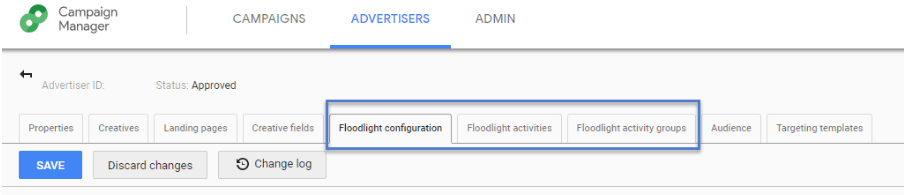
2. Definition of the u variable in Floodlight Activity Groups
The above-mentioned u variables are defined for the activities to be recorded (e.g.: product ID, sales…) and in so-calledFloodlight Activity Groupsdefined. These areCategories, to which you can then assign specific Floodlight activities.For example:A Floodlight Activity Group “Engage” would be assigned actions such as “Contact form completed” or “Newsletter sign-up”.
3. Creation of Floodlight Activities
The final step is creating theFloodlight Activities.Here they areindividual actions to be recordeddefined – for example: transaction, newsletter registration, contact form filled out etc. and assigned to the Floodlight Activity Groups.
Once the Floodlight activities have been created, they can be integrated into the website using the pre-linked Google Tag Manager or the Floodlight tag is integrated directly into the source code of the website.
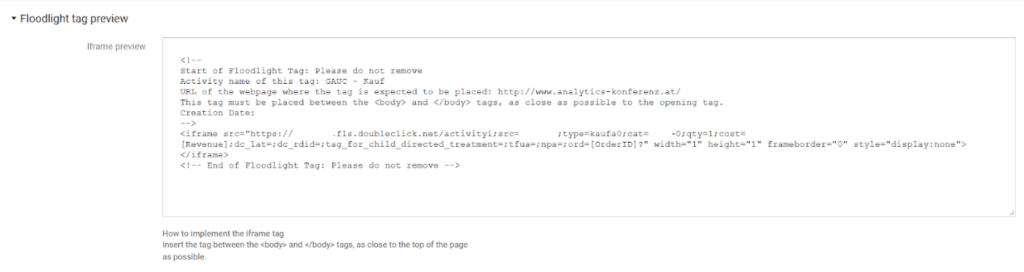
Here is an example of a finished Floodlight tag: