
Ga4 Big Query Export 8211 Costs And Differences

Management Summary
With its event data, the GA4 export provides a good basis for your own marketing data warehouse. But which export do I need and how much does it cost? This blog article provides an overview.
Export overview
In Universal Analytics, 360 customers have already had the ability to back up their data via BigQuery export and perform further analysis in a SQL format accessible to most analysts.
Since the introduction of GA4, this is now also possible for all customers, with one small difference:
Normal propertiesare only allowed to export 1 million events per day (Details about restrictions). However, it is possible to exclude certain events or streams in order to stay under this limit. Here you can also see the limit:
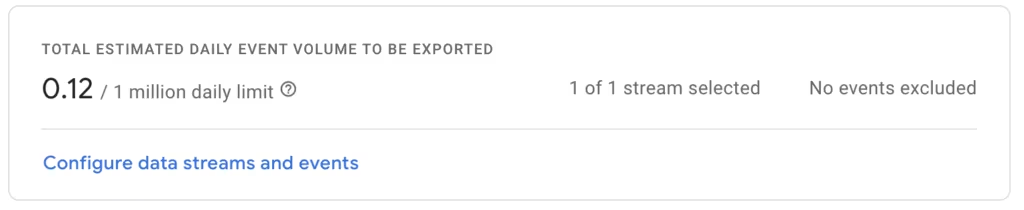
360 Properties: There is practically no limit to the number of events that a property can process per day (however, for very large properties it may take longer until the export is ready). There is no reference to a limit in the user interface.

Export types
The export is now available in several variants and is not uniform for standard and 360 properties:
| Export type | What is being exported? | Available for which properties? |
|---|---|---|
| Daily | All events unsampled with session and user attribution. The report prioritizes accuracy over speed and is exported once per day, typically between midday and afternoon. | Default, 360 |
| Fresh Daily | Updated in batches throughout the day starting at 5 a.m. and follows the Daily Export pattern. Prioritizes speed and guaranteed delivery over accuracy. | 360 |
| Streaming | Fast export in near real time, without attribution. Suitable for overview applications only. | Default, 360 |
| User Data – Daily | Export at user data level with audience data. | Default, 360 |
In the interface it looks like this (for 360 customers):
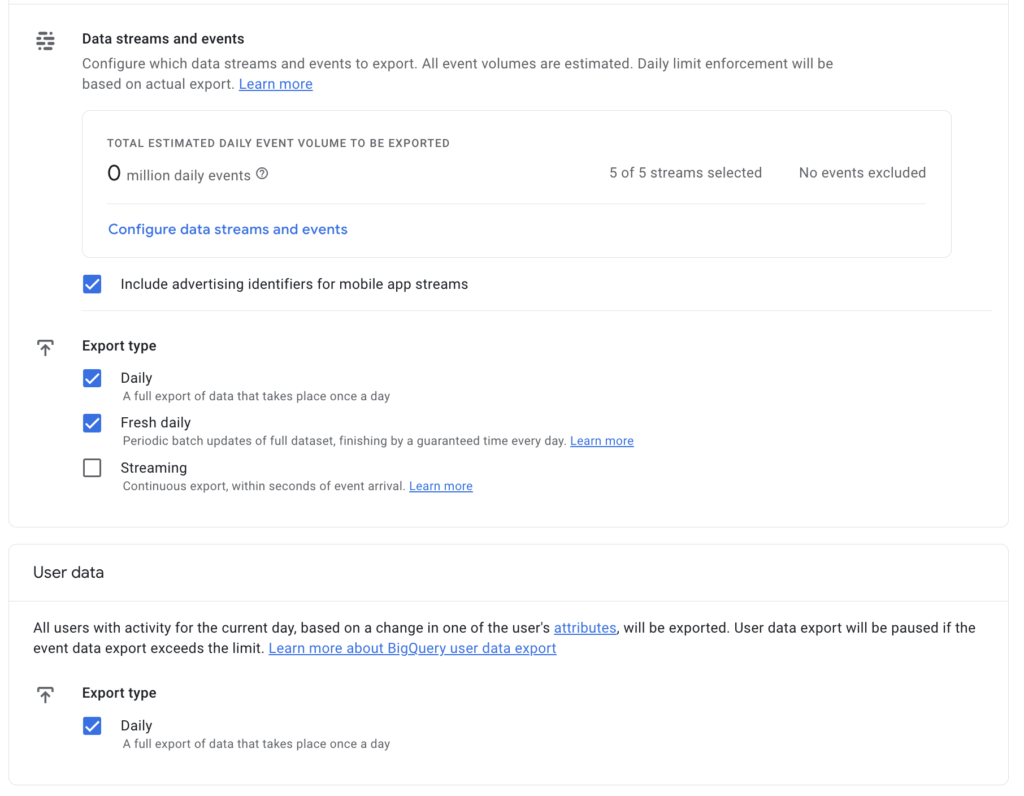
The exact content that is exported can always be updated via theSchemecan be viewed.
Depending on the export selected, either one, two or three tables are added to the analytics.dataset per day_propertyidcreated:
- Daily: events_yyyymmdd
- Fresh: events_fresh_yyyymmdd
- Streaming: events_intraday_yyyymmdd
The users then have two different exports in the same dataset:
- Client Id: pseudonymous_users_yyyymmdd
- User ID: users_yyyymmdd
Cost
In order to create a cost calculation, it is important to know how many events are processed in a day. You can use the overview when creating, which can be seen at the top of the article.
As a rough guide, it can be assumed that for every 1 million events between 1 and 3 GB of data are stored per day.
How much does Bigquery cost?
All information below is based on the standard pricing model. There are four types of export costs:
- Active Logical Storage: Cost for all data that was processed in a query in the last 90 days.
- Long-term logical storage: Cost for all data that has not been used in a query for 90 days.
- Data queries: Costs are based on the amount of data processed.
- Streaming Insert: Additional cost for inserting data in real time.
Here is the overview of the pricing in USD:
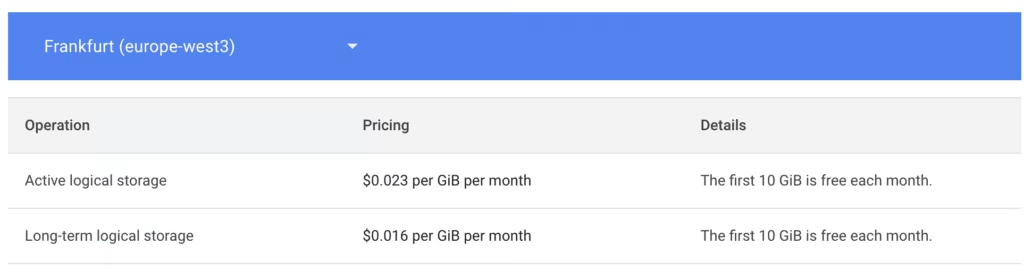
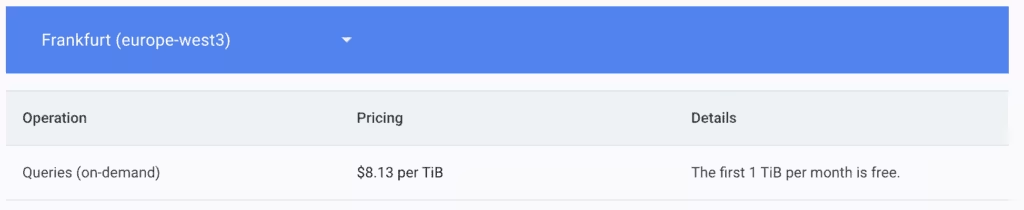
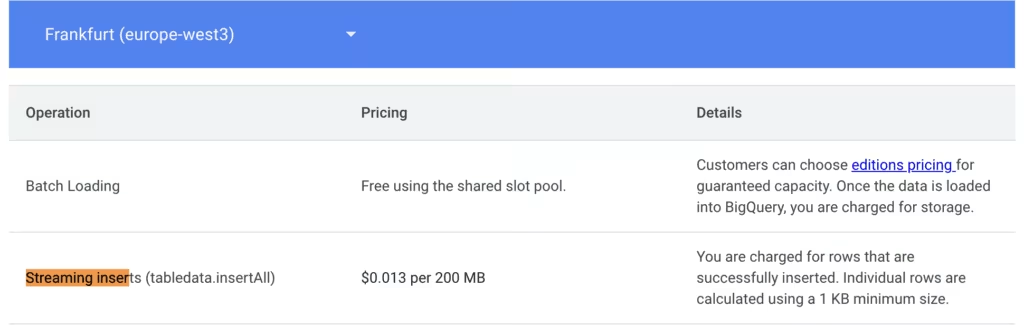
The overview can otherwise be found here:https://cloud.google.com/bigquery/pricing
And for the rest we use this calculator:https://cloud.google.com/products/calculator
To make the whole thing a little more tangible, we can use the calculator to estimate the costs under certain assumptions.
We make the following assumptions:
- A million events a day
- Only the daily export
- Everything remains saved
- The export has been going on for 2 years
- We have an existing pipeline that only processes the current data
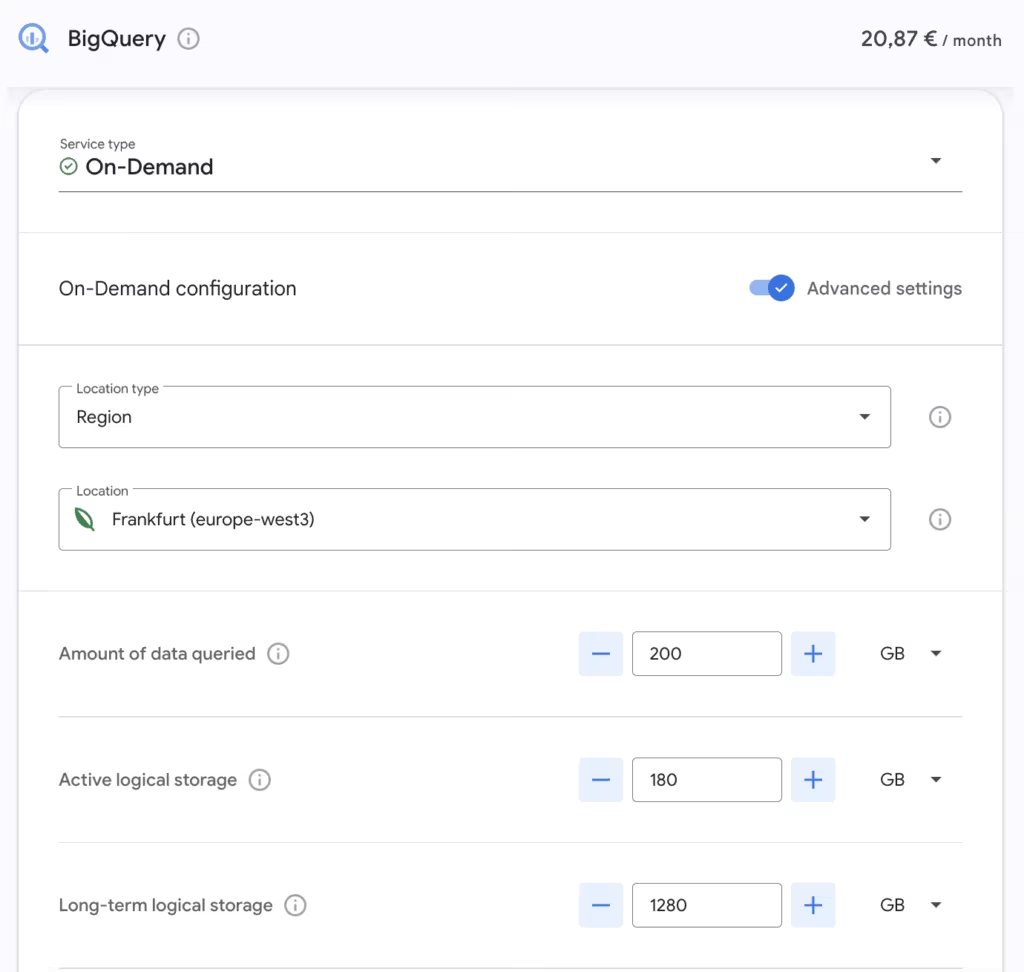

The first TB of data is free in the queries, so this amount is included in the bill at €0. In addition, the discounts are applied first, so the first 10 GB of storage are free.
The Active Logical Storage is used here at 180 GB, as we actively store 2 GB each for 90 days during this time. The storage is then moved to long-term logical storage. 730-90 days of 2 GB are now stored there. Accordingly, different scenarios can be played through in the calculator.
However, it can already be seen here that the costs are relatively low and, depending on the events generated, it is possible to control how much costs are actually incurred.
Conclusion
The cost of exporting GA4 data via BigQuery depends heavily on the amount of events processed and the export type chosen. It is important to know the number of events per day as this has a direct impact on the costs incurred.
Overall, however, it can be said that the costs are relatively low and exporting offers real added value.
For support and help with the export setup, simply send an email tokontakt@e-dialog.group
English version:
GA4 Big Query Export – What does it do and how much does it cost?
With GA4, the export of raw data is now available not only to 360 customers but to all properties. This opens up new use cases and reporting possibilities—from storing data in other data warehouses and creating detailed product reports to building custom attribution models.
But what does it cost? What are the differences in the exports? Here, we’ll provide a rough cost estimate and a few calculation examples to give an idea of what to expect—because often, it costs less than you might think.
The GA4 export provides the best foundation for building your own marketing data warehouse with its event data. But which export do you need, and what does it cost? Read this article for more details.
Export Overview
In Universal Analytics, 360 customers already had the option to secure their data through BigQuery export and perform further analyzes in an SQL format accessible to most analysts.
Since the introduction of GA4, this is now possible for all customers, with one small difference:default propertiesare allowed to export only 1 million events per day (see limits). However, it’s possible to exclude specific events or streams to stay within this limit. This is where the limit can be seen:
360 properties: There is virtually no limit to the number of events a property can process per day (although for very large properties, it may take longer for the export to be ready). In the user interface, there’s also no indication of a limit.
Export Types
The export is now available in several versions, and it differs between standard and 360 properties:
| ExportType | What is being exported? | Availability for properties |
|---|---|---|
| Daily | All events, unsampled, with session and user attribution. This report prioritizes accuracy over speed and is exported once daily, usually between noon and afternoon. | Default, 360 |
| Fresh Daily | Updated in batches throughout the day starting at 5 a.m., following the schema of the Daily export. Prioritizes speed and guaranteed delivery over accuracy. | 360 |
| Streaming | Fast, near-real-time export without attribution. Suitable only for overview applications. | Default, 360 |
| User Data – Daily | User-level export with audience data. | Default, 360 |
In the interface, it appears like this (for 360 customers):
The exact content exported can always be viewed via thescheme. Depending on the chosen export type, one, two, or three tables are created per day in the dataset analytics_propertyid:
- Daily: events_yyyymmdd
- Fresh: events_fresh_yyyymmdd
- Streaming: events_intraday_yyyymmdd
For user data, there are two additional exports in the same dataset:
- Client ID: pseudonymous_users_yyyymmdd
- User ID: users_yyyymmdd
Costs
To estimate costs, it’s important to know how many events are processed in a day. The summary view, as shown earlier, can be used for this purpose. As a rough guideline, around 1 to 3 GB of data is stored per 1 million events per day.
What Costs Does BigQuery Generate?
All cost information here is based on the standard pricing model. There are four types of costs for the export:
- Active Logical Storage: Cost for all data processed in queries within the last 90 days.
- Long-Term Logical Storage: Cost for data not queried in the last 90 days.
- Data queries:Cost based on the amount of data processed.
- Streaming Insert: Additional cost for real-time data insertion.
Here is an overview of the pricing in USD:
The full pricing overview can also be found here:BigQuery Pricing
And for the further we use thiscalculator
To make this more tangible, we can use the Calculator to estimate costs under certain assumptions:
Assumptions:
- One million events per day
- Only the Daily Export
- All data remains stored
- The export has been running for two years
- An existing pipeline processes only current data
The first 1 TB of data queried is free, so this amount is entered as €0 in the calculation. Additionally, discounts apply first, so the first 10 GB of storage are free.
For Active Logical Storage, we estimate 180 GB, as we’re actively storing 90 days at 2 GB per day. After 90 days, storage moves to Long-Term Logical Storage, where 730-90 days at 2 GB per day are now stored. Different scenarios can be modeled in the Calculator based on this setup.
This calculation shows that costs are relatively low and can be adjusted based on the number of events generated, allowing for better cost management.
Conclusion
The cost of exporting GA4 data via BigQuery depends heavily on the number of events processed and the chosen export type. It’s important to know the number of events per day, as this directly impacts the resulting costs.




