
Ga4 Bigquery Export

Management Summary
What changes with GA4?
Basically, at Universal Analytics we had a session + page view model that mapped the journey on websites well. However, this model could not be applied exactly the same to apps. That’s why Firebase Analytics was born. An event-based model, which is also supported by freely selectable parameters.
In order to use a common model for apps and websites, the Firebase model was chosen to combine both worlds. You can also measure page views as an event and track the parameters that are of interest.
Anyone who has already worked with Firebase and the Firebase BigQuery export will see that the GA4 export schema is based on the Firebase Analytics export schema.
This change is also reflected in the BigQuery raw data export. Queries that have been used so far for thisUniversal Analytics Export Schemawrote, require an extensive rethinking of thisGA4 export scheme.
What innovations are there?
First things first:The export itself is free with GA4!Saving and querying the data costs according to the BigQuery tariff. (Query prices, Storage prices) It depends on the size of the data and the number of queries how high the Google Cloud bill will be in the end. In contrast, you have toUniversal Analytics purchase a 360 license to set up BigQuery export for Universal Analytics.Without the license, the export remains hidden.
A data record in the Universal Analytics Export Schema always means a complete session. The data set has nested fields that contain the underlying hits. To get the hit data, you use the UNNEST function for standard SQL queries.
For GA4 data, a record (a row of a table) corresponds to an event. Here Google also works with nested fields. In the export schema, these fields are marked with the field type “data record”.
In the GA4 BigQuery Export schema there are dedicated nested fields for app information and separate web information. However, we will find the most important information at first glance in the nested field “event_params”: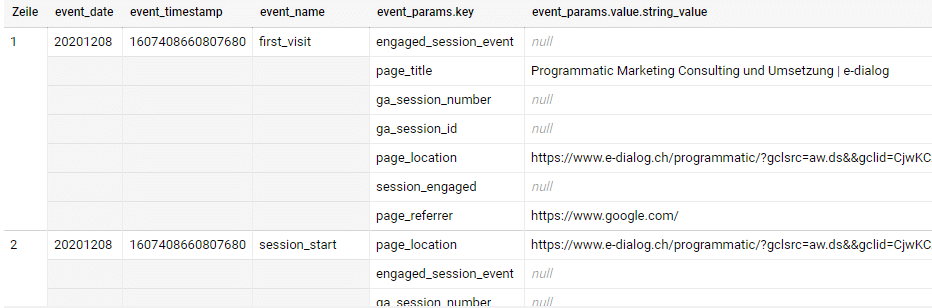 If in Universal Analytics you had to open the nested field “hits” with the UNNEST function in order to access the field “page” and the pageTitle field underneath, in the GA4 export you have to access the key in the nested field event_params, first filter for the key “page_title” and then have the value output via the “value.string_value” field:
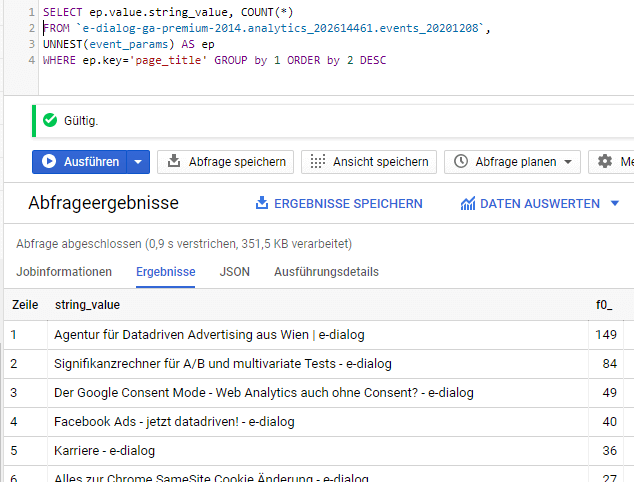 With the query above, an analysis of the most frequently displayed page titles on our site could be carried out. So the table has been flattened using the UNNEST command so that we can directly access the value in “key” and the value in “value.string_value”. Without the UNNEST command, BigQuery throws the error that you cannot call the field directly:
Why should you consider GA4 BigQuery Export?
- Your data belongs to you! Back up your raw data in BigQuery (Google Cloud) and/or send it to your DWH (data warehouse) in other clouds such as AWS or Azure
- Visualize your data even better in tools like Data Studio
- Link your data with data from other platforms on a raw data basis and enrich it with data from other raw data sources such as your company’s internal CRM
- Machine learning tools love raw data – BigQuery ML could also use your GA4 data to build machine learning models and derive recommendations
- Basically, perform advanced analysis on your data
Turn on GA4 Properties BigQuery link
Linking Google Analytics 4 Properties data with BigQuery works similarly to Universal Analytics: via the admin area. In the middle area (property level) of the admin area you will find the item “PRODUCT LINK” and below that the BigQuery link.
Specifying the required details is the same as with Universal Analytics, except that here you can select the data streams that you want to see in BigQuery. Just like with the Firebase BigQuery integration, here you have theBigQuery Sandboxthe ability to export the data completely free of charge. Up to a certain pointlimit.




