
Ga4 Linking With Cm360 And Dv360 8211 Process 038 Benefits

Management Summary
Do you want to learn more about the benefits and process of linking the two tools (CM360 – Campaign Manager 360 and DV360 – Display & Video 360) with GA4 (Google Analytics 4)? Then read on!
Linking GA4 with CM360 and DV360
If campaign management is carried out with CM360 (Campaign Manager 360) and DV360 (Display & Video 360), it is generally recommended to link both tools with GA4. What are the advantages of linking?
Advantages of GA4 linking with Display & Video 360 (DV360):
- Become analyticsTarget groupsaccording to display & Video 360 is exported, which can then either be used unchanged in the campaign, combined with other targeting or even analyzed. The exported audiences can be found in DV360 under All Audiences.
Which target groups are these? For example, valuable predictive audiences from GA4 that are enriched with Google’s machine learning technology (e.g. “Likely 7-day purchasers”: users who are highly likely to buy a product in the next 7 days), or even company-owned CRM audiences, provided they are linked to GA4. - In addition, GA4 also becomesConversionsexported, which can be used in the bidding strategy in DV360, alongside floodlights. This means that the GA4 conversions can be stored in the campaign in the same way as floodlights and can be optimized with the existing algorithms or even used for custom bidding.
- DV360trafficcan be evaluated collectively in GA4 reports as a “traffic source”. To do this, you have to select the dimension “Session source platform” (under “Session source”, however, the respective URL via which the users accessed your website is displayed.)
- DV360Campaign and cost dataare imported into Analytics.
Advantages of GA4 linking with Campaign Manager (CM360) – integration via Floodlight Configuration:
- GA4Conversionsare exported to the linked CM360 Floodlight configuration. The exported conversions are available to DV360 and/or SA360 advertisers for bidding and reporting purposes. This is what the CM attribution of GA4 conversions allows.
What does that mean specifically? In CM, GA4 conversions are reported according to the Floodlight model, which means that both advertising clicks and impressions (views) are taken into account. On the other hand, the CM floodlights exported to GA4 are only reported according to last-click attribution. Visual contacts (views) with a display advertising medium within the customer journey are not taken into account. You can find further information about the GA4 attribution model hereBlog article. Due to this integration, it is therefore possible to swap the Campaign Manager attribution model with that of GA4. - The CM360 associated with the Floodlight configurationAdvertisersSimilar to DV360, will appear as “CM360” in Analytics reports under the “Session source platform” dimension. Attention: GA4 reports only guarantee click-through measurement of floodlights.
- Campaign Manager 360Campaign and cost dataare imported into Analytics.
How does the integration of the individual tools work?
Both tools can be linked from GA4 or in the individual tools. This requires the editor role in GA4 and the admin role in the two GMP tools (CM360 + DV360). This article describes how the integration can be done from GA4.
In GA4 in the “Admin” area (gear symbol) under “Property Settings” you click on Product Links, where the respective products are located. After the product to be linked (in our case “Display & Video 360 links” for DV360 and “Floodlight links” for CM360) has been selected, click on the blue “Link” button and fill in the fields. The exact steps are described in this help article:DV360&CM360.
Once the link has been finalized, the details of the link can be controlled. A corresponding example can be found below: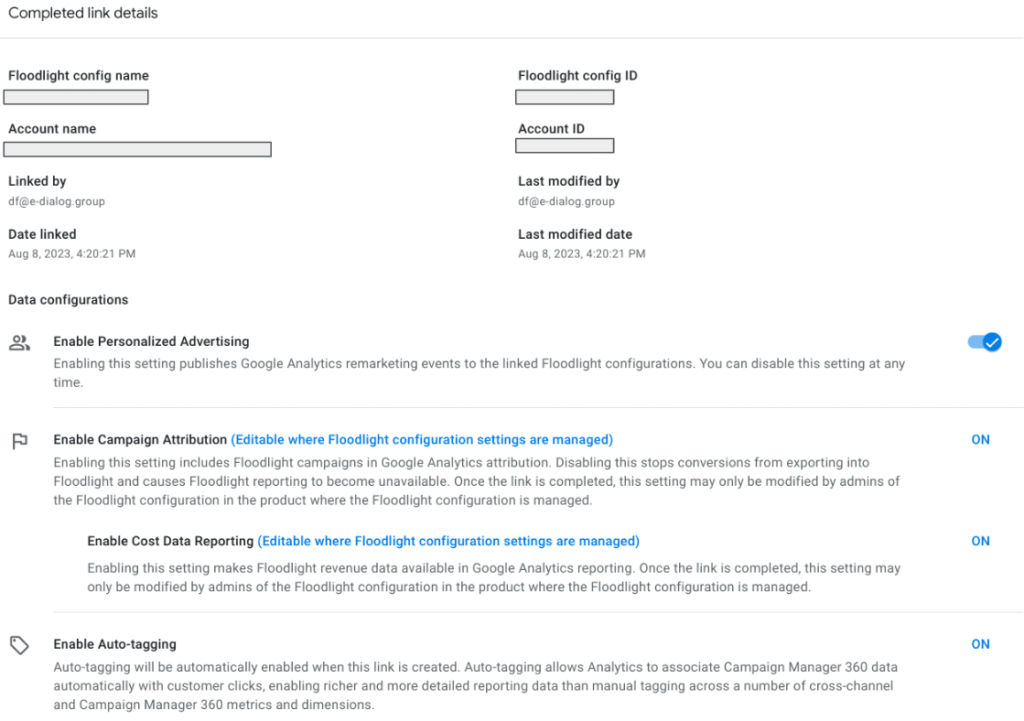 Structure of reports in the new Google Analytics 4
Manual vs. auto tagging in GA4
Basically, auto-tagging is used in GA4. This means that the campaign names and parameters from DV360 or CM360, when the tools are linked accordingly, are automatically recognized and recorded in GA4. Previously, campaigns from CM360 and DV360 could only be reported at campaign level. Reporting at deeper levels (e.g. “Insertion Order” or “Line Item” from DV360), which could be evaluated in Universal Analytics, was not supported by GA4 for a long time.However, this was recently changed and from now on it is possible to evaluate all DV360 and CM360 dimensions in GA4! For a complete list of dimensions, see this article –DV360&CM360.If the existing dimensions do not ensure the desired depth of reporting, you can still resort to manual tagging using UTM parameters: the two parameters “utm_term” and “utm_content” can be filled with the desired information and evaluated in GA4. In the future there will also be new UTM parameters (e.g. utm_creative_format or utm_marketing_tactic) which enable detailed evaluation. However, these are currently not supported by GA4.
A precise list of the supported UTM parameters can be foundherebe found.
Conclusion
There are several advantages when the tools from the Google Marketing Platform are linked to GA4. In addition to the ability to better evaluate campaigns in GA4, the tools can also access conversions, which can be used both for reporting and for bidding algorithms. It is also possible to share audience lists from GA4 with DV360. This also includes the predictive audiences from GA4. Furthermore, it should not be forgotten that conversion attribution across the entire Google Marketing Platform is improved when the tools are linked and talk to each other.




