
Google Ads Ad Customizer With Application Examples

Management Summary
How is the data feed created and loaded into Google Ads?
- AData feed is created in Excel, CSV or TSV, taking into account the specifications for fitting data. It will be betweenLanguage codes, attribute types, default attributes and alignment attributesdifferentiated. You can find more information at:https://support.google.comHere is an example of an online shop:
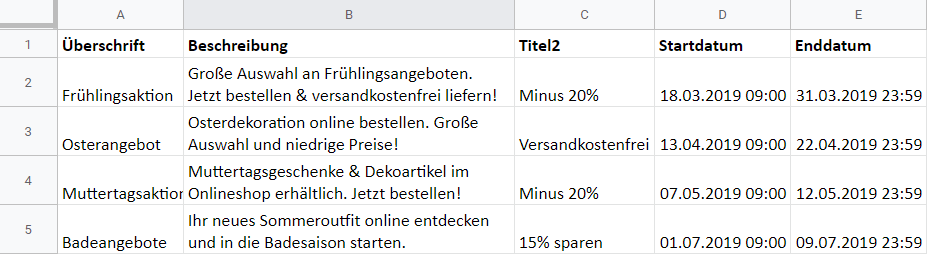
2. Once the feed has been created, you must add it to yourUpload your Google Ads account. To do this, first select “Tools” at the top right of the interface and click on “Business data”.
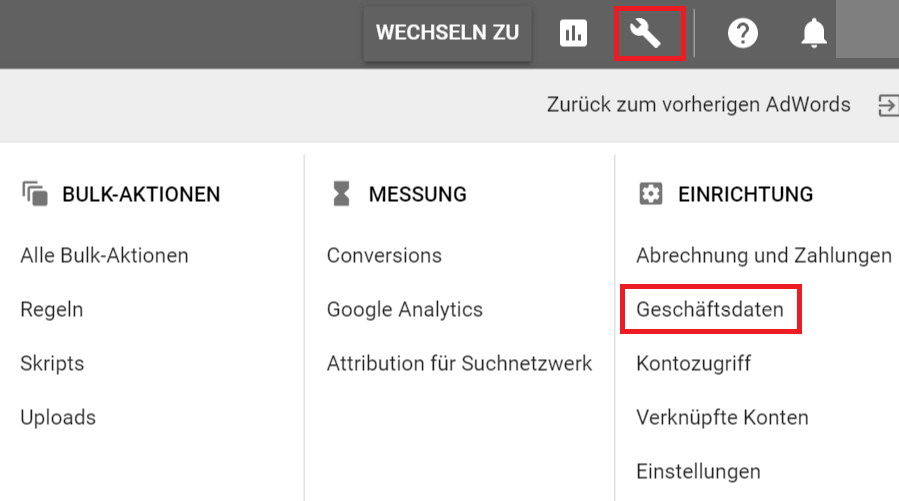
3. Then click on the big blue plus, go to “Ad customization data” and upload the feed.
4. To check whether the data is read completely and there is no error, first click “preview“.
5. If any errors occur, you should correct them and repeat the same process. If no errors occurred, click“Take over”and the newly created data feed appears in the business data.
Use of business data in ad copy
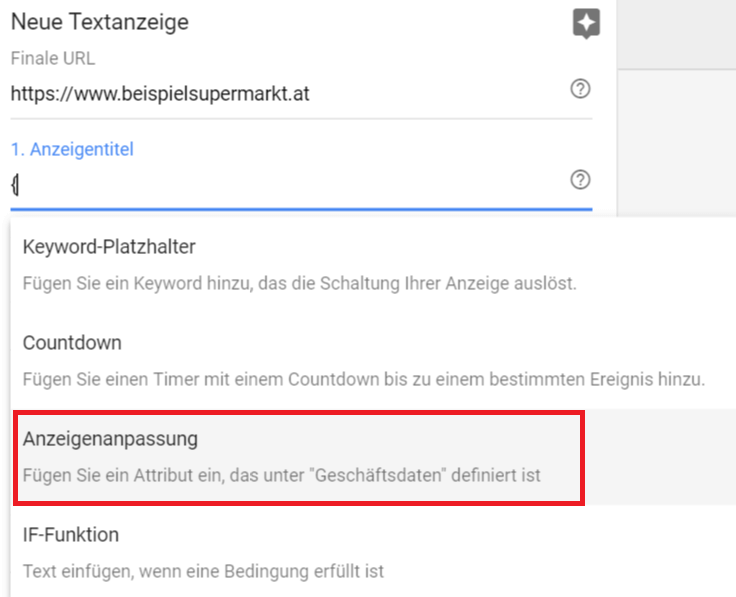
Create a new text ad, add inAd title fieldEnter a curly bracket and select the function “Ad Customizations” in the following menu:
For which companies do dynamic ad adjustments make sense? – Practical examples
Example 1: seasonal offers and promotions for a supermarket
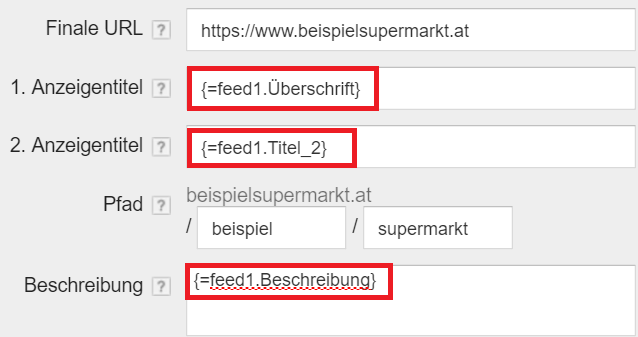
Imagine you run a supermarket and you want toPromote seasonal offers and constantly changing promotions, without putting a lot of time and effort into creating hundreds of ad texts. Through the ad customizations feature you canAll planned offers and promotions can be easily stored in an Excel file, which are spread over the year, capture and the ad texts by definingStart and end datespreset.

Example 2: regional user targeting for a trade fair organizer
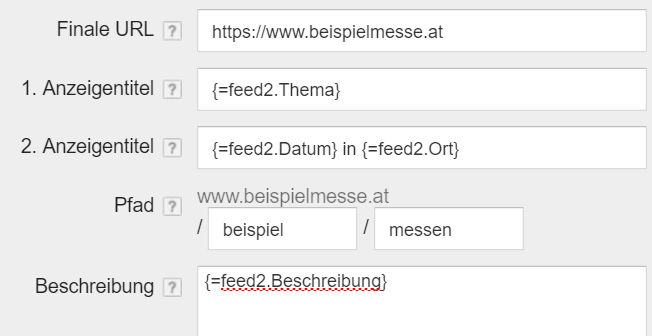
You market different trade fairs and want users, depending on which federal state they are looking for trade fairs in,the next trade fair nearbyis displayed.
Excel feed:
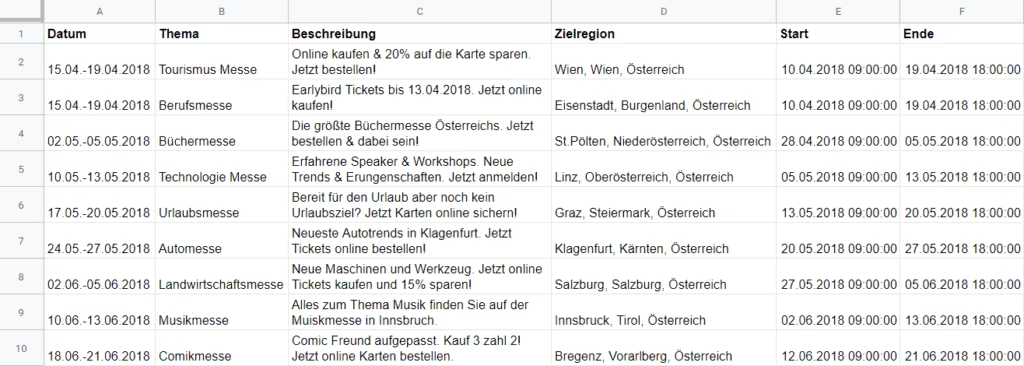
Function:Users who are inPeriodbetween April 10, 2018 and April 19, 2018 in theTarget regionIf you search for a trade fair in Vienna, the Tourism Fair will be displayed. Users who search in the target region of Burgenland during the same period will see the career fair.

Example 3: regional user targeting for different furniture store branches
A furniture store chain wants to create a dynamic text ad for each location for the respective target region. You upload a feed with all branches to Google Ads and the dynamic ad is displayed depending on the location in which the user is looking for a branch.
If a user searches near St.Valentin, the following ad appears (screenshot below), if they search near Amstetten, then an ad for the branch in Amstetten.

Example 4: seasonal program planning for a state theater
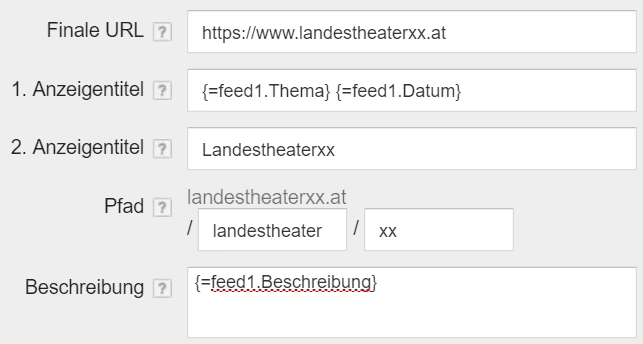
In a state theater it is often common to have onecertain period of time(say a month) the same production is played. For example, in January “La Bohème”, in February “Dance of the Vampires” etc. The annual program is oftenknown several seasons in advance and can therefore easily be loaded in advance as a feed into Google Ads.This means that the maintenance effort during the season is reduced.

Advantages of dynamic text ads
- Customized:Advertising messages individually tailored to user location, actions, devices or websites accessed.
- Time saving:Dynamic ads eliminate the need to create separate ads for each variant.
- Ad review and approval:Only the variants created in the data feed require Google review and not each individual ad after the initial setup has been completed.
- Scalability:Hundreds of variations for a single text ad. Potential customers are shown the most relevant variant. If changes to the advertising text are necessary, they only need to be adjusted once in the feed and not in each individual ad.
- Text, prices, numbers and countdownscan be inserted into ad titles and ad text.
- Orientation:Text messages can be targeted to specific campaigns, ad groups, or keywords (different keywords trigger different adjustments).
- Performance statisticsof the different ad variants are recorded by each ad customization.
What do you have to pay attention to when creating the data feed?
- For promotions with start and end dates, it is important to use the correct column names and the correct format DD.MM.YY hh:mm:ss, otherwise the function in the feed will not work. The easiest way is to make the adjustment in the Google Ads interface and set the desired start and end dates there.
- Even though dynamic ad adjustments have achieved very positive results in many cases, it makes sense not to completely omit static ads, but to store them as a backup and test them extensively.




