
Google Ads Editor Update 2 1 8211 13 Brand New Features From Fall 2022

Management Summary
Not too much time has passed since the 2.0 update, which primarily included support for the Performance Max campaigns. However, Google has apparently not given itself a break and has thought about how the editor can make everyday work in the Google Ads universe even easier. The 2.1 update now brings 13 new features to the user interface that are intended to make it easier to optimize campaigns in the Google Ads Editor. Below we present these features to you individually:
New features in the Google Ads Editor – Update 2.1
The Google Ads Editor update brings 13 new features to the user interface:
1. Table Header Recommendations
The editor now displays a list of recommendations that are available for the currently displayed items in the toolbar above the table. This should make the recommendations even more visible.
2. Primary Display Status
More information about the campaign is now displayed here. For example, reasons why the campaign cannot be run.
3. Overview Recommendation Cards
The overview cards for recommendations are now supplemented by Top Recommendations, Asset Performance and Asset Group Status.
4. Recommendations
The recommendations known from the online tool are now also displayed in the editor. Recommendation types such as “Set a Target ROAS/CPA”, “Upgrade Local Campaigns to Performance Max” and “Use Display Expansion” are added with the new update.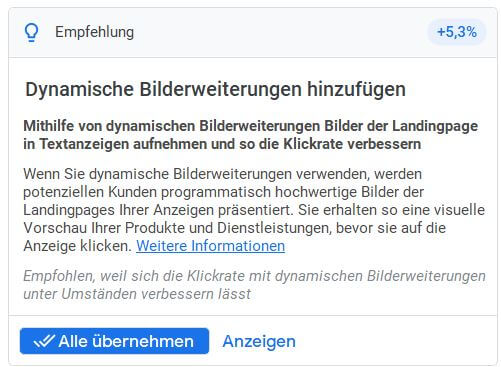 New feature in the Google Ads Editor: Recommendations
5. Warning Dialogue for Cross-Account Copy Paste
A new feature that warns when copying and pasting items between different accounts that certain account-specific data could not be copied. These are now listed in detail.
6. Validate Aligned Budget or Bid Strategy
With the new update, the editor displays an error message if a campaign is part of a shared budget but not the associated portfolio bid strategy.
7. Video-Drive Conversions Campaigns with Shopping
The 2.1 update supports the shopping campaign setting (product feed) and product groups for “Video-Drive Conversions”.
8. Final URL Expansion
The “Final URL Expansion” setting is now also available in the editor for the Performance Max campaigns. New feature in the Google Ads Editor: Final URL Expansion
9. Initial View on Start-up
The editor now allows different settings for views when opening a new window: overview, campaigns and last view.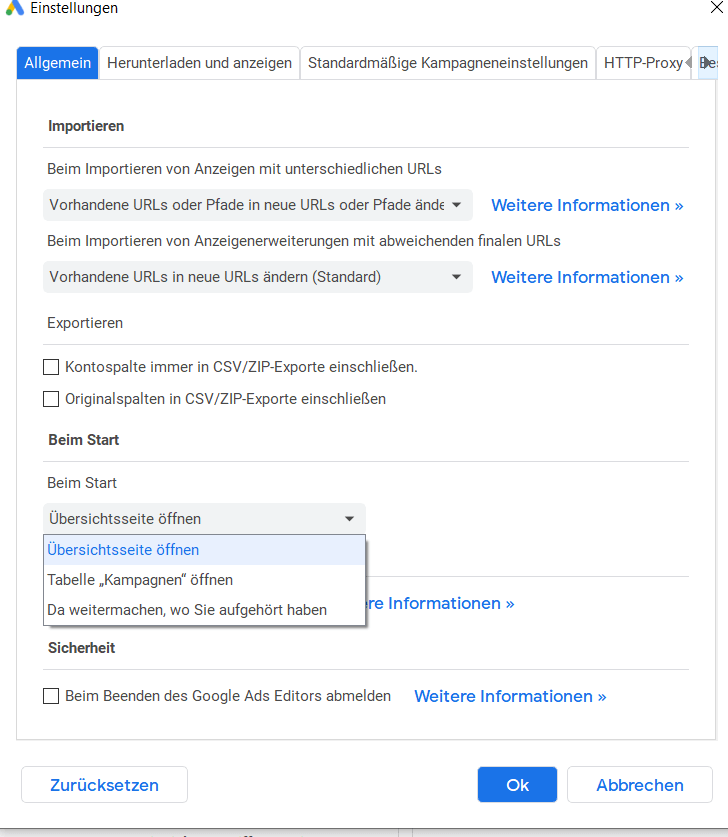 New feature in the Google Ads Editor: Initial View on Start-up
10. Global Offers
The setting options for the Shopping and Performance Max campaigns have been expanded to include two options:
- to set the sales country to optional
- Support for optional feed labels
11. Lead Form: Custom Questions, Age Questions
Thanks to the update, the lead form extensions can also be filled with custom questions. In addition, the age question “Are you older than X years?” open (between 18 and 65).
12. Lead Form Extensions at Account Level
In the Google Ads Editor, lead form extensions can now be added at the account level and excluded at the campaign level.
13. Budget Explorer
Already known from the online Google Ads tool, the Budget Explorer is now also available in the editor. The system provides 3 pre-calculated budget suggestions and automatically calculates the statistics for them.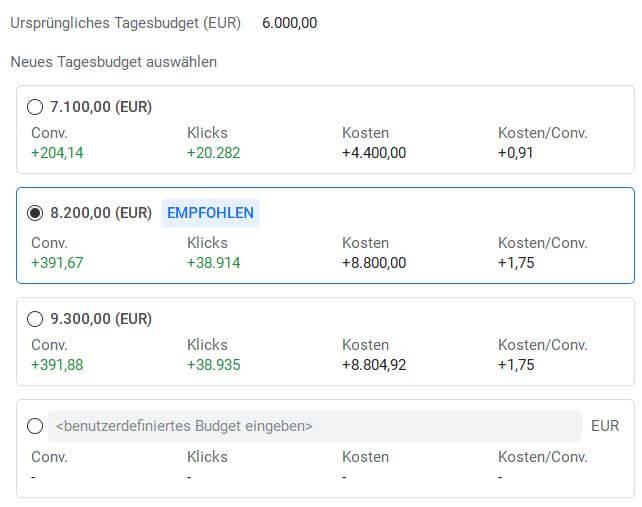 New feature in the Google Ads Editor: Budget Explorer
Goodbye: Include Display Network
In addition to these innovations, an old feature will also be discontinued. “Include Display Network” will no longer be available for Standard Shopping campaigns with the new update.
Conclusion:
With the 2.1 update of the Google Ads Editor, the software takes another step away from the image of a purely offline tool. Not only can you make pure setup adjustments, but you can also use insights such as the Budget Explorer or detailed recommendations to optimize campaigns directly in the tool. This will especially give users who work with multiple or complex Google Ads accounts the opportunity to make their everyday work even more efficient.




