
Google Analytics App Web Property Now Analyze Cross Platform Again
Management Summary
As of October 2019Google is ending supportlegacy Google Analytics Service SDKas well as data collection and processing in the legacy app properties.From then on, Firebase MUST be used for app tracking in the Google world. We’ve already covered what Firebase is and how App Tracking NEW works in this articleGoogle Firebase Analyticsextensively described.
Important:From February 2020, the previously collected data from the legacy Service SDK can no longer be accessed – neither via the Google Analytics interface nor via the API.These willaccording to Google documentationremoved from the Google Analytics servers. Properties of GA360 customers are not affected by this!
As great as Firebase Analytics has been up until now, it had one significant disadvantage: you could no longer analyze web and app data together out-of-the-box.
Even worse: you suddenly had two tools in use. Google Analytics for website tracking andFirebase for app tracking– completely separate and isolated from each other.
That’s over now!
Since July 31, 2019Website and app data can (finally again) be recorded and analyzed together in Google Analytics – and it’s so cool:
The App + Web Property [Beta]
When you create a new property in Google Analytics, there has recently been a third selection option in addition to “Web” and “App” – namely“Apps and Web”:
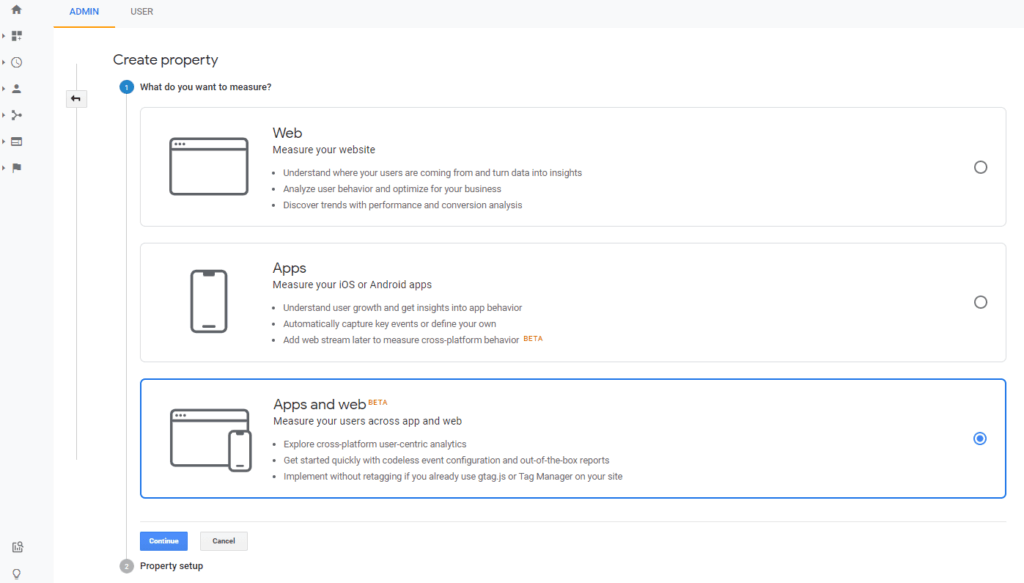
The new App+Web property can be created and configured here.
If you had already linked a Firebase project to Google Analytics, you will be informed about the property upgrade by a large blue bar in the analysis area:

Click on“Begin Upgrade”and Google will guide you directly through the upgrade process.
A notice:Google is currently in the process of launching the new App+Web Property worldwidePublic betato roll out. It may therefore take some time until the upgrade is available in your account. It should be available worldwide by the end of 2019 at the latest.
Important: Google Analytics 360 users must first actively agree to the use of the App + Web Property, as these are not currently available in Google’s SLAs.This means that the terms of use are the same as for GA Free Users!Consent can be given by any GA360 user who has Google Analytics Account Editor and Firebase Project Owner rights. GA360 customers who have concluded a license agreement with a sales partner must provide approval via the sales partner. GA360 customers who have signed a license agreement directly with Google must contact their Google Account Manager.>> All details again here.
To use the Web+App Property, two requirements are necessary:
Requirement App+Web Property: Firebase for apps
For apps, the only requirement is the use ofGoogle Analytics for Firebase.
So if you still have theold legacy SDK for Android and iOS trackingimplemented in the app, you should plan to upgrade to Firebase as soon as possible: On the one hand, because thelegacy SDK only available until October 2019 for GA Free Usersis available. After that, Google turns it off and no more data flows into your GA account! As of February 2020, you will no longer be able to access this data in Google Analytics as Google will delete it from the servers.
A notice:GA360 customers can continue to use the legacy SDK and legacy data!Upgrading to Firebase is still recommended because the legacy SDK is outdated and no longer maintained by Google.
Furthermore, the upgrade to the Web+App Property can only be carried out by using Firebase.
Tip:Currently it makes sense to use the Web+App property either ONLY for app data or for website AND app data – but NOT ONLY for website data. Standard Google Analytics should continue to be used for pure website tracking.
App + Web Property requirement: gtag for websites
For websites, the only requirement is the use of the gtag, which makes data collection in Google Analytics compatible with Firebase.
The gtag (Global Site Tag) is a new Javascript library (gtag.js) for websites, which will sooner or later replace the previous Universal Analytics Tracking (analytics.js).
So we’re talking about a new measurement model that Google is currently introducing and will completely turn website tracking on its head in the near future.Simo Ahava is already talking about Google Analytics V2 or Firebase Analytics for Web…
But don’t worry: we’re still in our infancy and we don’t have to worry about rebuilding the entire tracking on the website yet. The gtag can easily be added to all pages of the website in addition to existing tracking.
There are two options for this:
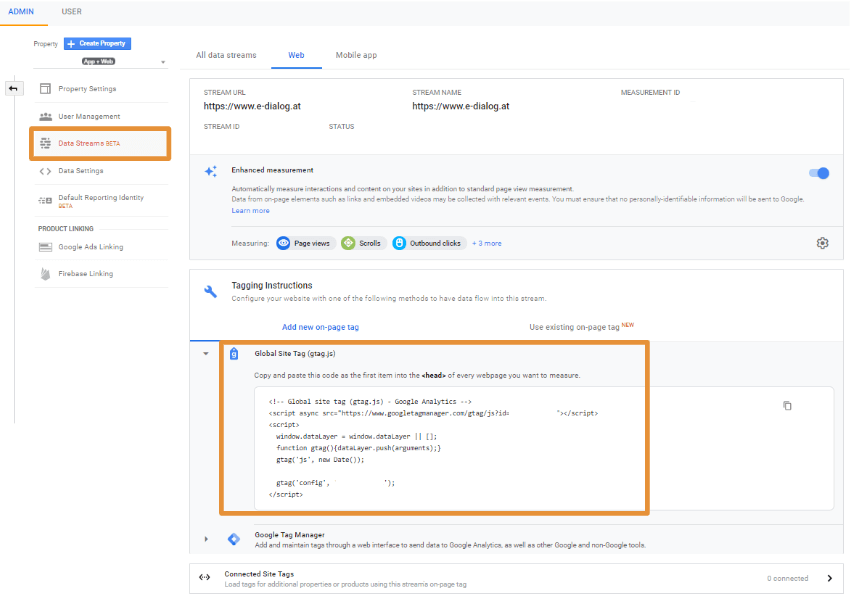
- Native implementation:You can use the Global Site Tag in addition to existing tracking on ALL pages of your website in the <head> Install area. You can find the tracking code in the admin area of the Web+App Property under Data Streams. Add a new data stream for the desired website here to receive the tracking pixel.
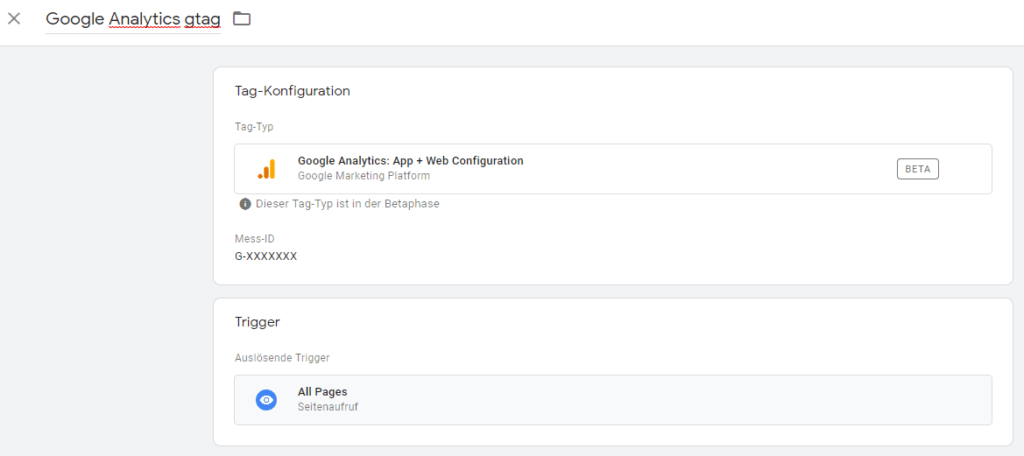
- Google Tag Manager:A new tag type is available for the GTM –“Google Analytics: App + Web Configuration”. Select this and enter the new Measurement ID of the App+Web Property in the “Measurement ID” field: Instead of the previous UA ID, there is now the G-Tracking ID (G-ID). Add the “All Pages” trigger and publish the container. gtag is now implemented on your website in addition to existing tracking.
Important:Since the App+Web Property is currently still beta and by no means fully developed, it is strongly recommended to use it IN ADDITION to the existing implementation. GAv2 is currently not a replacement for standard Google Analytics!
Further technical details are availablefurther down in Simo Ahava’s blog post.
App+Web Property: Benefits and all the advantages
Once the setup has been completed, the website and app tracking data flow together into the same property.
The greatest benefit and advantage at the same time is that the customer journey can now be analyzed across platforms and devices.Users are actual users and no longer devices, as the data streams are consolidated based on the user ID.
Both Google Analyticshome screen,as well as thatReport sectionsSimilar to those from Firebase Analytics – but some web-specific elements have been added:
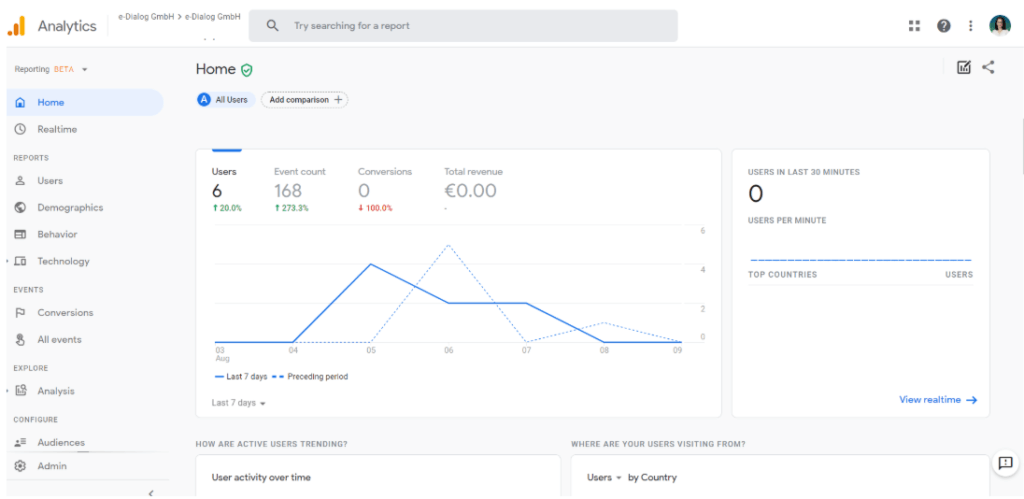
You can get an overview of all the new report sections as well as information about the new segment enginehere in Krista Seiden’s blogread up.
The following are the most important innovations:
New data schema: event and parameter model
What is fundamental is that thenew property on a new data schemabased: Instead of the previous session and page view model (which classic Google Analytics has used for over 15 years), there is now aEvent and parameter modelused.This is also already known from Firebase Analytics.
The main differences between Universal Analytics and Google Analytics V2 are clearly presented below:
| Universal analytics | Google Analytics V2 |
| Focus on sessions (session-based data model) | Focus on users and events (event-based data model) |
| Hit-, Session- and User-Scoped Custom Dimensions | User properties and custom event parameters |
| Basic real-time reports | Advanced real-time reports:StreamViewandDebugViewwith comprehensive drill-down options |
| Segments | Audiences |
| – | Automatically recorded and recommended events and properties |
| Sampling | No sampling (but strictquotas and limits) |
The only disadvantage: the website has to be prepared first!However, we do not recommend switching to this model at the moment but rather wait and see how the App+Web property develops further.
New: Optimized analytics
Instead, Google takes you with the“Enhanced Measurements”A lot of work has already been done, because the new property provides a series of “optimized analyses” as standard: The following events no longer have to be implemented via the GTM, but are made available out-of-the-box:
- Page views
- Scroll tracking
- Outbound link tracking
- Site Search
- Video engagement and
- File downloads
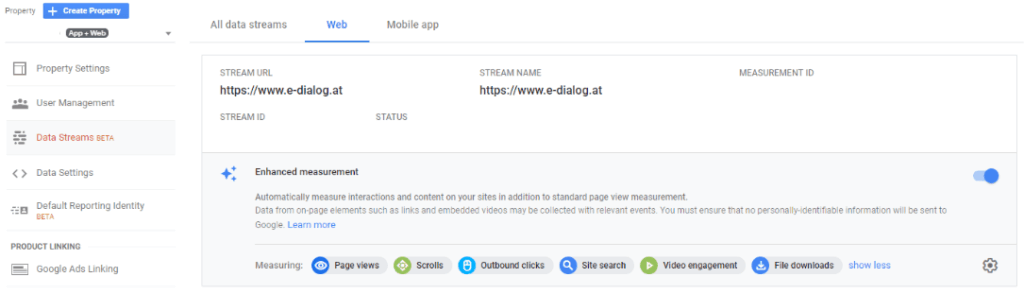
Tip:Automatic tracking can also be deactivated if your own solutions are better suited for specific use cases.
The great thing: It can be expected that Google will offer more standardized events over time and thus further simplify the use of Google Analytics.
Analysis Beta: Free for Everyone
The Analysis Beta, which Google Analytics 360 users already have, is also very coolAdvanced Analysis in Google Analyticsknow. In the Web+App Property this is now available for ALL users ( ):
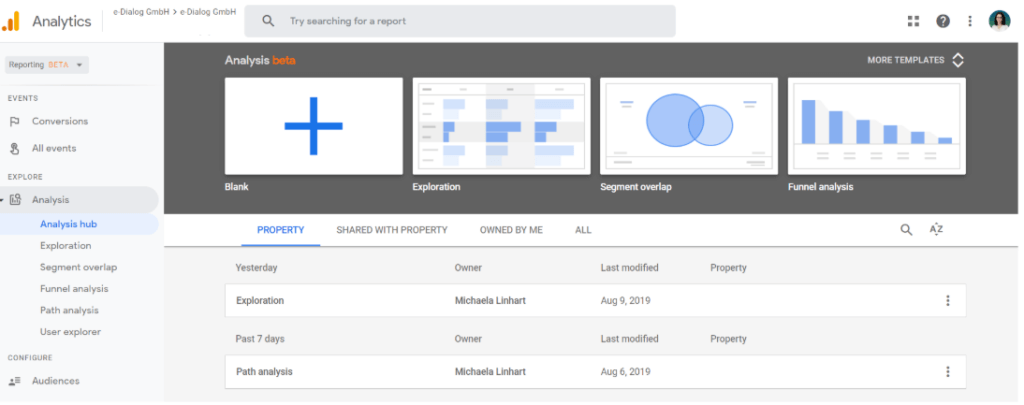
The Analysis Beta offers more detailed evaluation techniques and deeper exploration features. This allows for a better assessment of how users interact with your website and enables the derivation of measures to improve the user experience.
The custom funnel analyzes are particularly exciting – previously a pure Google Analytics 360 feature that can now be used by everyone. And that really offers a lot of advantages:You can read 4 brilliant application tips here.
Further details about the Analysis Beta can also be found in Krista Seiden’s blog:
- Introduction to Advanced Analysis
- Deep Dive on Funnels in Analysis
- Deep Dive Segment Overlap in Advanced Analysis
App + Web Property: Conclusion and outlook
With the new App+Web Property, not only can website and app data be recorded together in Google Analytics again(yeah!), but Google is ushering in a new era in web analysis.
Whether this new platform will actually replace Universal Analytics one day remains to be seen. The fact is: The new measurement model (users and events instead of sessions) has so far proven itself in Firebase and can therefore also be used for websites. It definitely has potential – even if it means we have to start completely rethinking!
The reports that are already available are a lot more advanced than the previous standard reports in Google Analytics: funnel analyses, path analyses… So we can look forward to what is to come.
Until then it’s time to wait and try out what’s possible.




