
Google Firebase Analytics How App Tracking Works New
Management Summary
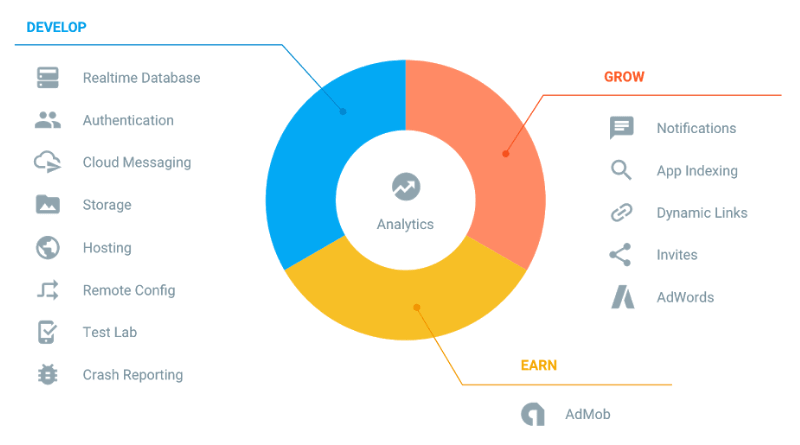
The app suite was presented and launched atGoogle I/O Developer Conferencein May this year. The key principle is their USP:Developers First!
Google has understood one thing: If you want to have fun developing an app, you have to enjoy using the tool. That’s why the developer experience at Google Firebase Analytics is in the foregroundexcellent documentationandfree supportis additionally expanded. In addition, Firebase is open source and the source codeavailable on GitHubis!
Google Firebase Analytics
The heart of the suite isGoogleFirebase Analytics: TheNew, free and unlimited analysis tool! The focus of the analysis is on users and their interactions with the app (not sessions and page views like in Google Analytics): This means EVERYTHING can be measured, from the core business to specific events.Without taking quotas into account! Without taking sampling into account!
With the installation of the basic tracking code, a lot of information is already includedFirebase Analytics dashboardavailable: from technical data such as app version to all kinds of user engagement, retention and revenue values and even demographic data and user interests.Take a look at thisIntroduction to Firebaseon YouTube (approx. 4 minutes long).
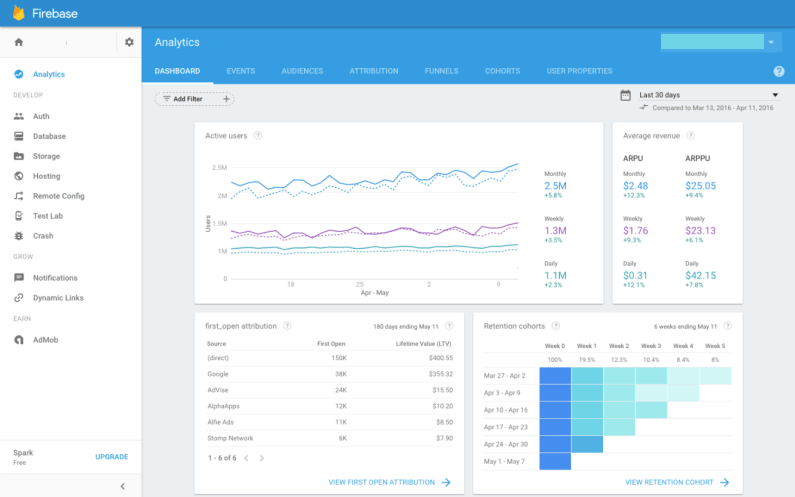
TheGoogle Firebase Analytics focuses on events, i.e. interactions that users have with the app. Google itself providesnumerous standard eventsavailable – and up to 500 additional custom events can be implemented.
Additional information such as game status, favorite sport, etc. can also be accessed using“User Properties” (compare with Custom Dimensions)can be tracked: up to 25 user-defined user properties are available.
Once all the information has been tracked, you canfurther measurescan be taken, for example, by creating groups of users (audiences) that are retargeted, for example, by AdWords remarketing or notified with notifications. Google Firebase Analytics really offers a lot of options here:Check them out in a brief wayYouTube video(for approx. 3 minutes).
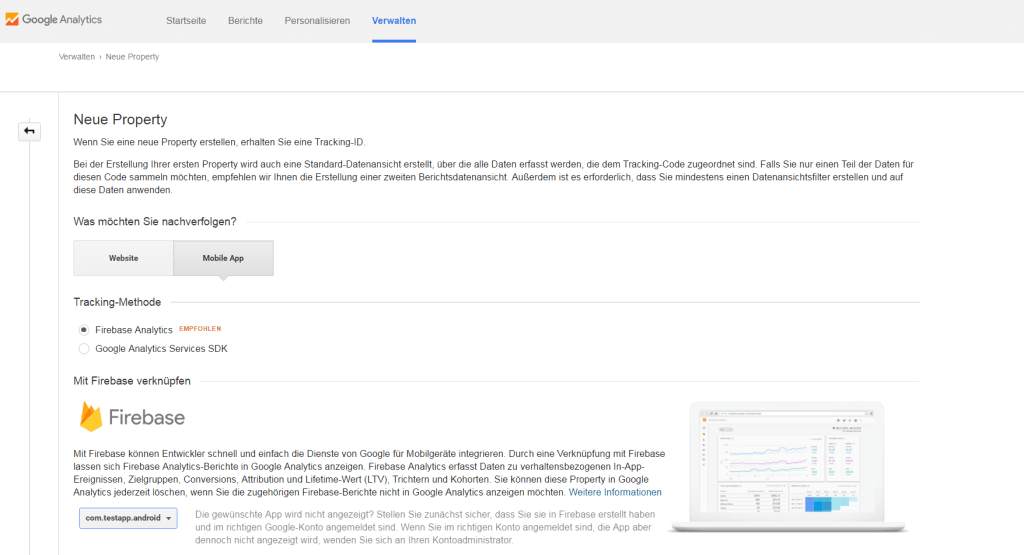
Now ask yourself whether Firebase replaces Google Analytics for Apps?Yes, it does! Firebase inherently provides you with significantly more information than Google Analytics previously did. You can still collect your app data in Google Analytics: Either automatically, byLink Firebase to GA. However, in this case, you need to create a new GA property with Firebase settings (see screenshot). Firebase will then be fully integrated into GA. Or by continuing to send your data to the previous GA property via the GTM – but then without the additional data that Firebase automatically provides.
The GTM for Mobile V2
The great thing is that Google still offers the option of collecting app data on the fly with GTM for Mobile – with the new oneVersion 2 of the GTM. Another revolution, because this is now based on Google Firebase Analytics and uses Firebase Syndax instead of the dataLayer. Integration into apps is even easier than before!(All advantages of using the GTM canherebe read again.)
The only downside is thatGTM for Mobile V2 is not a stand-alone productmore: He will be with theFirebase SDKinstalled and must also be implemented with the Firebase Syndax. In addition, a new GTM container must be created because the configuration has completely changed in the background. And if you have previously worked with data layer variables, it is not possible to export the old container and import it into the new one – unfortunately this has to be done manually. Therefore, Google itself recommends starting a completely new setup when upgrading to Firebase. The only advantage: It is THE opportunity to rethink and improve your tracking strategy! ;-)
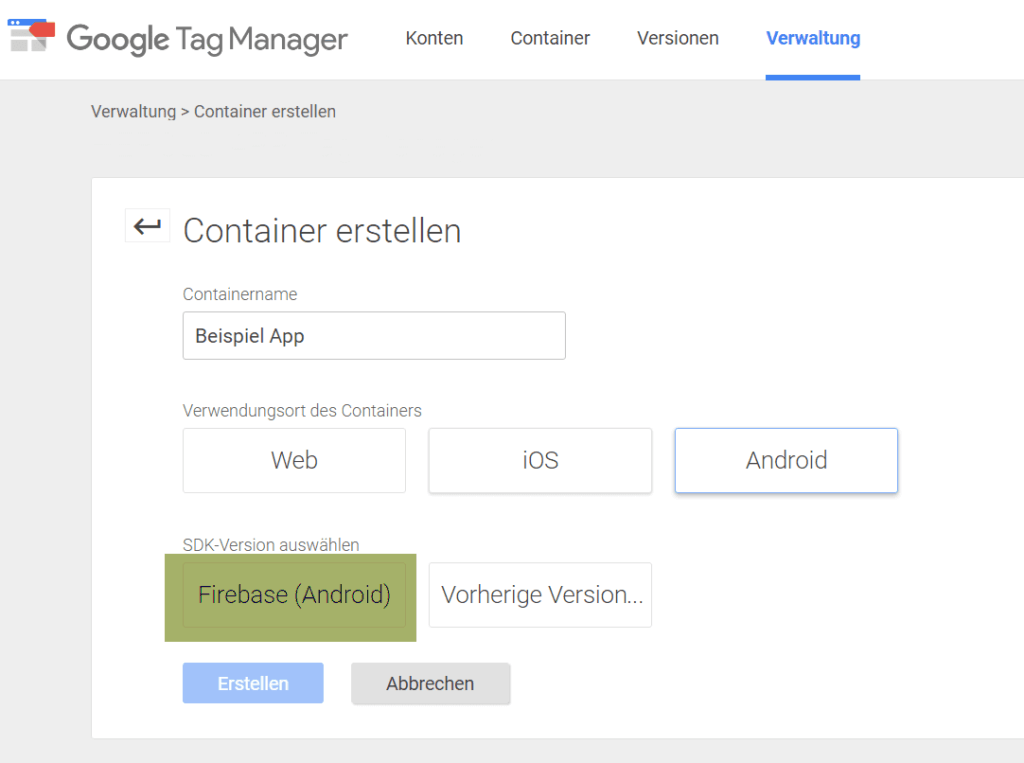
Now ask yourself what happens to the previous version of GTM and the existing (legacy) SDK?Don’t worry, this will stay with you for quite some time! This means you don’t have to switch to Firebase overnight. But: You should plan the upgrade, because new features are only available on Firebase. In addition, sooner or later Google will completely stop supporting the Mobile SDK.
Advantages: Therefore upgrade to Google Firebase Analytics
At first you might be a bit overwhelmed when you find out that the new GTM version only works with Firebase and that you suddenly “have to” work in Firebase Analytics instead of Google Analytics –at least that’s how it happened to me…
BUT (and here’s the big but): If you spend just a moment with Firebase, you’ll realize how incredibly cool it is! All the advantages summarized here:
- Firebase (like GA) is mostly free: Costs only apply to the use of the integrated database, data storage and hosting, as well as for test labs and Google Cloud integration.
- There are15 tools in one suiteintegrated, which fully support app developers and can be used very easily. Firebase is also compatible with all Google products and services such as: AdWords and AdMob are linked, making them easier than ever to use.
- There areno quota limits and no sampling.
- Firebase is forCross-platform compatible, i.e. for Android, iOS and web apps.
- The USP is on theDeveloper experience: There is extensive documentation and even free support.
- Firbase uses thatGTM for Mobile V2to make changes to the app on the fly.
How to: Start with Firebase now
Finally, I don’t want to withhold from you how you can get started with Firebase right away in 3-6 simple steps.The good news: It’s really easy!
- First you need to install the Firebase SDK forAndroid, iOSor thatWeb App (C++ Setup)download and install.
- Next the app will be in theFirebase Consoleadded: To do this, a new project must be created. A wizard guides the user step by step through the setup.
- The basic tracking code is then implemented in the app: These are just 3 lines of code that can be expanded with user-defined events and user properties.Voila: your data flows into Firebase!
- Extension to GTM:If you would like to use the new Google Tag Manager for Mobile V2, you must create a new GTM container and use itAdd to Firebase project.
- Create all tags, triggers and variables. If necessary, expand your tracking to include events and user properties. Test the implementation with the preview and debug version of the GTM and publish the container.
- Extension to GA:If you would like your data to also flow into GA, thenlink Firebase with GA.




