
Google Local Campaigns

Management Summary
Google Local Campaigns can highlight your branches or company locations (hotels, car dealerships, restaurants, service centers, etc.) in Google Search, Google Maps, YouTube and the Google Display Network. This makes it easier for you to guide users to your branches and make them aware of discounts and promotions.
The Local Campaigns campaign type was designed to highlight your branches or company locations (hotels, car dealerships, restaurants, service centers, etc.) in Google Search, Google Maps, YouTube and the Google Display Network. Using simple templates, you can add text and images to a local campaign and let Google do the rest fully automatically. You can guide users to your branches and, for example, draw attention to special offers at the respective locations. This article briefly explains what requirements are necessary and how to set up such a campaign!
Basic Requirements – Branches
It’s obvious: the most important requirement is to have business locations where your potential customers can visit you. To do this, you need to be able to measure store visits, for which Google Ads has some minimum requirements:
- have several physical company locations in selected countries – it is best to speak to your Google Account Manager about this
- several thousand clicks and impressions of your ads
- Google My Business Account including all company locations (preferably verified as owner) with the latest information about the branches
- Linking the Google Ads and Google My Business accounts
- Confirmation of 90% of linked locations
- Activation of location extensions, which usually has a positive effect on the user experience and is recommended as a best practice
- Enough online & Store traffic to use store visits in a GDPR-compliant manner
For example, Google uses GPS or WLAN signals including location history on the smartphone or Google Maps surveys to correctly identify the stay at the company locations as a store visit. A certain length of stay is also a prerequisite for the visit to be recorded as a conversion.
Store visits and data protection
All data is collected anonymously by Google and displayed as aggregated data in the Google Ads interface. Using current and historical data, the data is also modeled based on how many ad clicks resulted in store visits. It is not possible to draw conclusions about individual people at this point and the data can therefore be used in accordance with the GDPR. However, if the data base is not large enough, you as an advertiser will not receive any statistics.
If you meet all the requirements, you can start the campaign setup!
How to create a local campaign
Local campaigns are smart campaigns and therefore the setup is very simple – the most important factors for campaign success are the campaign budget and the creatives.
When creating a new campaign, you have the “Local store visits and promotions” objective available. Click on this target and begin setup.
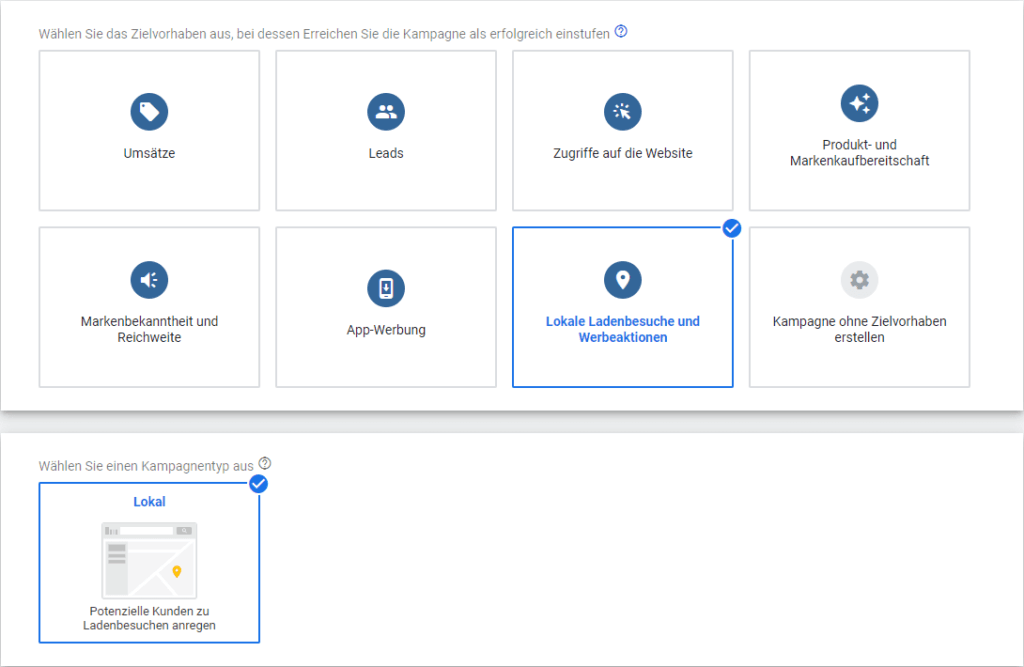
After that, select the “Local” type. In the next step, you can then use all company locations maintained via Google My Business or create location groups with selected branches. For example, all branches near large cities with a smaller catchment area or those in rural regions with a larger catchment area. This is also helpful if you have regional budgets and want to plan your campaigns that way.
Campaign budget, language and product data feed
In the next step, you can select the campaign budget, the language of the desired target group, and a data feed through which the locally available inventory will be promoted.
Ad creation
Finally we arrived at the ad creation stage. These ad templates are managed by Google and displayed across multiple networks and it is therefore important to adhere to the specifications in each case so that the ads can be displayed as desired. It is advisable to create different variants and test them against each other in order to attract users’ attention and lure them to your branch. This is also much more important than the click rate for this campaign goal.
Ad templates for local campaigns
With Google Local Campaigns, similar to responsive display ads, it is possible to define a target page including a path via a template. Up to 5 ad titles (max. 30 characters) can be created as a heading and up to 5 variants as a description (max. 60 characters). Up to 5 call-to-actions (max. 11 characters) can also be freely created and tested against each other. For example, in English “Buy now” would be fine, but in German “Buy now” is already too long with 12 characters.
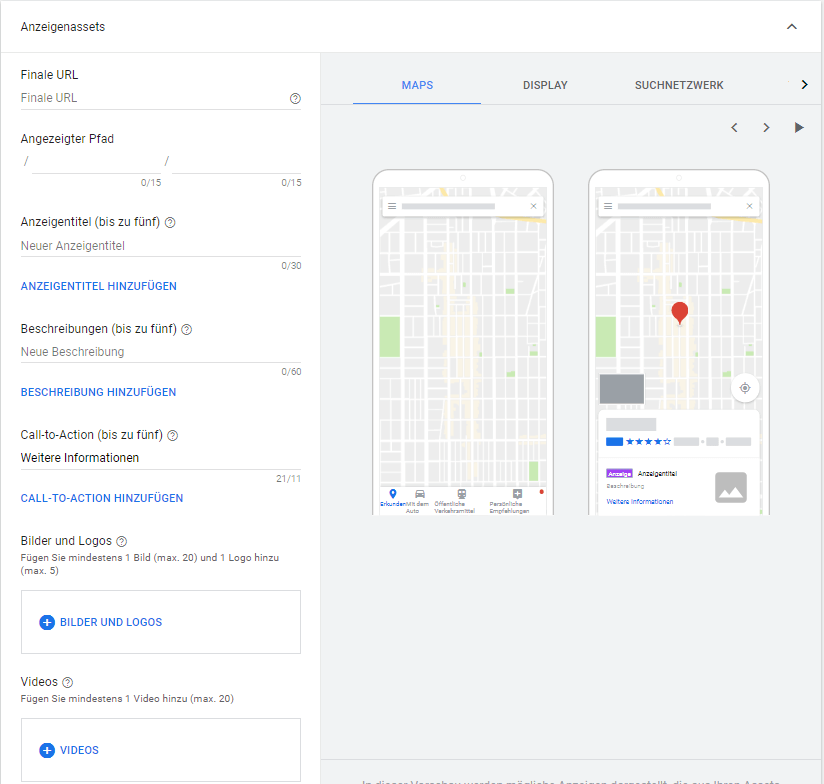
Creatives for local campaigns
You have significantly more creative freedom when selecting images (max. 20), logos (max. 5) and videos (max. 20). These images and videos are very important, so be sure to look for eye-catching images – as eye-catchers. If you own a restaurant, you can, for example, showcase the wonderful ambience and delicious food – because that makes us all want more
We definitely recommend ongoing tests to ensure that the maximum is achieved from the media budget used and that as many visitors as possible find their way to your company locations!
Testing local campaigns
This smart campaign allows for little experimentation when creating it, but target group testing is a first step. Add target groups and test ready-to-buy users or website visitors. Another option would be to test different landing pages. For example, to a subpage with local promotions or, in the case of a restaurant, directly to the daily evening menu
Conclusion:
Local campaigns via Google Ads may not be suitable for every business model, but they can be a valuable tool to boost brick-and-mortar retail.




