
Google Search Campaign Settings 8211 A Guide For Beginners

Management Summary
Every online marketer who takes a deeper look into itSearch Engine Marketing(SEM for short) knows this moment. A few seconds after you create a Google Ads account or log into an existing account for the first time to create your first search ad, you are already flooded with a ton of available setting options. Here it is important to keep calm, not to be put off and to give yourself enough time! Because even if the numerous options with which you can use Google…Setup of new campaignsmay seem a bit overwhelming at first glance, well-thought-out settings are an essential first step to setting up successful search ads.
Therefore, in the following paragraphs you will find oneStep-by-step instructions for successfully setting up Google search campaigns, including tips on which settings could be exactly the right ones for your campaign:
1) Campaign Goals
The first decision that needs to be made after clicking the “New Campaign” button in the Google Ads account is the decision about the general goal. This is what it is aboutMain goal of your company or campaign, so that the system will provide you with suggestions for campaign type & -Make settings that meet your individual requirements. The selection options range from abstract requirements such as increasing the willingness to buy a product to concrete goals such as acquiring leads or app installations. Google also offers the option to proceed without goals and set up a campaign (albeit with a little more effort) as you see fit. This option is recommended if you want to have as much freedom as possible when setting up your campaign. However, if you are still a little unsure about how to use Google Ads, then we recommend selecting one of the goals offered that corresponds to your business goals.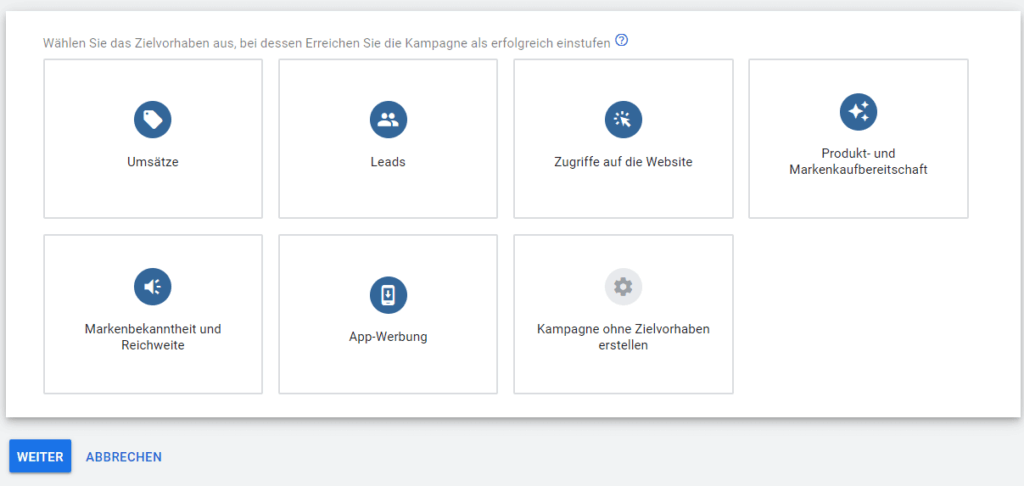
2) Campaign type
Depending on what you decide on in the first step, you can next select a campaign type according to the different Google advertising channels (Search Network, Display, Shopping, Video, App, Smart or Discovery Channels). In order not to go beyond the scope of this blog article, from this point on we will only focus on settings forAds on Google’s search networkfocus. More information on setting up the other campaign types will follow another time ;)
3) Target actions
Next, you can select up to three measurable target actions that you want to encourage with your search campaign. These can include either one or more of the following actions: website visits, calls or app downloads. Depending on your selection, Google will then ask for the specific target URL, telephone number or app name. Overall, filling out these fields is not absolutely necessary, but only serves to store certain target values as a template for system suggestions in the further course of the campaign setup.
4) Campaign name
After you have selected your goal, campaign type and goal action(s), you will be taken to the next page where you must first enter a campaign name. Even though this step shouldn’t be a major obstacle, please be careful with your campaignsclearly assignableand to name them according to a uniform pattern! You won’t believe how often an agency can still find unstructured customer accounts with poorly named campaigns. Best practice tip: It is best to integrate the campaign type (e.g. “Search”) in the name. This helps to maintain an overview and save valuable seconds, especially if you have several campaigns of different types running in parallel in one account!
5) Additional advertising networks
Next, Google gives you the opportunity to display your search adsGoogle partner sites or in the display networkto play out. Search partners are sites that Google works with and that serve Google ads on their own search results pages. Even if the system tries to keep the cost-per-conversion similar to the regular search network, the costs and performance of the ads displayed in the partner network can vary greatly, which is why we advise against checking this box, especially in the case of budget-limited or highly cost-oriented campaigns. For larger campaigns, however, this option can definitely make sense as a measure to further increase the potential reach.
The second option, “Include Google Display Networks,” gives Google the opportunity to display your search ads in its own advertising network outside of the search engine. Even though Google promises that this only happens in “probably effective” cases and only when the budget is otherwise not being utilized, we can only advise against selecting this setting! The following applies: search ads belong in the Google search network, while the display network has completely different requirements for online advertising media. So even if you have leftover campaign budgets, there are more efficient ways to use your money.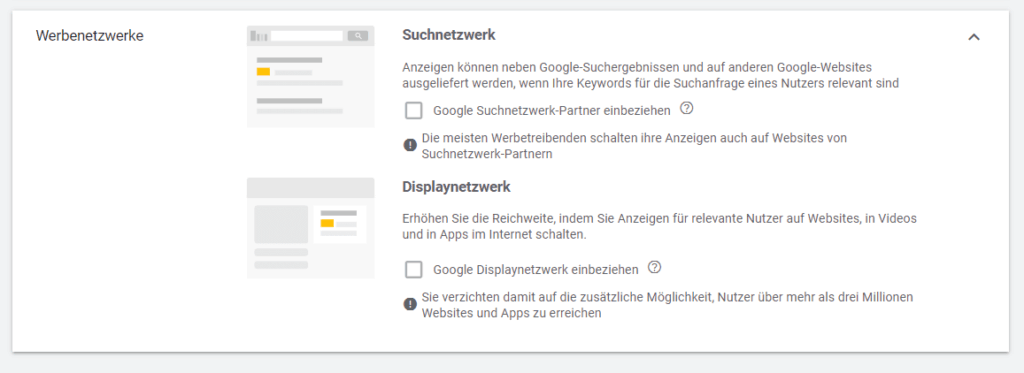
6) Start and end dates
Here you can select the start date and end date of your campaigns or, alternatively, have your ads run indefinitely. Attention: Once your campaign has started, you can no longer postpone the start date! The end date, however, can also be adjusted after the campaign has started.
7) Campaign URL options
Google also offers the optionClick information using URL parameters(= URL attachments that can be assigned to your ads) and applied to the campaign. This can be done either by inserting a tracking template, a URL attachment to be appended or individual, user-defined parameters. Whether the use of URL tracking is necessary for your campaign depends mainly on the structure of your website and your analysis structures. In general, you don’t need any URL parameters to analyze the performance of your search ads directly via Google Ads.
8) Dynamic Search Ads Setting
If you plan to run dynamic search ads (= ads that automatically target search queries based on the content of your website), you will need to specify a target domain, language and targeting source (= either an index of your website created by Google and/or you) at this point. If you have no plans to run dynamic search ads (for now), you can safely skip this point.
9) Locations
You can either have your search campaign run worldwide or target specific countries, regions, cities and postal codes. You can also exclude individual or multiple locations. Furthermore, you can use the “Target” setting to specify whether your selection should affect Google users who a) are looking for the selected locations, b) are currently or regularly there and/or c) are interested in them.Best practice tip: If you break down your entire target region (e.g. “Austria”) into smaller areas (e.g. all 9 individual federal states), Google Ads collects more detailed location information with the same reach, which you can use later to adjust your strategy, bids, etc.!
10) Languages
Here you can choose which languages you want to use to reach potential customers in the previously selected target region with your search ads. Attention: This setting refers to the language setting for Google set by users, which does not always correspond to the common everyday language of the target region. For example, English is often used as the Google system language by German-speaking users! If you want to achieve maximum reach (albeit with the risk of some irrelevant advertising), select the “All Languages” option here, even if the ad was only created in one language! In contrast, you can achieve greater efficiency by selecting individual languages that exactly match your target audience, albeit with limited reach!
11) Target groups
You can either store predefined target groups with common demographic characteristics, interests, willingness to purchase or user-defined interest or remarketing target groups for targeting (= option to limit the display of your campaign to a certain audience or to adjust your bids for this group) or for monitoring (= results of your campaign are assigned to the selected target groups but no bid adjustments or restrictions are made).
We recommend definitely adding relevant audiences to your campaign for monitoring. Often can bevaluable conclusionsfrom theVariation in campaign performancebetween the different target groups, and even if not, no damage can be caused by using the observation function!
12) Budget
In this field you enter the average daily amount to spend on your campaign. Attention: Expenses can vary greatly from day to day, but should normally not amount to more than your daily budget multiplied by the number of days over the course of a month! Google Search Ads does not offer a term or monthly budget, which means you often have to get out your calculator when setting a budget!
13) Commandments
One of the most important points when setting up your search campaign is theChoosing an appropriate bidding strategy. The main thing here is to choose between two opposing types of bidding strategies. On the one hand, the manual bidding strategy “Manual CPC”, which stipulates that a manually set cost-per-clicks must not be exceeded on average. On the other hand, a series of automatic “smart bidding” bidding strategies that submit automated bids based on certain real-time signals in order to achieve a specific goal (e.g. maximize conversions) as efficiently as possible.
Basically bidmanual bidding strategiesmore immediate control and planning security for your own campaign, but also require more ongoing optimization. In contrast, areautomatic bidding strategies(assuming correct setup and sufficient data basis) are easier to maintain and have made constant improvements over the last few yearsGoogle’s Machine Learninghave seen significant progress in terms of performance. However, this machine learning needs to be “fed” with sufficient data. Which bidding strategy is right for your campaign depends heavily on factors such as available budget, search demand, duration or even correctly set up conversion tracking!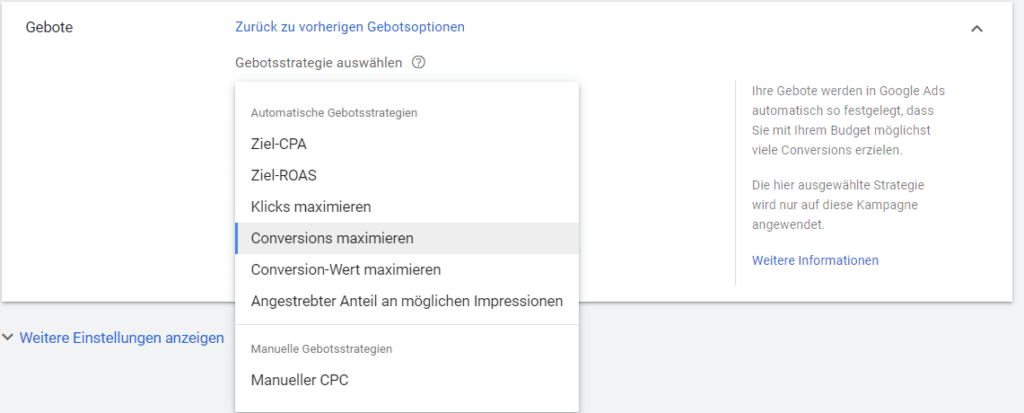
14) Conversions
Correctly recording conversion actions is an important, if somewhat complicated, aspect of campaign setup that would probably be better left as the central topic of its own blog post. In short, however, it can be said thatConversion trackingin recent years, particularly due to the many improvements inSmart bidding(which can be aimed at optimizing/maximizing conversions) has become increasingly important.
When creating a new search campaign, you can choose between conversion settings set at the account level or manually activating individual conversion actions to be applied to your campaign. The second option makes particular sense if you have activated a variety of different conversion actions at account level, but only a few are relevant to your current campaign!
15) Advertising Scheduler
Here you can set on which days and at what time your ads should be shown. However, the advertising time should only be limited if your ads should not/may not be shown at certain times for certain reasons or your campaign’s budget is very limited and you have collected enough data to be able to exclude certain days or times due to poorer performance.
16) Ad rotation
The default setting for ad rotation is that ads that have achieved more clicks or conversions in the past (or promise better performance for other reasons) are shown with increased priority. Alternatively, there is also the option of having your ads displayed via “unlimited ad rotation” regardless of performance. In principle, this setting is not recommended unless there are special reasons such as a mandatory quota for the display of certain ads or long-term A/B testing. Attention: In the case of Smart Bidding bidding strategies, higher-performing ads are prioritized even if you select unlimited ad rotation!
17) Ad Extensions
Setting the ad extensions at campaign level is the final point of the setup. Basically:Search ads with extensions(especially sitelinks, extensions with additional information & snippets)perform significantly betteras search ads without extensions! So it is recommended to create as many extensions as possible. However, ad extensions do not necessarily have to be taken into account at the campaign level, but can only be taken into account later when setting up the individual ad groups or ads.
Once you’ve completed this last point, you’ll have completed setting up your Google Search Ad campaign and can move on to creating and setting up ad groups and search ads, which we’ll be happy to cover in future blog posts!




