
Implement Clicktags In Html Advertising Media

Management Summary
What is a click tag?
Where do I end up after clicking on a banner? This defines the clicktag, a variable implemented in the code that contains the landing page URL of the advertising material. If a banner is not clickable, success can be difficult to measure. The click tag is primarily used for campaign tracking and should not be hard-coded.
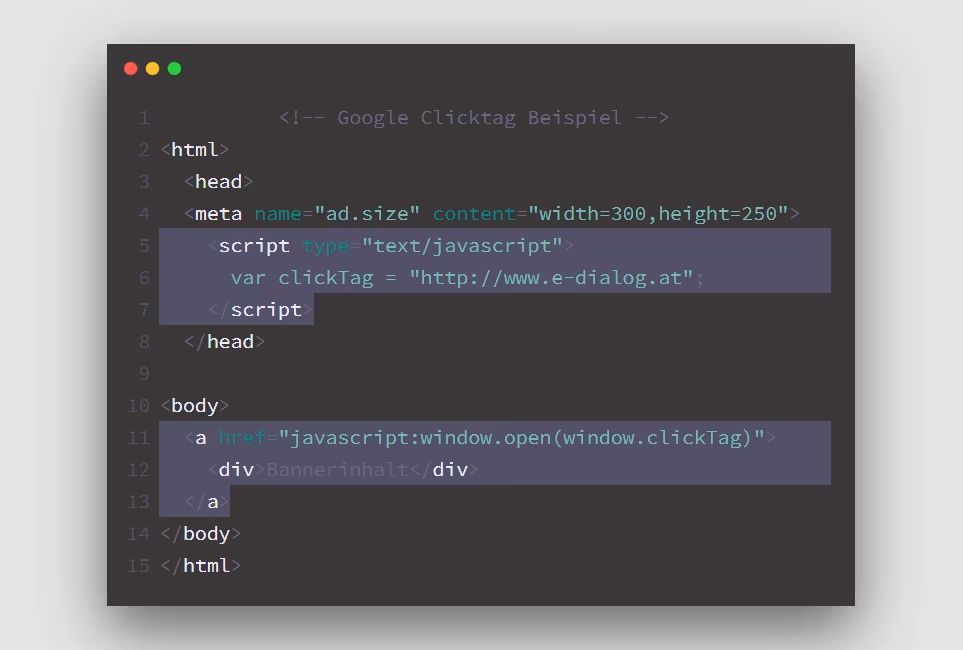
How do I add a click tag?
As is often the case, you first have to clarify the question of how and where your advertising material will be displayed. For which platform? Which publisher? Because unfortunately there is no solution for everything.
Classic campaign booking often requires thisiab standard, whereas platforms for programmatic marketing likeDisplay & Video 360prescribe other guidelines. In this case, ask for an exact technical specification to avoid unnecessary effort!
Copy + Paste is the trick here
Attached you will find some implementation guides with links to the respective documentation (yes, it’s all there). Simply open the published HTML file and the code snippetsbetween the correct tagsinsert:
-
- iab standard(for e.g. ORF, Kurier, the Standard…)
- Google Adsno click tag necessary; After the default setting, the entire area is clickable and the landing page is set in the tool. Here theseRequirementsfor reading.
- Google Campaign Manager, Display & Video 360
- Google Studio
- Adform
- Xandr (AppNexus)
Test
How can you determine whether a clicktag has been installed correctly? Here too, the type of verification differs depending on which click tag was used.
There are separate pages for validating advertising media for Google World:Google AdsGoogle Campaign Manager & Display & Video 360Advertising material with oneClicktag according to the iab standardcan be checked in a simple way in the browser:
- Open the index.html file in a browser
- Insert the following characters after the URL in the address line “?clicktag=https://e-dialog.group”
- then click ENTER, the page should refresh again, without any noticeable change to the interface
- If you now click on the banner, you should be redirected to the e-dialog page. This way you have determined whether the click tag was installed correctly.
last but not least
It is important where the advertising material is hosted! For example, if you build a banner for Courier but the deal is done through Display & Video 360 is running and the banner is uploaded there, you do not have to install the click tag according to the iab standard, but rather according to Google’s guidelines.
Do you have any further questions? WeadviseWe would be happy to help you plan and create digital advertising materials!




