
Improve Your Google Ads Tracking With Enhanced Conversions

Management Summary
Google has been offering the Advanced Conversions feature for a few months now. This involves collecting customer data such as email addresses, telephone numbers and private addresses and sending it to Google in hashed form. You can find out exactly how this works in this blog article.
Enhanced conversion tracking
Enhanced conversions are an additional, privacy-friendly way to capture data more accurately and fill gaps when fewer third-party cookies are available. The feature builds on Consent Mode and uses consented first-party data to model how users who have not given their consent behave after clicking on an ad. This means advertisers can measure the impact of their campaigns even if there is no cookie consent – aggregated and anonymized.
In this case, the measured conversions are enriched with enhanced conversions. Your own, actually measured conversions are sent to Google using a one-way hash algorithm in accordance with data protection regulations. This hashed data is compared with logged-in Google accounts and the additional conversions are then added to the existing campaigns.
The “Enhanced Conversions” function is available for both normal web conversions and leads and can therefore be set up for enhanced conversions. The differences between these two options will be discussed in more detail below.
Furnishings
There are two ways to customize advanced conversions tags:
General website tag
If you use the general website tag, you may be able to set up the ability to measure enhanced conversions with relatively small changes. In order to set up advanced conversions, this function must first be activated in the Google account under Conversions. The next step is to check whether a Google Tag can be identified on your website. In order to be able to send customer data such as email addresses, telephone numbers, names or addresses, this can be done using Javascript or CSS selectors. So select your desired option and click Save.
Google Tag Manager
When using Google Tag Manager, it is also possible to set up conversion tracking with small changes for advanced conversions. If automatic configuration is not available, Google recommends manual configuration using CSS selectors or existing data layer variables. If customer data is present on the conversion page, this implementation method is the easiest as it does not require any code changes on the page.
Learning phase
However, after setup in the tags, it can take up to 75 days until the data is processed and visible in the interface. During this period, conversion tracking continues as usual. You will receive the status as a notification in your account once they have been processed and the learning phase is completed.
Types of Advanced Conversions
A distinction can be made between two types of enhanced conversions:
Advanced Conversions for the web
Advanced Conversions for the web is most relevant to advertisers who want to track sales and other events on their website. Should a user record a conversion, the data provided is encrypted using the one-way hash algorithm SHA256 and assigned to the Google account with which the user was logged in when they interacted with the ad. The advantages are obvious: Thanks to the secure hash function, the system is completely data protection compliant and also provides more information about conversions so that they can be understood even better. In the long term, bid optimization can be improved with high-quality data in the system.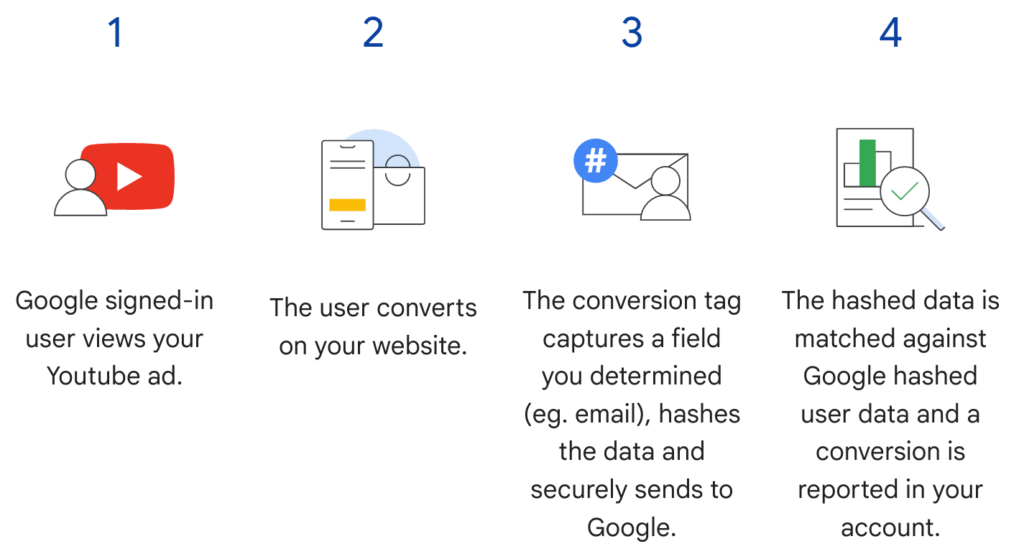 Source: Google
Advanced conversions for leads
Advanced lead conversions are particularly relevant for those advertisers who generate sales away from their website. Customer data is usually collected by filling out lead forms directly on the website. The data obtained, such as email addresses or telephone numbers, is recorded as a lead and also hashed and sent to Google. If a lead leads to a conversion, the hashed lead information can be uploaded and this data can be compared with the ad that triggered the lead. This provides a more complete picture of the entire customer journey. This feature can now be fully implemented via your Google Ads account.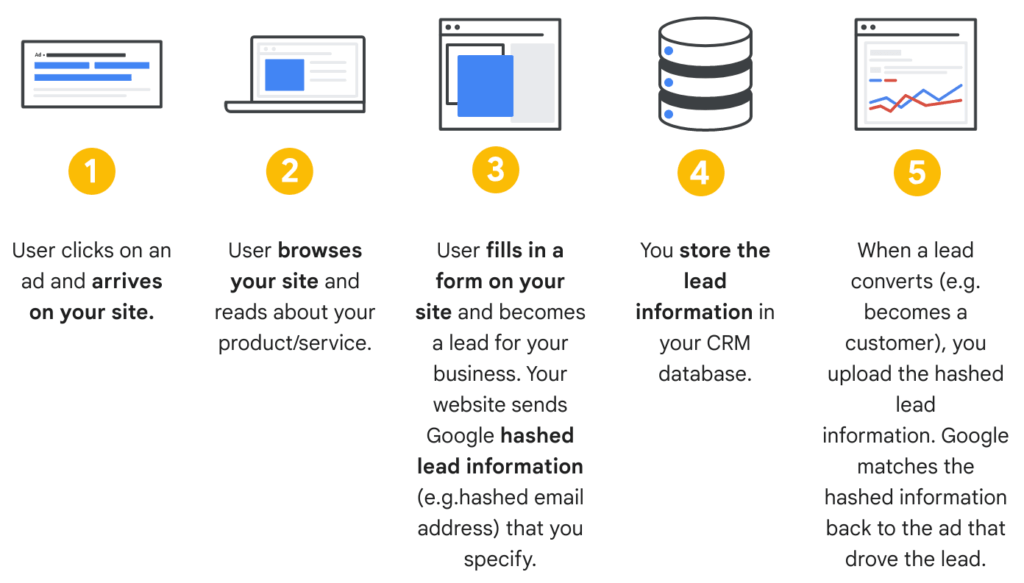 Source: Google
The 5 most common problems when implementing Enhanced Conversions
1. Error copying code
This error is related to the Enhanced Conversion Code or variable names present in Google Tag Manager. First check the code to make sure it is correct. If JavaScript variables were used, check that the snippets were copied correctly. If CSS selectors were used, ensure that the selector and all selector information were set up correctly.
2. Variables were not implemented successfully
If you receive this error message, you need to check the variables that were created when setting up Enhanced Conversions with Google Tag Manager.
3. No tag or multiple tags were detected
This error message implies that your website URL or its Google Tag is incorrect. First you should check whether the URL is complete and spelled correctly and then make sure that conversion tracking has been set up with GTM or gtag. Also check whether your site-wide tracking has been implemented correctly. If multiple tags were detected, you should only select one tag. Google recommends working with the Global Site Tag here.
4. Enhanced Conversion data is not available at the time of conversion
If you get this error message, first-party data such as: E.g. email, phone, address and name are not displayed on the conversion page. Some websites use third-party domains to accept payments. This information needs to be shared to enable improved conversions.
5. Your Enhanced Conversions will provide pre-hashed data
This means that the first-party conversion data is hashed as it is collected. The hashed data is then sent to Google for enhanced conversions. Since Google hashes the data itself using the SHA256 algorithm, Google does not support pre-hashing of the data by other advertisers, which can lead to complications.
Recommendation
In order to be able to measure the performance of your campaigns as precisely as possible in the future, it is recommended to also use the option of “Enhanced Conversions”. Using this method, it is possible that the lack of consent in consent mode can still be measured and, above all, analyzed in the conversions. By hashing the data one-way, Google is relying on a data protection-compliant industry standard that securely transmits the customer data it collects to Google.
If you need additional information on consent management and post cookie topics, please read ourPost Cookie FAQ Whitepaperin which we answer the most important questions in detail.




