
Local Inventory Ads Lias
Management Summary
What are the advantages of local inventory ads?
Local Inventory Ads allow companies to advertise their brick-and-mortar stores on Google by displaying actual product inventory. When customers research information online, they can immediately see which stores have the items they want in. In addition, stores can offer a pickup option: users order online and pick up the products in the store on the same day.
Google Shopping ads are not a requirement to participate in the program and companies can therefore compete with online retailers even without their own online shop. The advertisements encourage customers to visit a stationary shop.
For the campaigns themselves, local product availability ads are an additional feature that can lead to an increase in CTR and sales. Local inventory ads also help to determine the omni-channel ROAS and optimize the campaigns accordingly.
How do local product availability ads work?
As soon as a user searches on Google, they will see the appropriate advertisement for nearby stores and product offers in the Google Shopping search. In addition, the actual distance from the store is displayed, which massively increases the relevance of the ad.
After clicking on the ad, the user is directed to the relevant page, the so-called local storefront. This offers both the necessary information, e.g. address, opening times or telephone number for the shops, as well as detailed information about the products, such as size or color.
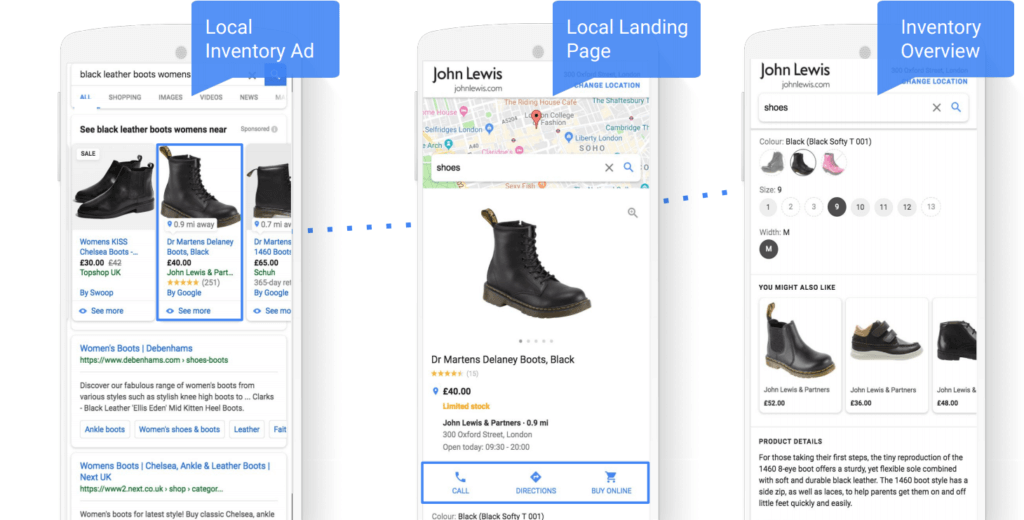
The local product availability ads work together with Google Shopping ads. The user is primarily shown ads with local product availability as soon as they are a maximum of 50 km (the radius can be adjusted downwards) from the shop.
How do you set up Local Inventory Ads?
Ads with local product availability can be shown under certain conditions.
1.) First, you need two local product feeds
The first feed contains the locally available products and the second feed contains the local product inventory. If there are multiple branches, a separate feed can be created for each. Alternatively, all locations are inserted into a feed. As with any feed, these data feeds must also comply with Google specifications.
2.) The necessary accounts must then be created
In order for Local Inventory Ads to be placed, three accounts are required:
- A Google Ads account where the campaigns are handled
- A Google My Business account where location-based business information is managed
- A Google Merchant Center where product inventory and feeds are managed
3.) Activation and linking
In order to display the ads with local product availability, the three accounts must be linked, the local inventory program activated in the Merchant Center and the legal notice must be stored.
4.) Google Inventory Verification
Once the data feeds are complete, they are submitted to Google for review. The verification takes place personally by the advertiser himself or by telephone by Google in the actual stores. A high quality of the data feed is very important for a successful listing. For this reason, the feeds should be updated regularly and checked for accuracy.
5.) Activating the LIAs
After the inventory has been verified, the local inventory ads can be activated in the account.
Evaluation of local inventory ads
In order to measure the success of the ads with local product availability, so-called offline conversion tracking for store visits in Google Ads can be used. As soon as sufficient valid data is available, this information appears in the Google Ads account.
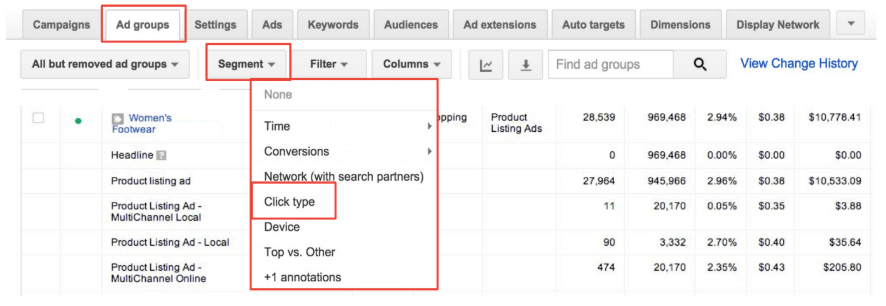
Within campaigns or ad groups, the click type segment shows which part of the ad the user clicked on.
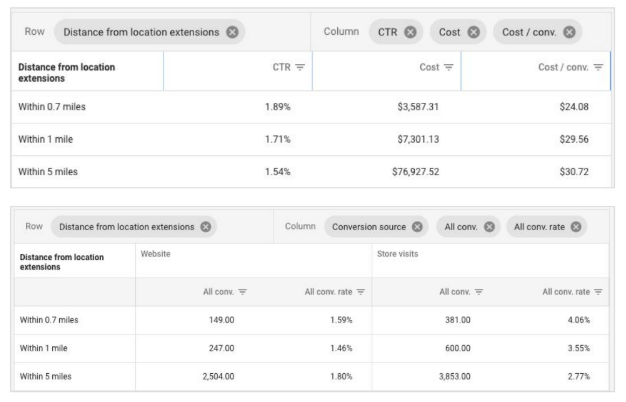
The tool also shows the distance of users from the branches and enables analysis at store level. In addition, a “click & collect” conversion can be created.
Conclusion:
Local inventory ads are a very good way to create multi-channel campaigns and drive customers to the stationary location even when searching on mobile. Thanks to the timeliness and high relevance of Google Shopping ads, users can search for the products they want online and shop offline. Success can also be measured by displaying store visits, whereby the costs per store visit and the store visits rate are also calculated. This can also be included in the automated bidding strategy (smart bidding).




