
Measure Itp Conversions Correctly Regardless Of The Browser
Management Summary
We try to answer the following questions here:
- What is ITP?
- What does the new general website tag (gtag.js) do and should I implement it?
- Is there an alternative?
1 What is Safari’s new Intelligent Tracking Prevention (ITP)
Imagine that a user first looks for a new cell phone on produkte.at and then gets ideas for dinner on rezepte.at. When both sides load tracker.at’s resources, tracker.at has stored the cookie in the user’s browser. This means that the owner of tracker.at has information about the browser that the user is using and about the user’s behavior on the two sites produkte.at and rezepte.at. It is a so-calledCross-site trackingand tracker.at uses oneThird party cookie.
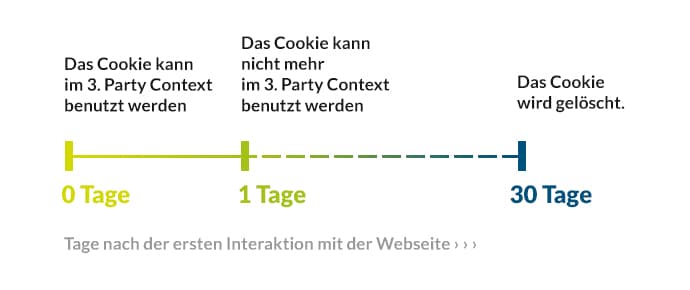
Intelligent Tracking Prevention (ITP) takes into account the increasing importance of data protection & Privacy and limits access to data that was not collected as first-party data. According to the machine learning algorithm, Intelligent Tracking Prevention classifies the websites that collect cross-page data andprevents trackingfrom users after 24 hours.
Here is an illustration of the cookie lifespan introduced by the ITP:
In order to protect the interests of both sides – user and advertiser – Google has developed a new type of cookie:_gac,.The cookie is set directly on the advertiser’s domain andconverts the collected data into first-party dataaround. In terms of the ITP, the use of the_gacCookies lawful. This means that all data associated with specific users is still available for conversion reporting and attribution.
2 What does this mean for an advertiser?
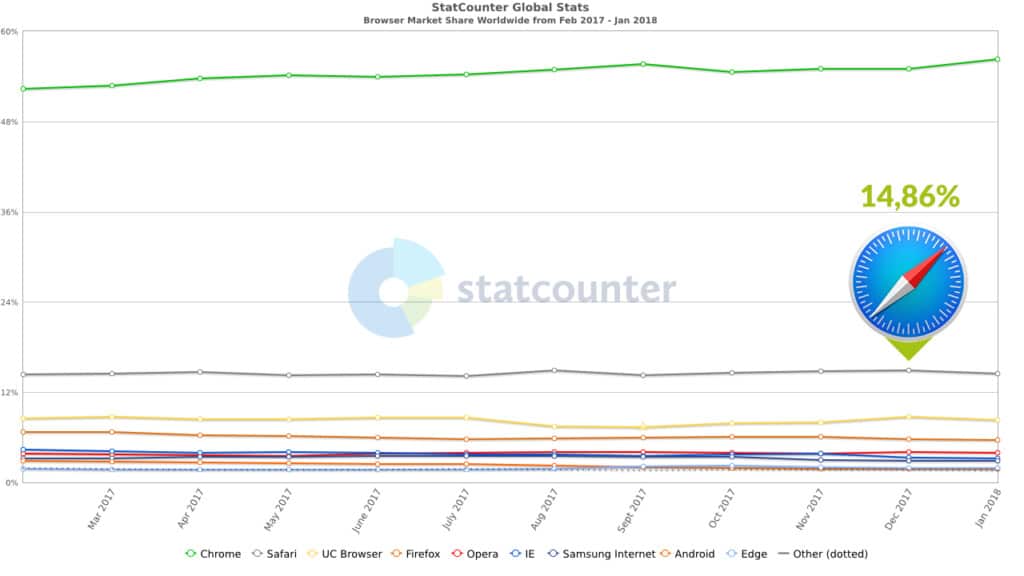
At the moment the ITP only affects Safari, which is about15%of the browser market share(StatCounter Dec. 2017). That doesn’t seem like much – but depending on the traffic, it can mean several thousand users and conversions.
Also: With increasing concerns about data protection & Privacy, this may affect other browsers and devices in the future.
If you want to make sure you’re measuring your conversions correctly, regardless of browser, you’ll need thisConversion linker, which ensures that data is sent to multiple Google products. This can be done either withgtag.jsorGTMbe implemented. Let’s look at this in detail.
3 What is the new global site tag (Google Analytics Global Site Tag, gtag.js)?
Google has just developed the new general website tag (gtag.js). The tag helps to unify tracking across multiple Google products and overcome data silos. For example, if you use Google Analytics, AdWords conversion tracking, and DoubleClick Search, you only need one general site tag on each page of your site. For each product, add a ‘config’ command to the global snippet so Google knows how to route your data.
<!-- Global Site Tag (gtag.js) - Google Analytics -->
<script async src="https://www.googletagmanager.com/gtag/js?id=GA_TRACKING_ID"><script>
<script>
  window.dataLayer = window.dataLayer || [];
  function gtag(){dataLayer.push(arguments);}
  gtag('js', new Date());
  gtag('config', 'GA_TRACKING_ID');
  gtag('config', 'DC-1234567');
  gtag('config', 'AW-234567890');
  gtag('config', 'AW-345678901');
<script>
4 How can I continue to measure all conversions?
It’s very important to note here that you don’t need gtag.js if you already have itGoogle Tag Manageruse. Both – gtag.js and GTM – use the conversion linker, which we need to properly track all conversions.
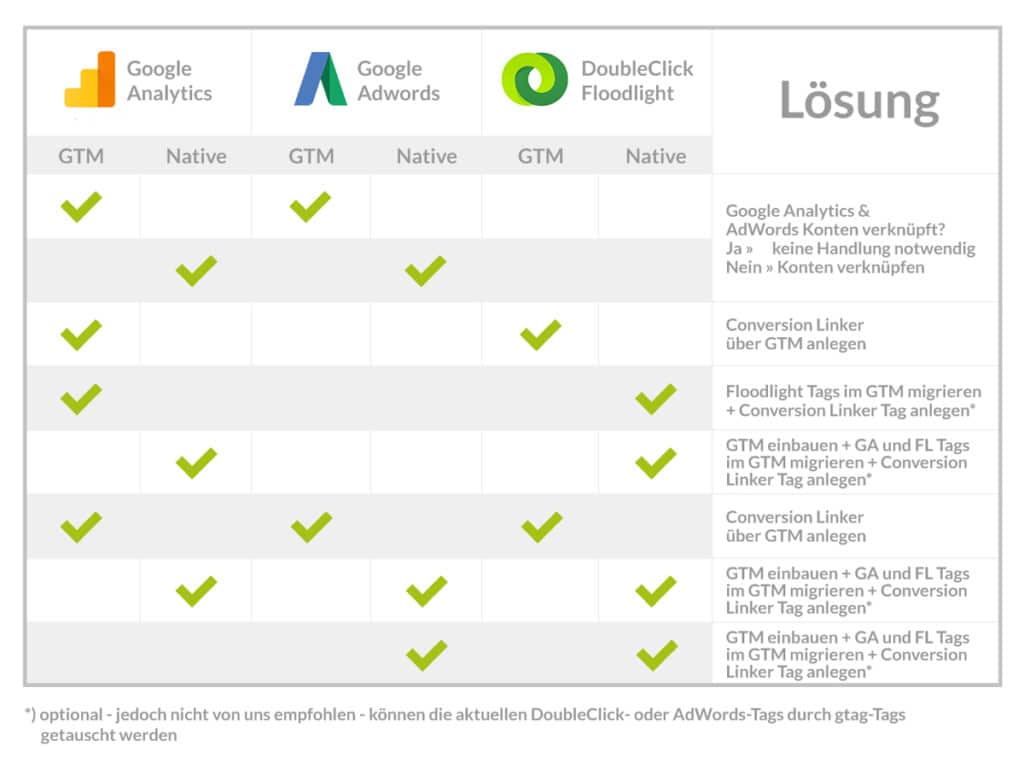
What should be done depends on your tracking implementation and the Google products you use. Please see the table below to see what is the best solution for you.
Example 1:You are a Google Analytics-AdWords customer and have implemented your Google Analytics and AdWords tags via GTM or native(Table: line 1 or 2). You don’t need to do anything if your Google Analytics and AdWords accounts are linked, which we hope is the case.
Example 2:They use Google Analytics and DoubleClick. Both codes are implemented via the GTM(Table: line 3). In the case of DoubleClick, unlike AdWords, it is not enough to have the Google Analytics and Doubleclick accounts linked. In order to properly track DoubleClick conversions, you must create the conversion linker tag in GTM. The implementation is very simple(see point 5: How do I implement the conversion linker?).
Other scenarios:
5 How do I implement the conversion linker in GTM?
How to implement the conversion linker tag in GTM: It’s that quick!
1) Create the new tag, click on it and select “Conversion Linker” from the Featured Tags menu.
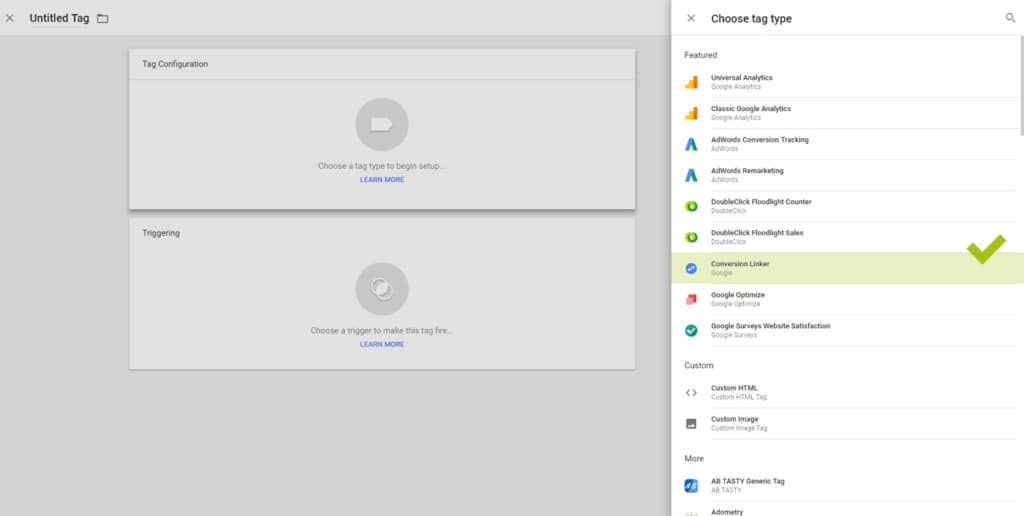
2) Create “All Pages” as a trigger and click “Save”.
3) Publish the day.
6 A la longue: gtag.js or GTM?
Basically: GTM is aTag Management System(TMS) – a central management system for tags. The gtag.js is (as the name suggests) a tag. A comparison is therefore difficult. So we’re trying to answer the following question: if I have to choose between the two methods, what advantages/disadvantages do I have to consider?
As inChapter 4listed, the “best solution” depends on your implementation . If you have built your codes natively on your website, you can still use this method by using gtag.js natively on your website. Or you can use the opportunity to switch to GTM.
Implementing gtag.js means that your implementation, including all custom events, should be rewritten to gtag.js. This involves the same effort as switching to GTM. In addition, switching to GTM offers the following advantages over managing native codes:
- flexibility
- Cost reduction and time savings
- Independence from long deployment cycles and minimized use of IT
- User-friendly interface and built-in tags (templates)
- Speed of implementing tags
- Less prone to errors because the source code is not changed
- Easy troubleshooting with preview mode, debugging feature and version control
- Reduced loading times
- Easy data control and data protection
flexibility
Gtag.js differs from its predecessors, classic Google Analytics and Universal Analytics, in that it has a built-in feature, the Conversion Linker, which simplifies website tagging for all Google products. GTM also has this feature. If more features are added to gtag.js in the future, as in the case of classic and Universal Analytics, you can easily switch to GTM.
Cost reduction and time savings
At the moment, switching to gtag.js does not seem to bring any advantages over GTM. In contrast, the GTM saves you time with fewer implementation loops. In addition, the ability to reuse tags results in certain economies of scale; Data and rules can, for example, be used and shared by multiple tags. This means you have a much better relationship between increasing the corresponding capacities and the resources necessary for this.
Independence from IT or less effort for IT
Thanks to predefined tags and a user-friendly interface, GTM requires no programming knowledge. Tracking scripts can be integrated quickly without long deployment cycles. This means self-determined work for online marketing specialists and more independence from IT. You can install and test the third-party tags quickly and independently.
Easy troubleshooting
So that you don’t accidentally publish incorrect tags, there is a preview and debugging mode to help you find and avoid errors. For this purpose, all versions of the container are stored in the GTM. This allows you to easily track when and by whom changes were made to your tags. If you have discovered an error, old versions can be restored.
Reduction of page loading time
By loading tags asynchronously, Google Tag Manager can shorten the loading time of a website. Slow tags are reloaded and you can determine when a tag should be triggered.
Data control and data protection
Last but not least, the GTM as a Tag Management System (TMS) enables data control through simple settings. With a “Do Not Track” variable you can, for example, set in GTM with just one click that the browser should read the “Do Not Track” variable and the data should not be sent to Google Analytics.
Conclusion
We hope this article has answered your questions on the topic. In summary: At the moment it is not absolutely necessary to migrate to the new gtag.js. Give yourself time to review your implementation and decide which solution is best for you. From our point of view, the GTM fulfills the same (and additional) tasks as the new gtag.js, but offers significant advantages in tag management (as in detailin chapter 6was listed).
If you already have a GTM, no further action is necessary on your part. If you haven’t already, we recommend doing so. The implementation requires the same effort as migrating to gtag.js, but makes the upgrades in the future much easier than making modifications on every page. This means you are well prepared for the future and have the greatest flexibility.
Help
- Conversion linker via GTM
https://support.google.com/tagmanager/answer/7549390?hl=de - Gtag.js
https://developers.google.com/analytics/devguides/collection/gtagjs/ - Floodlight
https://support.google.com/ds/answer/7550511?hl=de&ref_topic=7550510 - AdWords
https://support.google.com/adwords/answer/7548399?hl=de




