
One Page Seo Blueprint

Management Summary

This creates the following problems for SEO:
- A URL must rank for keywords for all topics
- Keyword targeting with the title tag is virtually impossible because all sections share a single title tag
- Users who reach the page via a search result always end up at the top of the page instead of the relevant section, which may be found in the middle of the page
- Links and social shares always go to the top of the page rather than the relevant section of the page
Matt Cutts also sees potential problems with the one pager model:
To solve these problems, each section of the one pager should be on oneown URLbe found. For the user, the entire content must still be presented on a single page, while search engines find SEO-optimized landing pages including title tags, which can then rank for the target keywords.
AJAX + HTML5 History API = Best Friends Forever
To solve the problem with URLs, we first create a regular page with landing pages, title tags and navigation. The content of the individual pages is then merged into a one-pager via AJAX. With the help of the Browser History API – available since HTML5 – we can change the status of the address line when scrolling so that shares and links always point to the relevant section. Then we just need a function that scrolls the user to the relevant section of the page depending on the URL from which a user accesses the page.
A big advantage of this solution is that any CMS can be used. In addition, sections are treated as separate pages, which makes content management much easier.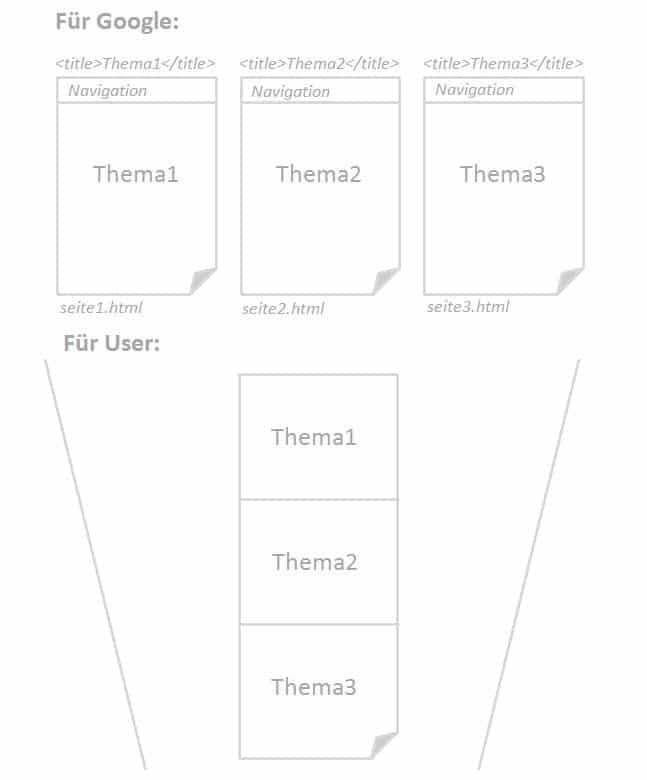
The Ajax script
To combine the individual subpages into a one-pager, we can use Ajax. The best way to do this is to “Ajaxify” the navigation of the static page. The script should iterate through each menu item in the navigation and extract the content from the URL to include it on the current page. This keeps the page maintainable and new pages can be added without having to adapt the script. Each subpage is then inserted into the one-pager as a section on the client side.
Observe:
- The order of the sections should correspond to the order of the links in the navigation
- Only the content part of the pages should be included, not navigation, footer or other template elements (not even the HEAD section)
- The script should run on every page
- The URLs should also be reflected in the sitemap
The History API Script
The History API Script fulfills two functions:
- Users who land on the page are scrolled to the relevant section
- When a user scrolls to a section, a new entry is added to the browser history and the address bar displays the URL of the current section. The back button should then scroll the user to the previous section.
This is how it should all work:
The scroll position is at 0. The user is in the first section, so page1.html is displayed in the browser’s address bar: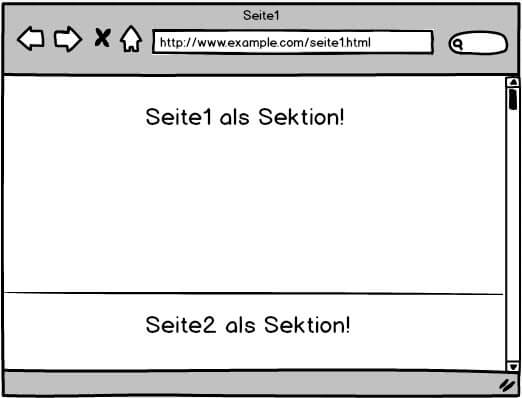 When the user scrolls to the second section, the URL in the address bar also changes: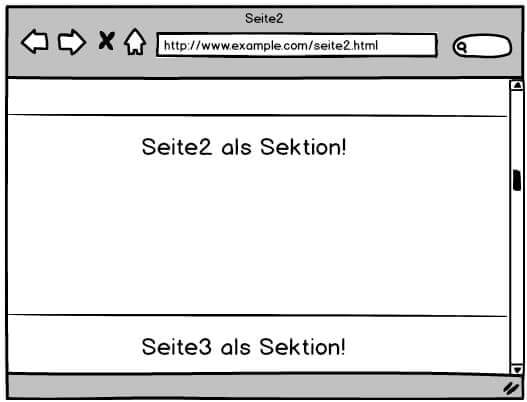
Observe:
- The browser’s history stack must be managed by a special script to avoid unexpected behavior during back button navigation. Clicking the Back button should not result in a new entry in the history.
- A user who accesses the page via a specific URL should be scrolled to the relevant section.
- The URLs should not be implemented with hashtags because Google ignores them (otherwise why do we need the history api?!)
The navigation
Static navigation that links to our optimized subpages is important for both Google and Ajaxification. However, depending on the design, navigation might not be desirable.
If navigation is not desired
If navigation is not desired, it should be removed from the DOM by Javascript, but still available in the source code. Hiding with CSS would also be an option, but in my opinion it would be riskier because Google could classify this approach as manipulative.
If navigation is desired
If the navigation is to remain available, the default behavior of the links must be overridden. When a user clicks a link, a new page should not be loaded, but instead scrolled to the respective position of the target section.
Observe:
- Links in navigation should be implemented like any regular links
- The sections should have their own “normal” URLs (no hashtags)
- Links should preferably contain the full path
Alternative applications
This method is also ideal for other modern user interfaces that can be problematic from an SEO perspective:
- Tabs
- Accordions
- Web apps
- Lightboxes
- Lazy loading
- Infinite scrolling




