Performance Meets Analytics: Core Web Vitals in GA4

Management Summary
Learn how to correctly analyze Core Web Vitals in GA4: for better loading times, increased usability, and improved rankings for your website.
Core Web Vitals & Their Significance
Core Web Vitals provide information on how user-friendly your website is in terms of loading time, stability, and usability. Accordingly, they serve as excellent indicators for a website’s SEO performance and user experience.
The following official Web Vitals metrics exist:
- LCP (Largest Contentful Paint): shows how long it takes for the largest element within the viewport to load, providing insight into loading time.
- FID (First Input Delay): shows how quickly the website responds to user interactions.
- CLS (Cumulative Layout Shift): shows the stability of the website and is influenced, for example, when text or elements shift.
Web Vitals are therefore a good tool for evaluating your own website and should definitely be checked regularly. For those already working with GA4, it is logical to monitor Core Web Vitals performance directly there. You can learn how to track these metrics as custom events in GA4 here: Web Vitals in GA4 – How a faster website leads to increased revenue.
But once the data is available, how do you use it correctly? This question will be answered in the following sections.
Analyzing Core Web Vitals in GA4
Since Core Web Vitals are not available in GA4 by default, there is no standard report for them. You must create one yourself; an Exploration report is best suited for this. If you have implemented the events as described in the article linked above, your events will be named exactly after the Core Web Vitals (LCP, FID, and CLS), and the following parameters will be available in GA4:
- webvitals_name
- webvitals_id
- webvitals_value
Since we have a separate event for each metric, you can initially filter your Exploration simply by the respective event name. Then, add your webvitals_value as a metric and optionally the webvitals_name or webvitals_id. This is how it can ultimately look when you display the values over time:
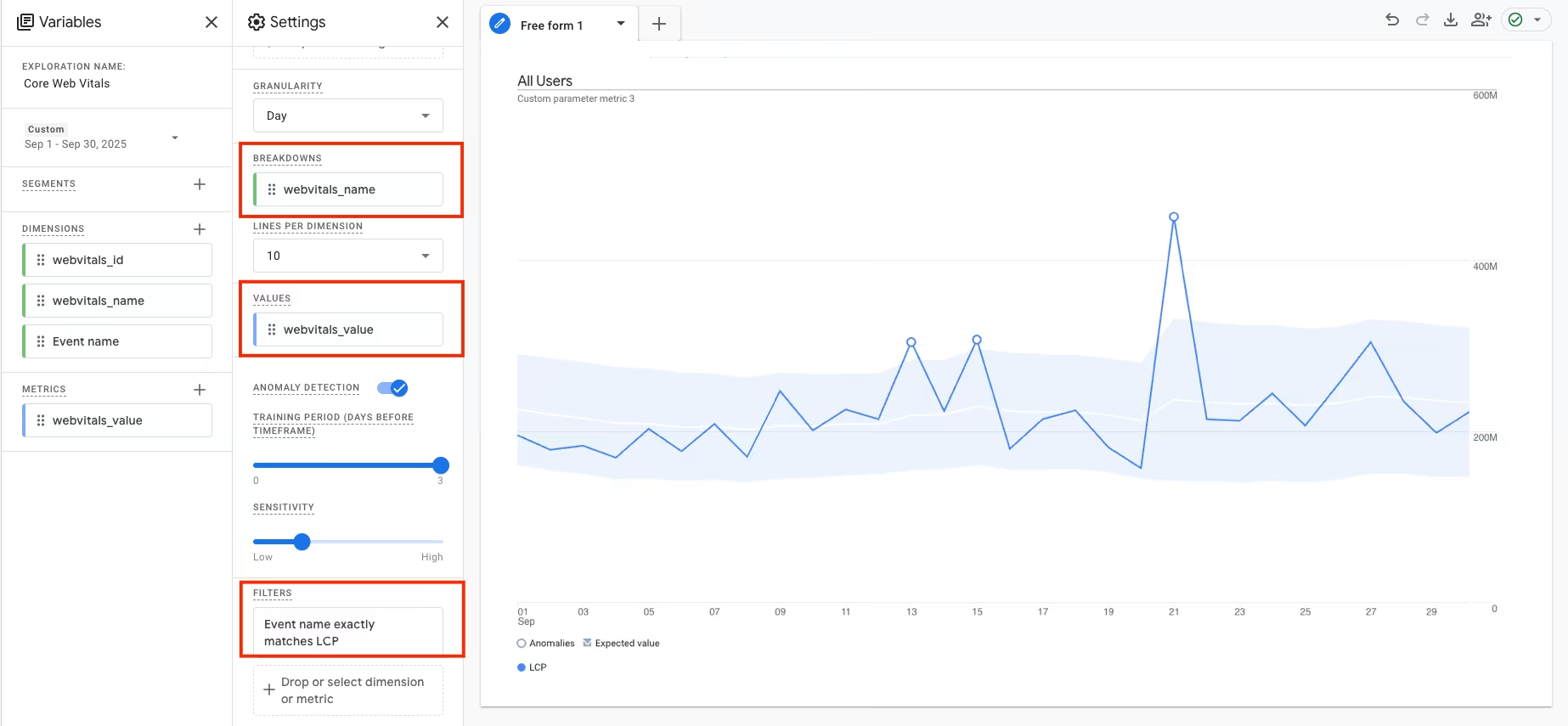
Following this pattern, it is best to create a separate page in your report for each metric. Since the individual values can exist on very different levels, it makes sense to visualize them separately.
Tip: Also create extra pages in your Exploration report for detailed evaluations. For example, you can include device categories to see what differences exist.
Once you have prepared your Exploration, the analysis begins. It is best to set a regular reminder in your calendar to check the report from time to time. With every change to your website, the Web Vitals can also change. Remember to keep an eye on the numbers, especially after major technical adjustments such as a relaunch.
Interpreting Benchmarks Correctly
When interpreting the data, it is of course important to know which guide values to follow. The following apply to the respective metrics:
| Metric | Good | Average | Needs Improvement |
|---|---|---|---|
| LCP | 0 – 2.5 seconds | 2.5 – 4 seconds | Over 4 seconds |
| FID | 0 – 100 milliseconds | 100 – 300 milliseconds | Over 300 milliseconds |
| CLS | 0 – 0.1 | 0.1 – 0.25 | Over 0.25 |
Evaluating Website Performance Centrally
Another advantage of recording Core Web Vitals in GA4 is that you can track the progression of your values over time and compare them with historical data at any time. This allows you to analyze, for example, whether an improvement in Core Web Vitals also has a positive effect on the quality of your traffic.
Monitoring Core Web Vitals in GA4 therefore not only enables you to regularly check your performance indicators but also to recognize correlations with other success metrics.
Conclusion
Core Web Vitals provide valuable insights into your website’s performance. Through integration into GA4, you can continuously monitor loading time, interactivity, and stability, and identify optimization potential based on data. Regularly checking and specifically improving these metrics not only ensures more satisfied users but also strengthens your website’s performance in the long term.