
Programmatic Video 8211 Which Placement Performs Best

Management Summary
Video advertising – programmatically please
Existing collections can be adapted just as easily. To do this, for example, click on “Edit Collection” in the “Life cycle” collection and you will be taken to the same editing menu. In the following screenshot we have the monetization for demonstration purposes. With the increasing video offerings, there are increasingly diverse booking offers for advertisers. Appropriate targeting options and the programmatic display of the messages in the individual available formats are then the turbo boost for the success of the campaign. In contrast to non-programmatic display, the wastage is significantly lower and the relevance of the advertising messages increases. The area has been completely removed and the order of the topics within the “life cycle” collection has been adjusted.
Video marketing in the right video environment
The available video environments offer a variety of options for positioning messages in a targeted manner. A basic distinction is made between mobile and desktop placements as well as between the different positions of video ads, such as in games, editorial content or apps. More information about availableVideo inventorycan be found in our blog.
Video Environments
|
Display Mobile App Interstitial |
Full-screen ad in a mobile app, which is played before or after an action by the user. For example, when loading a new level in a game app. These ads are installed at natural transitions in order to “disturb” the user as little as possible. The difference to a normal mobile app ad is that this format takes up the entire user interface, whereas with a mobile app only part of the screen can be covered by a banner. |
|
Video Desktop In-Read |
Video ad slot, which is played in the middle of editorial content on a website. For comparison: Video Desktop In-Feed is located between the editorial content of a news feed. |
|
Mobile app |
Ad slots in mobile apps fall under this category. These can be very simple banners on the edge of an app interface. The difference to the mobile app interstitial is that this format always takes up the entire screen. To answer your question about in-read: As described above, an in-read ad is always installed between editorial content on a website. In DV360 In-Read is only possible as a Video Desktop Web In-Read option. |
|
Mobile web |
Mobile web ad slots on websites that are optimized for mobile viewing. This includes all ads on websites that are accessed from mobile devices. These are not necessarily installed in the middle of editorial content, but can also be placed outside of it. The difference to the mobile app interstitial: These are ads on websites and not in apps and they do not necessarily take up the entire screen. |
|
Desktop web game |
Ad slots on websites that host games. These are specifically optimized for desktop web use. |
|
Desktop Web Video |
Ad slots on websites that play videos, specifically optimized for desktop web use. |
|
Video Mobile App Interstitial |
Full-screen video ad in a mobile app, which is played before or after an action by the user. Comparable to the display version (as described previously), but in video format. |
Which video environments are the top performers
So the offer is large. But which environment delivers the best performance numbers? Let’s look at the key figures of a campaign using an example and compare them – prerequisite: played out programmatically, of course.
CTR – Comparison of the different video environments
TheClick Through Rate (CTR)is a crucial key figure when it comes to the relevance of an advertising message. It indicates what percentage of the users to whom the ad was shown clicked on it.
In the example shown below it is clear that videos thatdirectly before, after or between video contentare placed in a player, achieve good CTRs. This applies specifically toDesktop placements.
The high CTR valuesMobile app interstitialshould be treated with caution. Often, especially on mobile devices, the supposed click is a click away or a click away. High bounce rates on the landing page are an indication of this.
Placements Desktop In-Readclearly achieve the worst values in terms of click rate.

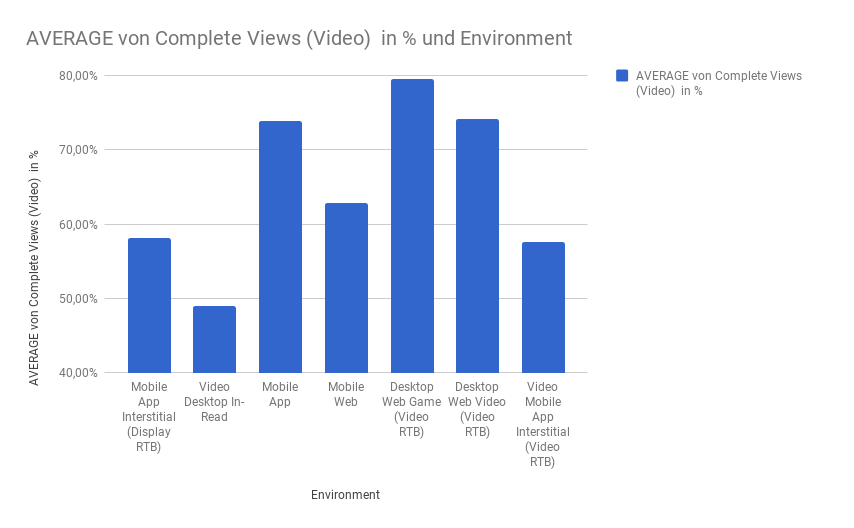
Complete Views – Comparison of the different video environments
The comparison of theComplete viewsis crucial for theRelevance of the advertising messagein the environment. Complete views areone of the most important metricsin the video Advertsing. It indicates how many times the video has been viewed in its entirety. This is especially about awareness. Simply looking at the CTR as a key figure is often not enough (especially in the mobile environment), because a click or an attempt to skip the ad leads to high click rates.
In our example – also in terms of complete views – videos that are placed directly before, after or between video content in a player achieve the best values.Desktop placements are once again the front runners.
Desktop In-Read also performs worst in comparison when it comes to complete views. A likely reason for this: the in-read placements are integrated into the page layout but are not directly tied to the content. As a result, it is easier to scroll over or away here.
Performance leader desktop placements – our conclusion
Desktop placements generally deliver very good performance numbers.In-read placements tend to be the negative outliers and provide the worst values. Mobile placements bring average values except mobile app placements. These perform comparatively well.
In general the following applies:The more naturally the advertising is integrated (before, after, between video content), the better the performance values are – especially on the desktop.
The video environment must match the campaign content and address the audience in the right environment.When played programmatically, the relevance of the ad increasesand thus the measurable success of the advertising campaign.




