
Recognize And Avoid Personal Data In Google Analytics

Management Summary
What is PII?
First, however, a short excursion into the definition: What is actually meant by personal data or Personal Identifiable Information (PII)?
According to Art 4 Z 1 GDPR, “[…] “personal data” means all information that relates to an identified or identifiable natural person […]; […]” This includes, for example, name and surname, IP and email addresses.
In Google’s guidelines, however, PII is defined less broadly and includes data through which “[…] a natural person can be directly identified, contacted or precisely located.” (https://support.google.com/analytics/answer/7686480?hl=de). Examples mentioned here are:
Email address
Postal address
Telephone number
Precise location (e.g. GPS coordinates)
Full name or username
How and where can PII sneak into GA?
Typical sources of error for the unintentional collection of personal data include contact forms, logins, registrations or confirmation links from emails.
This is particularly the case if the website uses URL patterns that contain personal data. For example, a login website may contain a link to the My Settings page with the following URL:site.com/settings/sample@email.com. The personal information contained in such URLs could then be sent to Google via data tracking on the relevant pages.
Furthermore, forms can be transferred using the HTTP protocol using POST or GET. With GET, the parameters are part of the URL. When the form is submitted, the values entered can be seen in the URL of the following page and would therefore be sent to Google Analytics. Therefore, the preferred method for submitting forms is POST.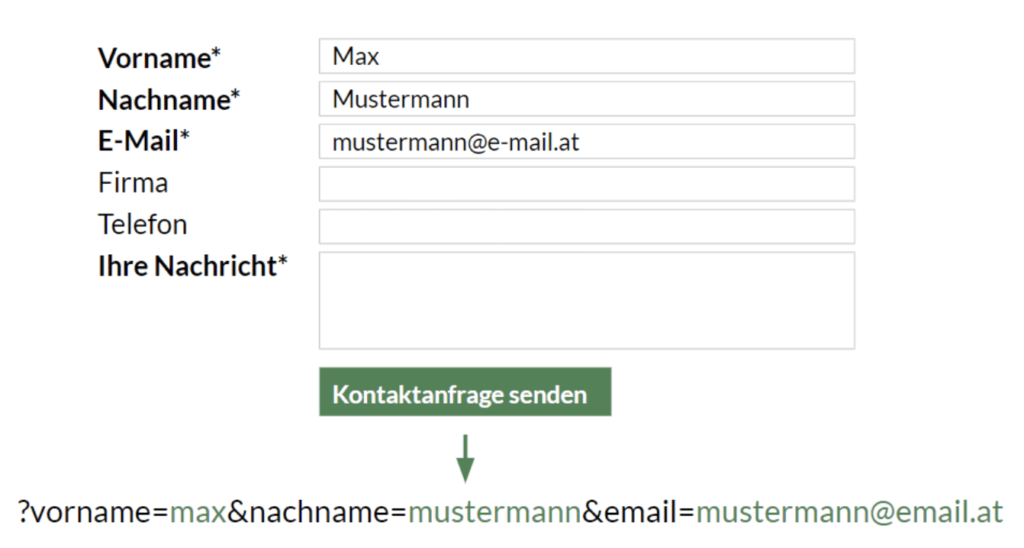 In the two cases mentioned above, personal data can sneak into the Google Analytics page report unnoticed via the URL.
Campaign UTM parameters can also unintentionally store personal data in the Google Analytics campaign report. When selecting the parameters, it should be noted that they do not contain any personal information.
Mindfulness also applies when defining custom dimensions and events. Here, too, personal data can creep into Google Analytics reports.
If your website contains search fields, visitors to your site can also enter personal data there. These would then unintentionally appear in the Google Analytics internal search report.
It is therefore necessary to take a look at the corresponding reports in order to recognize personal information in Google Analytics.
How to detect PII?
A first step can be to take a look at the website to check potential sources for the transmission of personal data in URLs. The most common links/pages where this may occur include profile pages, settings, account, notifications/alerts, messaging/email, registration, login, and other links associated with user information. Here, for example, it is advisable to access the relevant links, fill out forms as a test or go through the registration process and check the transmitted URLs for personal references. You can also check the method used to submit the form by looking at the page source code. The preferred variant here is method=post.
It is also essential to take a look at the Google Analytics page report. To get a quick overview of whether the most common forms of personal data have been recorded, you can use the filter function. For example, you can filter for email addresses with an “@” in the search field. In order to determine whether first or last names have been saved in Google Analytics, you can check whether they were recorded using a parameter. Here you can, for example, enter “name=” in the search line to check. A detailed review of the pages and page title reports is still necessary to discover less common forms of personal data. It is also recommended to extract an extract of all URL parameters from Google Analytics and search for critical parameters there.
The next step is the event report, which can be found under the user behavior reports. Here you should take a closer look at the event category, event action and event label under Behavior/Events/Most important events. You can then take a look at the “search terms” for the internal search under the behavior reports and see whether personal data has been entered.
To check the UTM parameters, it is recommended to examine them using a custom report. Here, the source, medium, campaign, ad content and keywords must be checked to ensure that names, email addresses, telephone numbers, etc. are recorded. The same applies to controlling the custom dimensions. You should also examine these using a custom report. If you have activated the user ID feature, it is important that no conclusions can be drawn about a person and that the ID is passed on to Google Analytics in encrypted form.
Basically, checking personal data in Google Analytics is very extensive. Due to the diverse tracking options, such data can unintentionally sneak into a wide variety of reports in Google Analytics. Therefore, a detailed analysis is essential.Our specially trained analysts will be happy to support you in checking your data view in Google Analytics as part of our GDPR audit. In addition to our experience, where personal data can creep in, we also use automation and algorithms to support us in the audit. Our test report also serves as documentation in accordance with the GDPR. If you are interested, contact us:kontakt@e-dialog.at
What to do if you discover PII? How to avoid collecting PII in GA?
There are several ways to delete user data from Google Analytics, ranging from the data retention setting in the property settings to deleting multiple users through oneData deletion requestor the User Deletion API. You can find out more about this topic in our blog post“GDPR: Delete user data in Google Analytics”.
Google itself also offers best practice recommendations for avoiding sending PII. You can find the corresponding support articlehere.
The best way to remove personal data collected through URL parameters is to not send it to Google Analytics in the first place. With our whitelist solution we can implement exactly this for you. The whitelist is implemented via Google Tag Manager and only allows parameters that have been previously defined. In general, the best practice for e-dialog is to only send parameters required for the evaluation to Google Analytics. With this method, the data is excluded at the property level and the URL search parameters are not even sent to Google Analytics. Our solution also provides pseudonymization for email addresses. You can find out what other advantages the whitelist solution offers in the blog article“Exclusion of URL parameters before data collection in Google Analytics”.




