
Remote Usability Testing The Fast And Cost Effective Conversion Optimization Analysis Method
Management Summary
Remote usability testing – basis for conversion optimization
Remote usability testing is an extremely effective and quick way to get answers to the question: “Why don’t users complete?” to get. Because as a website manager you are always spoiled for choice: What should the headline be? Which image will appeal best to my target group? How should you best design the call to action so that users click on it? How is the usability of the website? Where are the hurdles in the purchasing process?
Additionally, remote usability testing is a good complement or alternative to quantitative testing. The qualitative analyzes are particularly interesting for portals with too little traffic for meaningful A/B or multivariate tests. Thanks to usability tests, optimization approaches can also be demonstrated on the website. High-traffic websites can also formulate various hypotheses and test them qualitatively.
How do remote usability tests work?
For a remote usability testa defined number of users from your target groupinvited to solve several test tasks and express their thoughts, preferences and criticism through “thinking out loud”. The target group of the test is defined based on various criteria such as gender, age, interests, shopping behavior, etc. The interviews, including navigation during the test tasks on the site, are recorded using videos. After completing the test tasks, the users are asked final reflection questions about the website.
Possible goals are insights into the questions:
• What is the perception of your website from the perspective of your target group?
• Why do users leave the website without taking a desired action?
• What are the stumbling blocks on the website?
• What does your target group value here?
Through remote usability testing, you can determine which changes on your landing page can lead to better results. The findings are ideal as a basis for further testing. Often it’s just small details that determine whether a product bounces or converts. Such optimization potential can be uncovered through qualitative usability tests.
Advantages of qualitative usability testing
The advantages of these tests speak for themselves:
- cost-effective– compared to similar research methods such as usability lab testing
- target group specific– Feedback from customers of the desired target group
- can be carried out quickly– Results shortly after setting up a test
With a remote usability test you get information about where users reach their limits, what is important to them and what they attach particular importance to. Even with a relatively small test pool of 10 users, helpful optimization recommendations can be obtained, as the basic stumbling blocks generally emerge very quickly. At the same time, the positive aspects of a website are confirmed, which can be an equally important finding.
A case study – MODUL University Vienna
Two remote usability tests were carried out for MODUL University Vienna one year apart. An initial test before a planned website relaunch to collect insights for it, as well as a test a year later to check the measures implemented after the relaunch and identify further optimization potential. An ideal application scenario for a remote usability test.
1) The initial test before the relaunch
The target group for this remote usability test consisted of 10 test users between 18 and 24 years old, including 6 women and 4 men. 5 of the test subjects were high school graduates, 5 were students or bachelor’s degree holders.
What was tested?
In addition to a general assessment of the website, the aim of this test was primarily to check course registration. The test users should describe their impression of the sites in question. They were also asked to carry out effective course registration and to comment on it. This solution task should be used to find out, for example, which information is particularly important for registration and whether all the necessary information is on the website.
After completing the test, the test users had to answer five specific questions in writing, which were primarily aimed at irritations, suggestions for changes and usability.

The findings?
In this test, the greatest need for improvement was the effective login process, which was perceived to be too extensive. Further potential for optimization was seen in the structure of the information provided on the site (such as course description and schedule) and the lack of a German language version was criticized.
The next steps
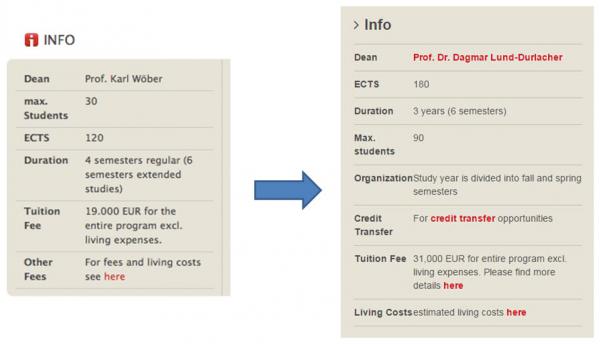
The findings from the test flowed directly into the relaunch of the site. For example, the structure of the courses was optimized through a better breakdown of the information on offer, the short information in the info boxes was supplemented with the most important points of criticism and a German translation of the top pages was provided.
Following the test, the insights gained were additionally analyzed in connection with quantitative data material. Google Analytics was used to check the extent to which tracking of these points is possible and appropriate solution suggestions can be derived from this. The findings of the analysis were implemented in further optimization recommendations and were incorporated into the next test phase.
2) The follow-up test after the relaunch
This test was divided into two target groups – desktop and tablet users – in order to additionally test the mobile implementation of the website. The desktop test group consisted of a total of 10 test users. 8 test subjects, including 7 women and 1 man, were high school graduates, students or bachelor’s degree holders. These users were between 18 and 24 years old and had knowledge of English. 2 of the desktop testers were parents who have children of college age. The tablet test group was composed of 8 test users between 20 and 30 years old with the same educational background.
What was tested?
The aim of the test was, on the one hand, to check the optimization measures implemented after the relaunch. To do this, the testers should again evaluate both the home page and the individual course pages. In addition, the various registration options and the German language version of the website were also evaluated in this test. The focus was on reviewing the new structure and preparing the information on the overview pages and course registration options.
In addition to questions such as: What information is missing from the desired course? Where/how would you apply? – Specific questions were asked, such as the total cost of the course, the possibility of working while studying, living costs and the necessary English skills to register for a course. This form of questioning was intended to clarify whether the necessary information was presented understandably and adequately.
The findings?
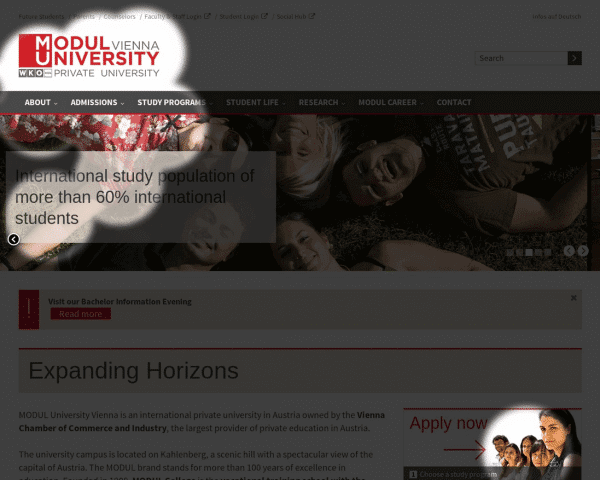
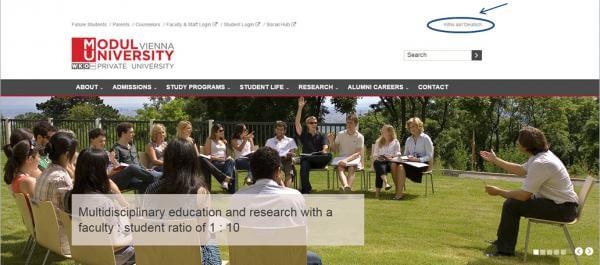
The optimized structure and usability of the website and the information preparation after the relaunch were generally rated positively for both desktop and tablet. The only major criticism was the speed of the image slider on the homepage. The option to select a German language was also received positively.
The main weak point in the registration process identified in the test was the three different registration methods for the courses. Some of the specific questions, e.g. about the cost of living and the possibility of working while studying, also caused difficulties in answering.
The next steps?
The registration paths are specifically tracked via Google Analytics in order to be able to quantitatively analyze user behavior and thus sustainably optimize the registration process. The preparation of missing information on the website will also be further optimized.
The best time for a usability check
As you can see, it generally pays to carry out several remote usability tests – on existing pages and before a website relaunch. But also after a relaunch to give the website the finishing touches. Qualitative analysis can help at various points in time to obtain effective feedback for the design and improvement of the site and thus increase usability.
Are you interested in a remote usability test for your website?
We would be happy to support you in implementing and evaluating a test concept tailored to your needs. You will receive a final evaluation from us consisting of a detailed, approximately 60-page final report on the interviews and a summary of the results with recommendations for optimization measures.
We would be happy to combine the insights gained with quantitative data and develop proposed solutions for your website!




