
Roll Up Properties In Ga4

Management Summary
A roll-up property is already a well-known concept from the old Analytics (Universal Analytics) and also finds its place again in Google Analytics 4 within the 360 license. You can find out here what roll-up properties are, who they are suitable for and what else needs to be taken into account.
What is a roll-up property and when should it be considered?
A roll-up property makes it possible toDatafrom several GA4 properties into one collected propertyto merge. For example, if you as a company have your own GA4 property for each brand or region, but you also want toReports or analysesIf you create a collection across brands or regions, roll-up properties offer an easy and automatic remedy for this. You save yourself the hassle of merging the data using Excel or other tools and can benefit from further advantages – you can find out what these are in the section “Advantages of roll-up reports“.
Roll-up properties can merge data from source properties or individual sub-properties. As in the followingillustrationAs can be seen, for example, you could merge all data from one property (here: Source Property WX) with data from a single sub-property of another GA4 Property (here: Source Property YZ). Data from up to 50 source properties can flow into a roll-up property. However, it should be noted that either the entire GA4 property (=source property) can be added to the roll-up, or only a selected sub-property from it – but not both at the same time or several sub-properties from a source property.
Roll-up properties make it possible, regardless of the existing account or property structure, to create more flexible data combinations for a comprehensive analysis of multiple websites, brands or apps – according to business needs.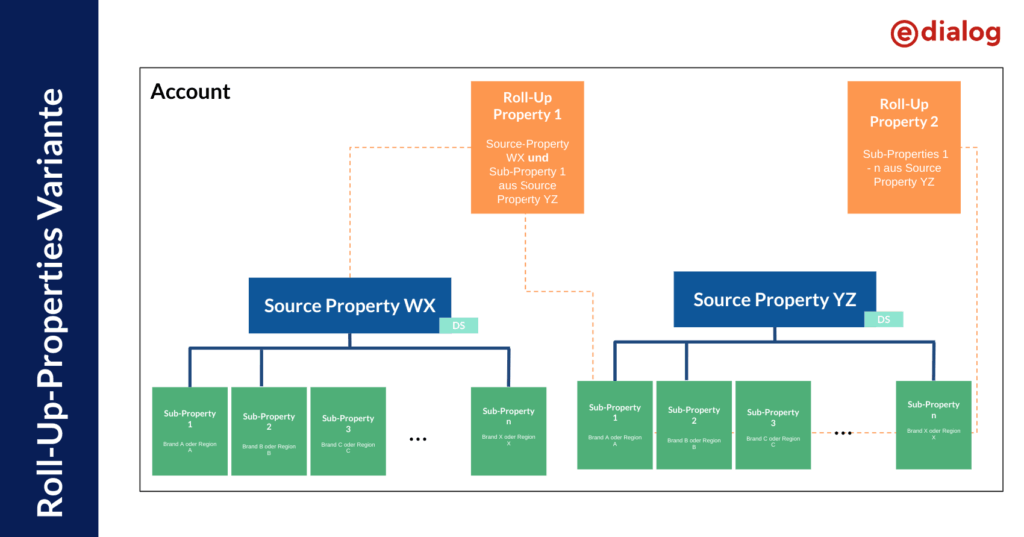 Illustration: Example of a roll-up property structure, source: e-dialog
You can find out what sub-properties are about inthis blog article.
Advantages of roll-up reports
Roll-up reportsprovide a comprehensive picture of all linked propertiesand can thus also provide a collected overview of all company data. For example, insights can be generated about the average engagement time of all active users, total revenue or total number of users across different regions and brands.Users are deduplicated in roll-up properties. This means that if a user has the same reporting identity across multiple properties (e.g. the same user ID or is logged into the same Google account), this user is recognized and counted as one user. For example, you could see the unique number of users across all your websites and apps combined.
In addition, a roll-up property enables aComprehensive customer journey analysisacross the various websites as well as theUse of audiences and segmentswith the overall data.
The great thing is that…Data flows in automaticallyand no additional tracking code needs to be implemented because the data is obtained from the respective source or sub-property. It should be noted thatall data from the source properties flows in, including those via product links such as Google Ads.
Limitations & Cost
Roll-up properties are only available for source properties that have a Google Analytics 4 360 upgrade. The same configuration limits for roll-up properties apply as for a classic GA4 360 property.Configurations from the source properties are not adoptedand must be set up separately in the property (e.g. Custom Dimensions/Mertics, Audiences, product links or Google Signals). No sub properties can be created within roll-up properties.
Roll-up properties cannot have their own events, only those that come from the source properties. It is important to note that the data only comes in once the property is createdno backfillof historical data is possible. We therefore recommend starting to create a roll-up property early if one is desired.
In addition to the basic costs for the 360 license, Roll-up Properties chargesAdditional coststo. This point is pointed out when creating a roll-up property and it must be confirmed that you are informed about these additional costs. The cost per event in the roll-up property is 50% of the cost per event in the source property – based on the respective 360 license agreement.
Conclusion
Roll-up properties are a helpful tool in terms of aggregating data, regardless of the property structure chosen. Such properties can be created with just a few clicks and without any additional tracking code. This allows relativeEasily generate important overarching insights from the data. Of course, the aspect that additional costs are incurred for this tool and the 360 license is a prerequisite should not be neglected. Depending on the size and structure of the company, it must be decided whether the use of roll-up properties is the best choice for aggregating data.




