
Search Ads 360 For Pla Shopping Campaigns

Management Summary
Search Ads 360 Shopping campaign
Search Ads 360 supports Google Shopping campaigns for ads with product information, which includes, for example, image, title, price, and your company name.
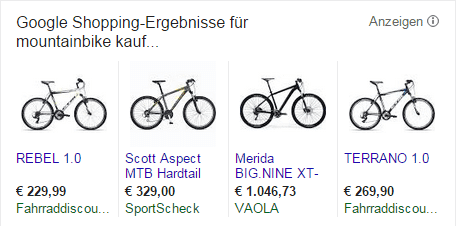
Google Shopping campaigns replace the well-known PLAs. Manually managing shopping campaigns can be time-consuming with large data feeds. DS helps you manage and optimize your campaigns, allowing you to get more out of your campaigns.
If you already use product data feeds connected to Google’s Merchant Center, Search Ads 360 gives you the benefit of a completely new automated campaign type – Inventory Keyword Campaigns.
Search Ads 360 inventory keyword campaign

Inventory keyword campaigns rely on the data feed in Google Merchant Center. Based on this feed, you automatically create search campaigns including a complete campaign and ad group structure. For the new inventory campaigns, you first set the targeting options and Search Ads 360 generates keywords, text ads and ad groups based on these settings and rules. For example, if you create new keyword templates and combine product titles with brand or category terms, you will quickly get a comprehensive keyword set.
The big advantage of inventory keyword campaigns is that new or out-of-stock products no longer have to be created/paused manually, which results in enormous time savings. You can also automatically enrich your ad texts with product information from your data feed (price, brand, category, etc.) and refine it with rules.


Bid automation for shopping campaigns
To automate your shopping campaigns, use bidding strategies that align with your business goals. To do this, define whether you want the bids to go to a specific position, for example < 5 or want to receive as many clicks as possible based on a fixed budget.
In contrast to these branding goals, online retailers have conversion or revenue-based bidding strategies available to achieve as many conversions or the highest possible sales from a set budget. Advanced bid strategies based on effective revenue share (ERS) or specially defined KPIs round off the options for bid strategies. Use the great potential of bid strategies to optimize your shopping and inventory keyword campaigns.




