
Set Top Feature Attribution Model In Ga4 Property Settings

Management Summary
Google Analytics 4 enables the selection of attribution model and lookback window at the property level. This article provides an overview of this feature and the setting options.
Attribution models
Attribution models form statistical modeling along the multi-channel funnel based on granular data. Based on these modeling, sales/conversions are proportionally attributed to the touchpoints involved. The analysis of channels, advertising forms and conversions enables the cost-efficient and targeted optimization of digital advertising measures. Using attribution, even more distant touchpoints, and thus customer interactions that precede the actual purchasing process, can be included in the analysis. The attribution models available in Google Analytics 4 consist of predefined rules or data-driven algorithms. In GA4’s property settings, users can choose between different types: Nextcross-channel rule-based models(such as Last Click or Time Decay) as well as thatAds-preferred rule-based model(last Google Ads click), is above all thedata-driven attributionThe focus is on machine learning and leads to insights into the creation or attribution of sales and conversions based on the data entering the account.
Choices in GA 4
The attribution models for reporting are accessible to users with the “Editor” role in the GA4 admin area at the property level. Here you can choose which model should be applied in the reports of your Analytics property or in the conversion reports of all linked Firebase projects. One click on the sectionAttribution settingstakes you to the associated submenu, where the relevant settings can be made using the drop-down menu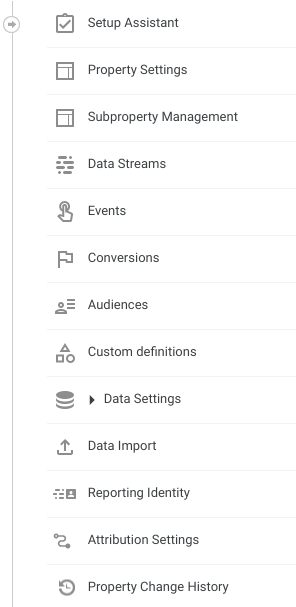
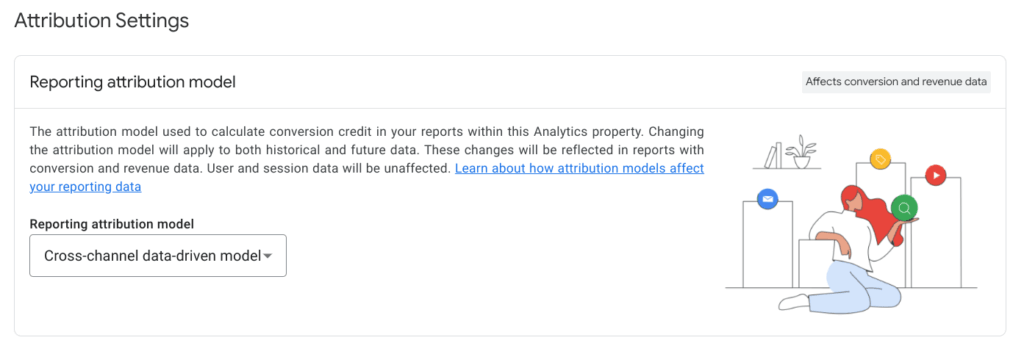 Attribution Settings in GA4, source: e-dialog
Data-driven, rule-based and ads-preferred models offer various options for proportionally attributing conversions. In the following overview we have themdifferent attribution modelssummarized for you.Cross-Channel Data Driven AttributionThe complete rollout of the model took place in early 2022. In contrast to purely rule-based models, this form of attribution uses data-driven machine learning based on incoming data to assign conversions to touchpoints/channels proportionately according to their conversion probability.Rule-based attribution
- Last clickThe sale/conversion is 100% attributed to the last touchpoint/channel along the conversion path. Attention: Direct traffic is not taken into account in this model.
- First clickThe sale/conversion is attributed 100% to the first touchpoint/channel along the conversion path.
- LinearThe sale/conversion is allocated equally to all touchpoints/channels along the conversion path.
- Position based40% of the sale/conversion is allocated to the first and last touchpoints/channels along the conversion path. The remaining 20% is allocated equally to the remaining touchpoints/channels.
- Time decayMeasured by the temporal proximity to sales/conversion, those touchpoints/channels that are closer in time are assigned a higher percentage of sales/conversion than those that are further away.
Ads preferred attribution
- Last clickThe sale/conversion is attributed 100% to the last clicked Google Ads touchpoint. However, if the conversion path in question does not contain a Google Ads touchpoint, the Cross Channel Last Click model is automatically applied (see above).
The special oneFlexibility of the new settings at the property levelbecomes clear when switching between attribution models: changes affect both future and historical sales and conversion data for your account. The choice of a model affects all reports where event-related traffic dimensions are used, e.g. b.Source, medium, campaignandDefault channel group, as well as the conversion detail reports and the Explore analysis tool in Google Analytics 4.
However, the changes have no impact on traffic dimensions at the user and session level, such asSession sourceorFirst user source. This means that the standard reports under the GA4 reports “User Acquisition” and “Traffic Acquisition” are not included. The reports in the “Advertising” area are also not affected by this setting, as they are designed to compare attribution models anyway. Assuming they are used with event-related traffic dimensions, the following values change depending on the attribution model selection:Conversions, total sales, sales from purchasesandTotal sales from ad.
Lookback window
In sectionAttribution settingsFinally, you will also find the settings for the so-calledLookback window.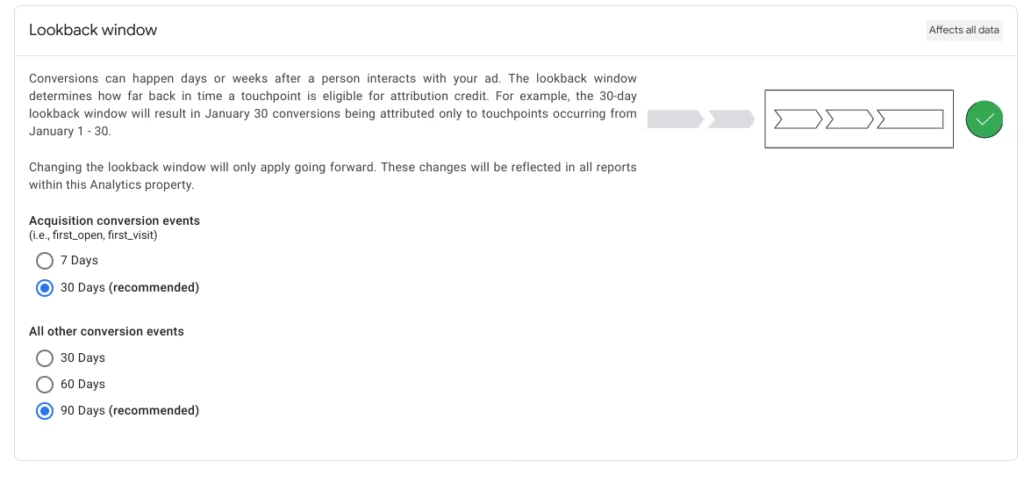 Attribution Settings in GA4 – Lookback Window, source: e-dialog
The lookback window determines the period within which a touchpoint/channel should still be taken into account for attribution. A change in the lookback window affects all reports within the GA4 property. In the settings in the lookback window, the time frame can be selected differently for conversion events of the acquisition type on the one hand and the other conversion events on the other.
Conclusion
Through the user-friendly integration of the various attribution models in the reporting settings at the property level and the focus on the data-driven approach using Cross Channel Data Driven Attribution, GA4 optimizes the handling of reporting and also offers the possibility of a more comprehensive analysis of different conversion paths along the customer journey for standard properties. This provides crucial support for qualified decisions to increase the performance of advertising measures and thus increase the return on investment (ROI). However, when analyzing and reporting, care should be taken to use the correct dimensions to avoid misinterpretations.
If you are interested in the topic of cookieless modeling of conversions and future approaches to the approaching elimination of third-party cookies, read oursBlog post on Regression Based Attribution here. A detailed comparison ofAttribution and Marketing Mix Modelingdo you think …? Findhere.




