
Sgtm 038 Phone Tracking 8211 Handover Of First Person Id Fpid To Matelso

Management Summary
Telephone tracking with Matelso and server-side GA4 tracking – can they work together? What needs to be taken into account when setting up together? Server-side tracking uses the FPID – we show how both can work together.
Phone tracking & sGTM
Recording the surfing behavior of telephone callers on websites is called telephone tracking. Thanks to telephone tracking, conclusions can be drawn about how customers get to the website and whether campaigns have led to successful sales via telephone calls.
Telephone tracking with a tool such as Matelso allows all customers to display individual phone numbers on websites. If such a number is called, Matelso already has data such as the channel, the campaign and the websites visited for this call. At Matelso, each call can also be registered in Google Analytics 4 via “Integrations 2.0”, where an advanced analysis of the calls can take place.
Cookies when using a server-side GTM
With the introduction of server-side tracking and especially when using the Server Side Google Tag Manager (sGTM), more and more website users are getting a new type of client ID for identifying browsers in Google Analytics 4 (GA4). Instead of the classic _ga cookie in the format GA1.1.134086739.1708512876, the sGTM creates the cookie “FPID” in the format FPID2.2.DTB6aPZTYF8heNouSVrjnFHrdPyf7UbPOaZXGU8x+2c=.1709032348
In the future, GA4 will store more and more client IDs of the “FPID” type when used. All well and good – they are cookies that we can simply transmit to our phone tracking tool?! However, the detail that changes when using the “FPID” is that the “FPID” cookie cannot be read by the server-side GTM from the website using JavaScript. The cookie is set by the sGTM as “httpOnly=true”, which means the cookie is only visible during browser-to-server communication. JavaScript cannot read the cookie; it essentially does not exist when it is queried via JavaScript.
Now the telephone tracking tool has to record the calls to our GA4 property again using event tracking. Due to the website integration of the tool via JavaScript, the tool cannot read the FPID and continues to only record the value of the _ga cookie (the old cookie), although the caller is already saved with the FPID in GA4. If the phone tracking tool now sends us a GA4 event with the _ga Client ID even though the caller was recorded on the website with the FPID, this will lead to nothing. This means that the call is assigned to a non-existent user in GA4 and our analysis of the caller data is therefore not complete or even unusable.The solutionwould be to also pass the FPID to the telephone tracking. And it goes like this:
Handover of the FPID to Matelso
What needs to be done so that the FPID can be sent to Matelso as a parameter and the value can then be sent back to GA4 from there?
- The FPID must be determined
- The determined FPID must be sent to Matelso as a parameter
- Matelso must use the FPID for GA4 integration
Obtain 1 FPID
The easiest way to determine the FPID is to query the server-side Google Tag Manager. To do this, you can simply create a custom client template that returns the FPID when called.
To do this, the “Templates” item must be called up in the sGTM: There you have to click on “New” in the client templates:
 “FPID Callback” can be specified as the name and the following must be stored in the code:
The following permissions must be set: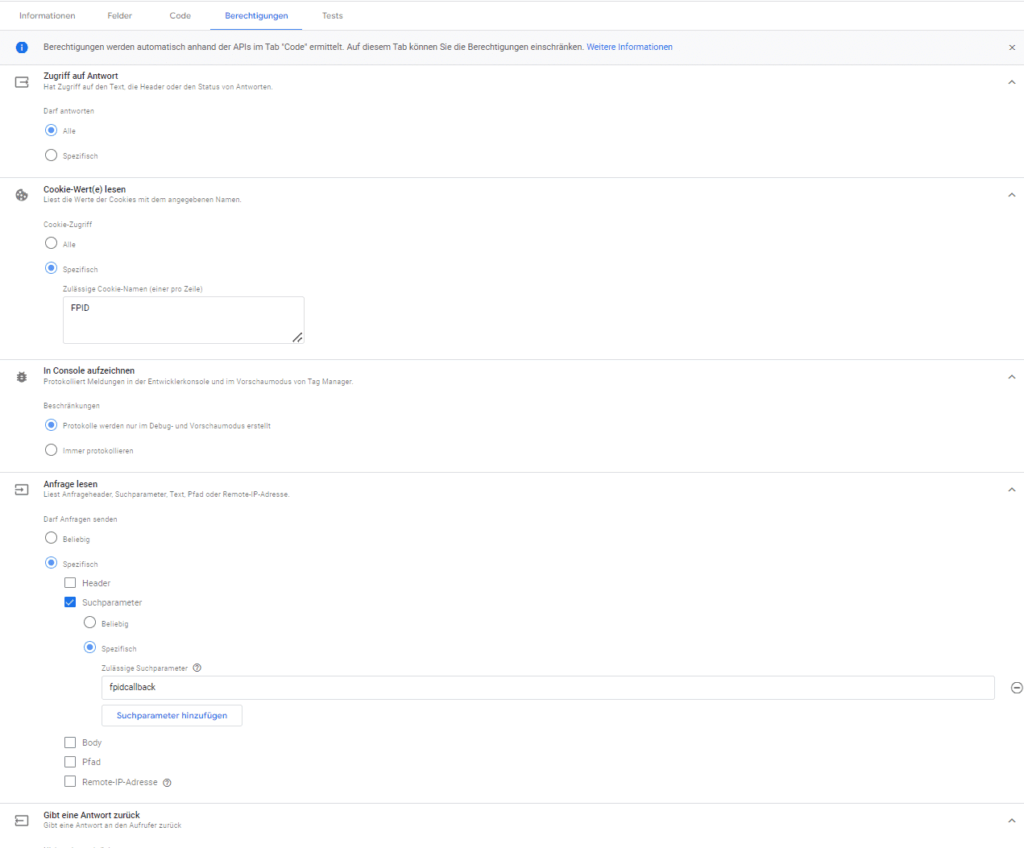 Once the client template has been created, it must be added and activated in the sGTM under “Clients” in the menu:
 The client simply needs to be added without further configuration and the container needs to be published.
When the endpoint is called, the FPID is now output: Any name for a JavaScript function can be entered in the “fpidcallback” parameter, which captures the value and sends it to Matelso.
2 Handover of the FPID to Matelso
On all sites where Matelso is used, the FPID can now be passed to Matelso as a parameter. If a client-side Google Tag Manager is available, you can easily create a custom HTML tag that (1) queries the sGTM as shown above, (2) passes the FPID to Matelso using JavaScript.
Thanks to the “addCustomTrackingValues” function of Matelso’s “CallTrackingObject”, custom parameters can be passed to Matelso.
It must be ensured that (1) GA4 and (2) Matelso have already been loaded on the website.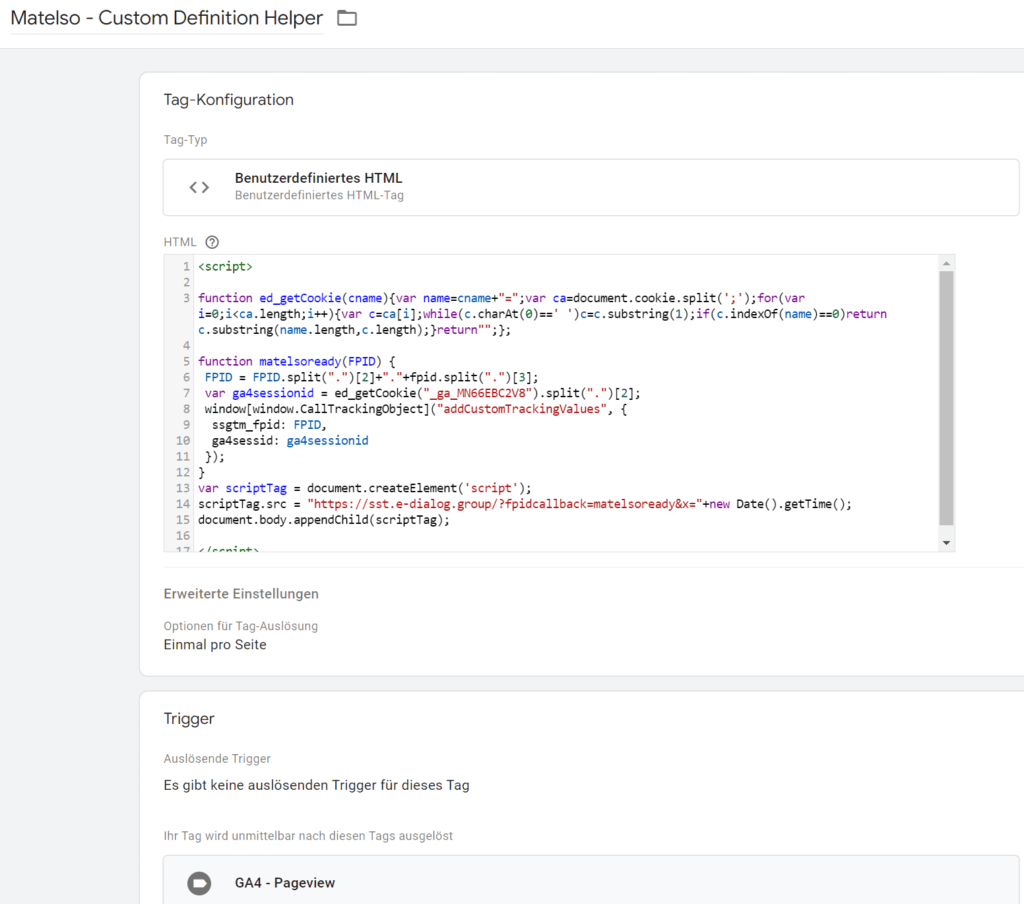 This can be achieved, for example, by storing this custom HTML tag as a “Cleanup” tag from GA4 or the Matelso Loader Script. “Cleanup” tag means that this tag “Matelso – Custom Definition Helper” is only played out as soon as the actual tag – such as the GA4 Pageview tag – has been executed.
3 Setup in Matelso
If the values “ssgtm_fpid” and “ga4sessid” end up in Matelso, the integration in Matelso must be set so that these values are also used when sending a GA4 event.
The GA4 Session ID (“ga4sessid”) is also passed to associate the call with a specific session in GA4.
In Matelso, the following parameters must be determined in the DDD (Data Definition Directory) provided by Matelso: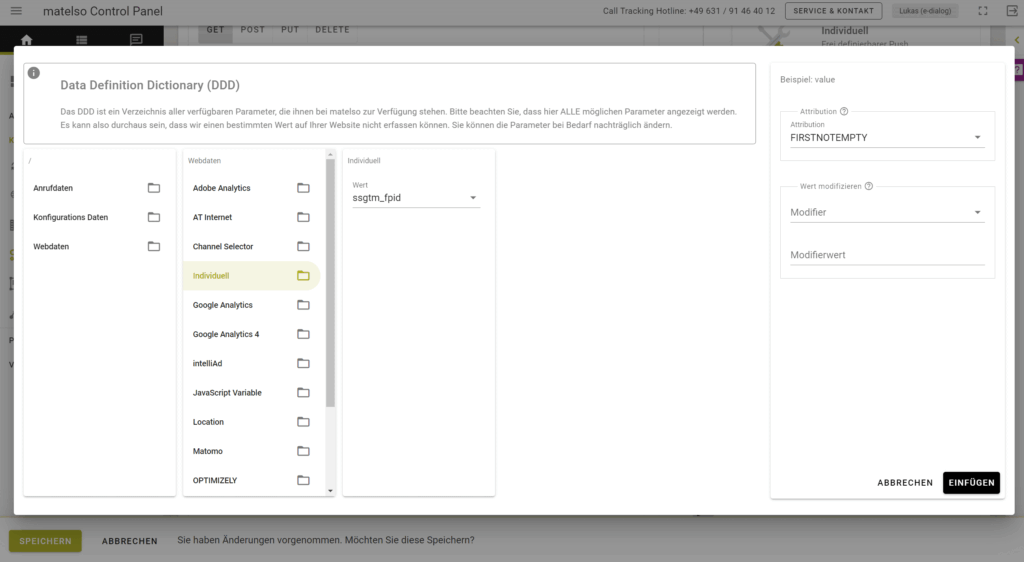 In the form for the parameters in the Matelso integration, a parameter looks like this:
{{webData.custom.ssgtm_fpid.attribution(FIRSTNOTEMPTY)}} Similarly, the session ID must also be inserted.
In Matelso, for example, you can use these values to create a custom integration that sends the call data to the server-side Google Tag Manager. From the sGTM, the Matelso call data can then be further processed in any way. So, with a Matelso Custom Integration towards Serverside GTM, the sGTM can then control GA4, BigQuery, Meta (Facebook), Floodlights, TikTok and other tracking tools and record the call. For example, when handing over to Meta (Facebook), it would be advisable to include the values _fbp and _fbc so that Facebook can identify the call as a user who clicked on a Facebook advertising campaign.By the way:The approach of determining the FPID from the solutions shown above in chapters (1) and (2) can of course also be used for any other case where the new First Person ID (FPID) set by the server-side GTM is needed.
Conclusion
If a telephone tracking tool is used on a website in conjunction with server-side website tracking such as sGTM + GA4, the transfer of the new First Person ID (FPID for short) must be set up in order to be able to understand the attribution of calls. Once the handover has been set up, the evaluation can continue undisturbed.
We would be happy to support you in integrating the transfer of the correct client ID to your phone tracking tool, such as Matelso. Contact us viakontakt@e-dialog.group
All images – Source: Screenshots e-dialog




