
The Power Of Lookup Tables In Google Tag Manager

Management Summary
Google Tag Manager (GTM) is a powerful tool that can be used to manage tracking codes and scripts on websites without having to constantly interfere with the source code. One of the most powerful features of the GTM is the use of lookup tables. This function allows values to be dynamically changed or added depending on the defined conditions.
What are lookup tables?
Lookup tables are a feature in Google Tag Manager that allows changing values in tags, triggers, or variables. Predefined criteria can be set to determine which changes should be made. Essentially, they help to dynamically adjust certain data depending on the defined conditions. This can range from simple translations to complex customizations.
There are two main types of lookup tables in GTM: regex tables and lookup tables. Main type of lookup tables, source: Google
Regex tables
Regex tables use regular expressions to recognize patterns in values and assign appropriate replacement values. They are particularly useful when you need to catch a large number of variants of a value.Here is an example:
An e-commerce shop is represented in different countries with different currencies. To ensure that the correct currency is passed during the Add to Cart event, a regex table can be created based on the URL.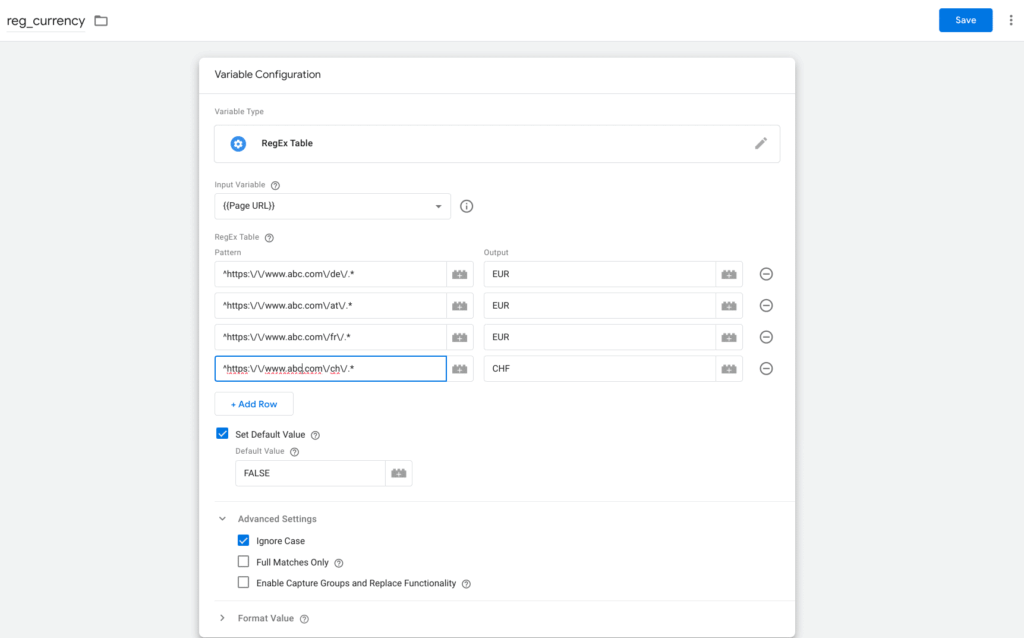 Regex table Currency, source: Google
This variable can now be inserted into the Add to Cart event.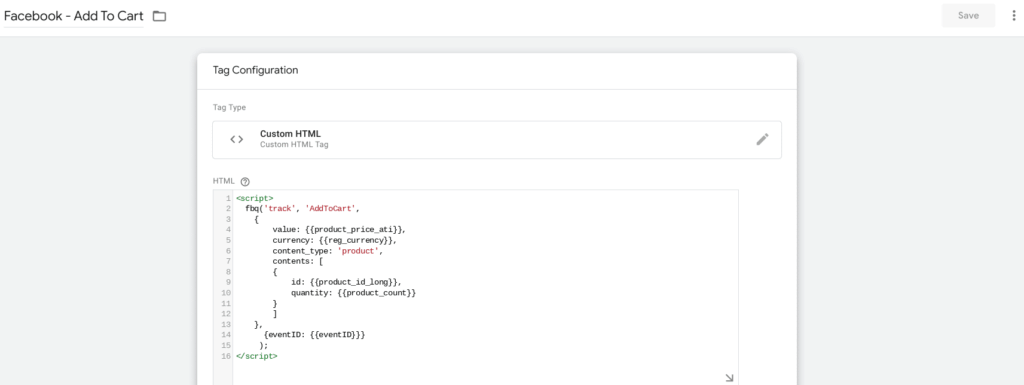 Event Add to Cart, source: Google
Regex tables
Lookup tables are simpler and are good for cases where you want to search for a specific value and assign a corresponding replacement value.Here is an example:The e-commerce shop runs various advertising campaigns and would like to assign the respective campaign name based on a unique parameter ID. This goal can be easily achieved with a lookup table. Lookup table Campaign, source: Google
Conclusion:
Lookup tables are a powerful feature in Google Tag Manager that allows tracking data to be organized and managed efficiently. The choice between regex tables and lookup tables depends on the specific needs of the project. Whether for simple translations or complex replacements, they offer flexibility and efficiency




