
Tiktok Ads Manager Guide For Beginners Part 2

Management Summary
Can I easily reuse my creatives from other platforms for TikTok ads?
Even though TikTok has become a very popular advertising platform for advertisers in recent years, it is becoming clear again and again that the requirements of the platform and its users for high-performance advertising cannot be transferred from other, more familiar social media platforms.
It’s tempting to simply upload and reuse the creative from the last Instagram story in the TikTok Ads Manager and thus save yourself additional effort – but if you really want to attract positive attention from TikTok users with your ads, you should stick to a few important basic rules! We have summarized the most important specifications and best practices for you in this guide for beginners.
What elements does a TikTok ad consist of?
An ad on TikTok is made up of various elements. However, the selection available may vary depending on the objectives of the campaign. Below we give you an overview of the individual components:
- Ad name: You can use the ad name to describe your ad and differentiate between different ads
- identity: This feature allows you to decide how to represent your business in the ads you serve
- Creative: TikTok in-feed placement currently only supports videos
- Ad Copy: Unlike Facebook, TikTok Ads Manager only provides you with a text field
- Landing page URL: Redirect users to your website
- Call to Action (CTA): Encourage users to carry out a specific action; TikTok currently provides you with 22 options
- Tracking: If you are already working with an advanced setup, you can finally specify impression and click tags
What forms of identities are there and when do I use them?
In the second step when creating an ad, you decide which advertising identity should be stored and displayed to users who see the ad. The TikTok Ads Manager provides you with the following three options:
- Own TikTok account: Use the TikTok account linked to the TikTok For Business account to create Spark Ads with organic posts.
- Other authorized account: This option allows you to create Spark Ads with posts from other TikTok accounts that you have authorized to use your videos in your ads. The ads served look as if they come from the corresponding creators who published the post.
- Custom identity: Select this option if you don’t want to use an existing post to create an ad.
What options do I have when incorporating the creative into my ad?
The heart of your ad is the video, which you use as ad creative. When integrating, you can choose between four different ways:
- Uploada new video from your PC
- Use existing advertisements from theLibrary– the TikTok Ads Manager offers you the option to search by name/ID or to sort the existing videos according to various KPIs such as impressions, CTR or CPC in order to find a suitable video for the objectives of your campaign.
- Createa new creative – you can use the TikTok Video Editor to create new ad videos from scratch, or you can use thematically tailored templates. But even if resources are too limited for this, TikTok offers a solution: By uploading individual images, setting the aspect ratio and video duration, and gradually adding additional elements, you can create a new TikTok ad with just a few clicks.
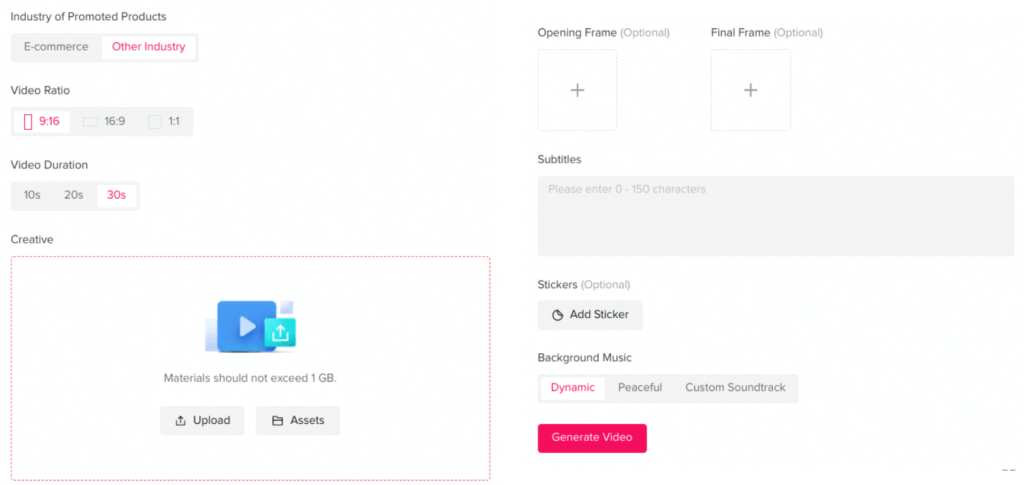
- Integrate existing TikTok posts– Similar to integrating existing ads from the library, TikTok also offers you the option of integrating posts posted on your TikTok account into the application as so-called Spark Ads. The advantage of this approach: The interactions generated by the application are attributed to the organic post and are visible under it.
How can I integrate my organic content into my TikTok ad?
Have you created a campaign, set your advertising goal and also aligned the targeting at the AdGroup level to your intended target group? – Then all that’s left is the last step: creating yourSpark Ad: If you include an organic post in an ad, it is called a Spark Ad. The advantage that this form of ads offers is that various user interactions triggered by the application are attributed to the organic post in the TikTok account. If you would like to work with Spark Ads, you have two methods for integrating posts:
Method 1: Via your own TikTok account linked to your business account
- Activate in the sectionIdentitythe option:Use TikTok account to deliver Spark Ads
- Choose the option:Use account owned by you
At this point you can decide whether you want to integrate an existing post from your TikTok account or whether you want to create a new post using the Ads Manager, which – if desired – will also be displayed in your account. To select an existing post, do the following:
- Select in sectionAd detailsthe option:+TikTok post
- Tick the post you want to include and clickConfirm
At this point you can make the other settings for your ad as normal – in this case you no longer have to worry about the ad text, as it will be taken over by the post.
However, would you like one?Create a new post from the Ads Manager, select the +Video option instead. From here on, you have the same options as when creating a regular ad (see section What options are available to me when embedding the creative in my ad?, points 1-3). In addition, the TikTok Ads Manager offers you the opportunity to decide whether the created post should only be displayed as an ad or should be displayed in the account. To do this, you can either tick Only show as ad, which is located directly below the video.
Finally, you can publish your Spark Ad.
Method 2: With the help of authorized posts
Want to promote a post that wasn’t posted from your own TikTok account? This can be the case, for example, if you advertise for a customer or, for example, as a company you enter into a cooperation with a TikTok creator. If you include such a video in your ad as an authorized post, it will appear to users as if the corresponding company account or creator was the sender.
If the company or creator’s account is not yet linked to your Business Center, TikTok will provide one in the Business Help CenterInstructions for linkingavailable. Once this step has been checked off, you can continue:
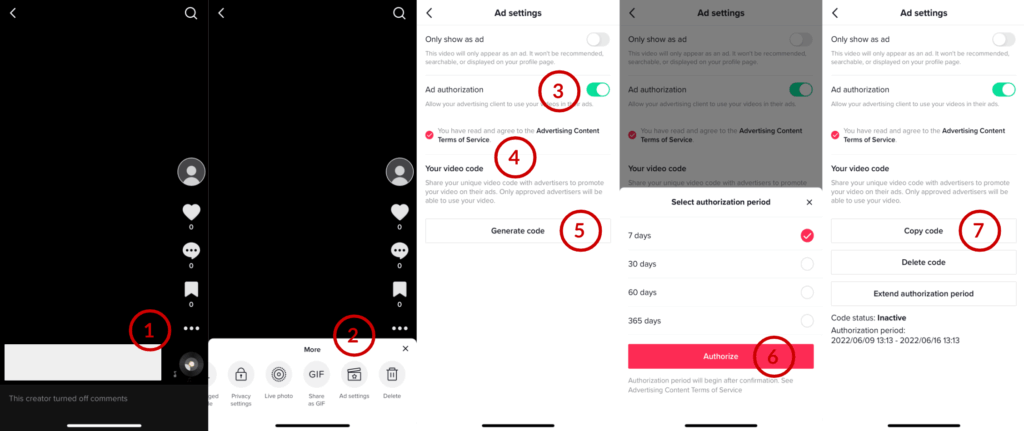
In order to authorize a post so that it can then be included in a Spark Ad, the account owner must first ensure that the promotional use of posts is activated in the ad settings. This can be easily set via your own profile in the app.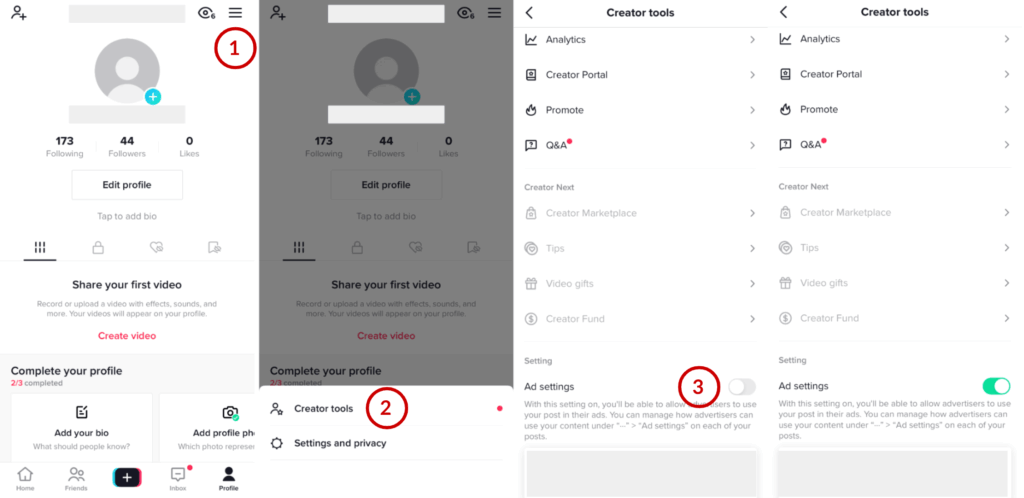 Once this setting has been made, this step can be skipped in the future and an authorization code can be generated directly for the desired post:
- Click on the desired video in the feed
- Click on 3 points in the right interaction column
- Ad settingschoose
- Enable ad authorization
- Agree to the Terms of Use
- OnGenerate codeclick
- Select and authorize the desired period
- Copy code and send to advertiser
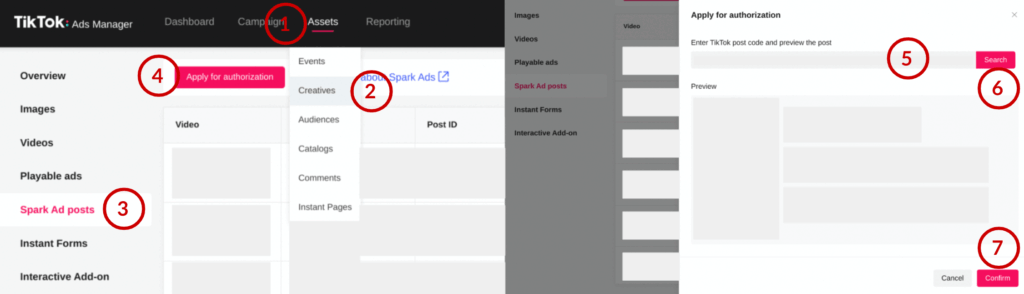
 Once you as an advertiser have received the required authorization code, you can authorize the post for use as a Spark Ad in your campaign. Navigation in the Ads Manager is as follows:
- about the rider> Assets > Creativethe top navigation bar,
- then in the left side menu> Spark Ad postschoose,
- top left> Apply for authorizationchoose,
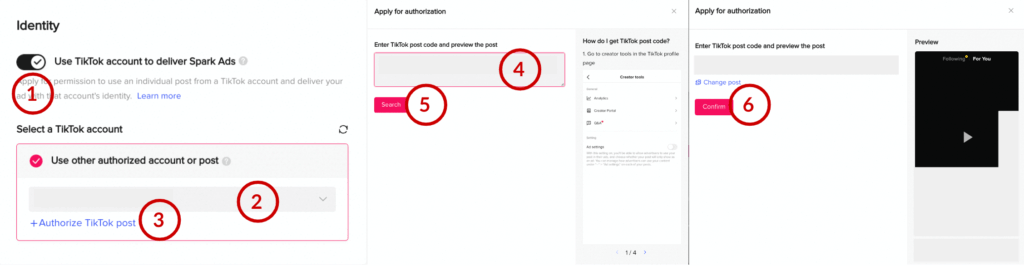
- Enter authorization code,> Searchclick and with> Confirmconfirm
 To finally integrate the post into your Spark Ad, you must go through the following steps:
- In the Identity section, enable the option:Use TikTok account to deliver Spark Ads
- Choose the option:Use other authorized account or postand select the TikTok account that authorized the post
- In the Ad details section, click+TikTok post
- Tick the post you want to include and click Confirm
Finally, you can make the other settings for your ad as normal – this way, too, the ad text is already taken from the embedded post. Alternatively, you can also carry out post authorization directly during ad setup:
- After you have activated Spark Ad usage and selected the TikTok account whose post you would like to include:
- > Authorize TikTok postClick and enter authorization code
- Click on> Searchand with> Confirmconfirm
What specifications and technical requirements does my TikTok ad have to meet?
When creating your ads, there are a few things to considerFramework conditionsPlease note: The first requirement for a common in-feed ad – even if this shouldn’t come as a surprise – is a video file. This can have the dimensions 9:16 (≥540*960 pixels), 1:1 (≥640*640 pixels) and also 16:9 (≥960*540 pixels) and come in the formats .mp4, .mov, .mpeg or .avi. Videos lasting between 5 and 60 seconds are permitted, but must have a minimum bit rate of 516 KB/s and a file size of no more than 500 MB.
It is also important to keep the TikTok layout in mind while designing your video. Adhering to the save space is important to ensure that the essential components and messages of your video are clearly visible to users and are not obscured by individual layout elements such as like or share buttons, etc. TikTok provides detailed information and templates in theBusiness Help Centeravailable.
The next important element is the ad copy; This is limited to 1-100 characters for normal in-feed ads and may not contain emojis or special characters such as {} and #.Danger: Spaces are also taken into account when calculating the number of characters! If you integrate an existing post into your Spark Ad, you can bypass these restrictions – because the text is automatically adopted and can therefore contain emojis and other special characters that were used in the organic TikTok text.
Last but not least, you can click on theAccount namesnot be forgotten. This can be up to 20 characters, but it is recommended that you limit yourself to a maximum of half – namely 4-10.
Best practices in ad design
Now you know the basics of creating TikTok ads. However, we will briefly summarize for you in this section the tips you can consider to give your ads a finer touch:
- Even if the Ads Manager gives you some freedom in theFormat selectionFor your video, TikTok recommends using the 9:16 format – this makes full use of the available space and fits most naturally into the user feed
- In relation to theVideo lengthThere is a fairly wide range available to you – depending on your objective, the resources provided by TikTok contain different information between 9-34 seconds as the optimal length. Our recommendation: Test video versions with varying lengths and determine how your target group best receives the advertising message
- Showpersonsand grab itTrendson – from filters to sounds. This means your ad fits in better among the organic content
- Are yoursresourceslimited for content production, it is recommended to focus on the fit for TikTok – this content often works better on Instagram than the other way around.
Helpful ad design resources
Now you know the theory of placing and designing ads on TikTok, but what could they actually look like? In this section we present two helpful tools that TikTok provides to help you:
If you are looking for inspiration for your next TikTok ads, you will find it in the Creative Center: ThisTikTok Creative Centeris a database provided by TikTok where you can get an overview of the latest trends and also the most successful advertisements.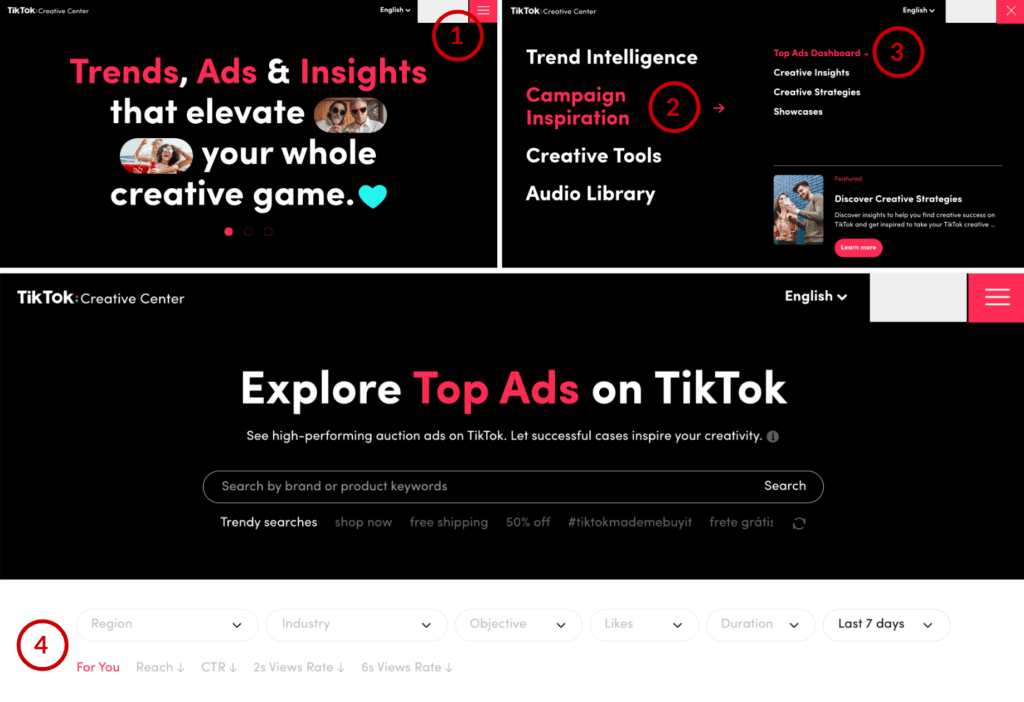
- Open the TikTok Creative Center
- Navigate using the menu at the top rightCampaign inspiration
- Choose the optionTop Ads Dashboard
- Filtering and sorting
Now you not only have the option of selecting the ads by region, industry, objective, likes, video duration and time span. Filter the results by a variety of KPIs and click through to see what worked best for your competitors on the platform when running ads.
Once the first draft of the video has been created and the first text ideas have been recorded, you can get startedAd Preview ToolPreview how your ad will look on different devices. This way you can ensure in advance that all important information is clearly visible.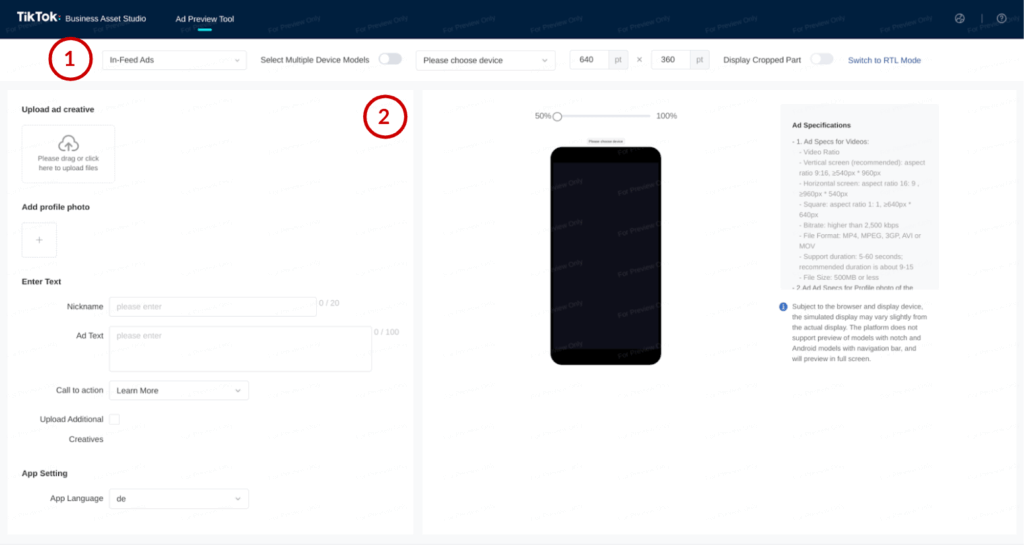
- Select the desired placement in the top navigation bar – in this case In-Feed Ads– out of
- One or more smartphone models are then selected
- Fill in the input fields on the left side of the screen
You will then receive a preview of your ad. If you have only selected one smartphone model, it will appear to the right of the entry; On several models it can be found below.




