
Tracking Amp Pages With Google Tag Manager Part 1 Page Views

Management Summary
What are AMP pages?
AMP – which originally stood for Accelerated Mobile Pages – is a scripting language for (mobile) websites that is very similar to HTML. The idea behind it is that through caching, severely limited JavaScript and the extensive avoidance of external resources (such as external CSS files) the loading and rendering of websites becomes significantly faster. The main application area of AMP is the mobile versions of static content pages. It is more suitable for news articles than for the new car configurator and is therefore used primarily – but by no means exclusively – by publishers and blogs.
More about AMP in an older blog article from us
What’s the point?
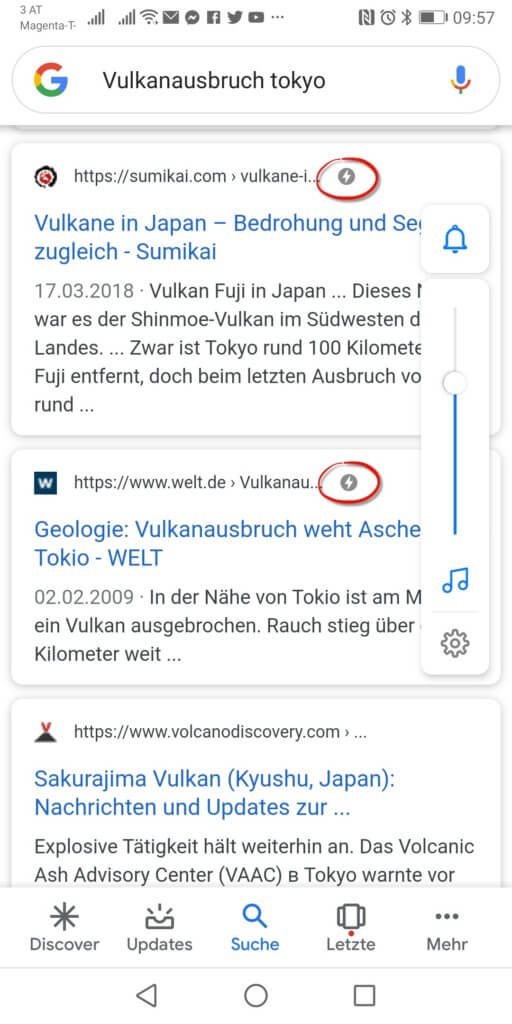
From an SEO perspective, AMP versions of websites are particularly interesting because this means a double bonus in Google’s search engine ranking: on the one hand due to the faster loading time, on the other hand the existence of an AMP version of a page is itself a bonus at Google: when searching from a mobile device, this is taken into account favorably and is displayed in the result lists with a small lightning symbol (see screenshot).
What does this mean for me?
The most important feature for the front-end developer as well as for the web analyst is the fact that you cannot use your own JavaScript. AMP only allows custom, pre-built applications from the AMP JS library. At least currently,There is an opening for your own JavaScript. Until then, we will also have to accept some restrictions when it comes to tracking. We look at what is currently working and what is not.
Google Tag Manager for AMP pages
As with conventional HTML pages, we use Google Tag Manager. The first step is to set up your own GTM container.
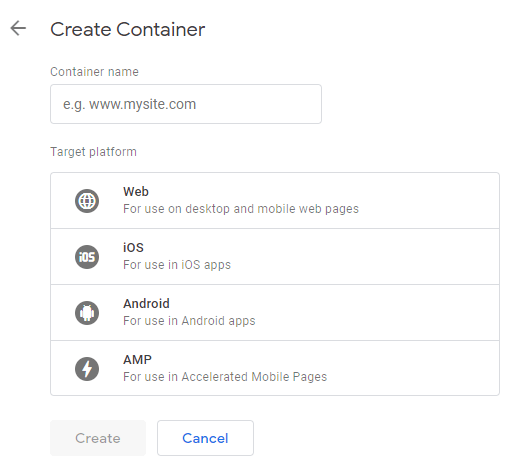
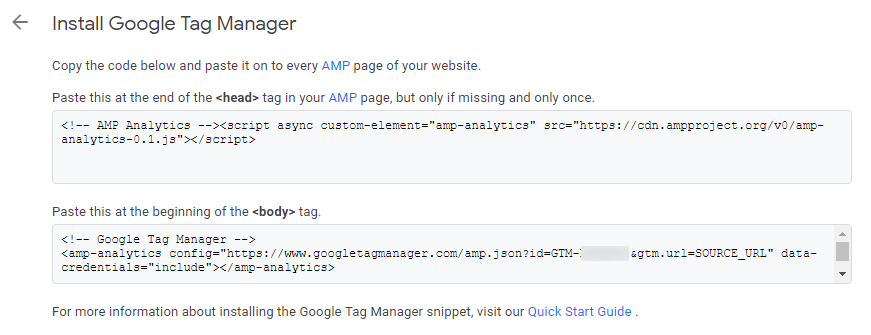
The GTM lists two code snippets that we need to include on our AMP pages. Or if the AMP module of the content management tool has an option to install GTM containers, all you have to do is enter the container ID in the appropriate form field.
Track AMP page views
Tracking AMP page views or sessions is a largely neglected topic. It is just as easy and quick to install as on HTML pages. If you offer AMP versions of your websites, we definitely recommend tracking the views of these AMP pages separately. Once you can assess how relevant AMP traffic is to your website, you can decide how much effort you want to put into event tracking.
Own or existing property?
The first question is whether a separate property should be created in Google Analytics for the AMP pages. However, since the content is usually the same as the HTML version, we recommend writing the data into the existing GA property.
Setting up the Analytics Pageview tag
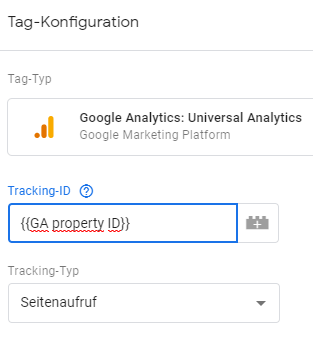
Unfortunately, there is no settings variable for AMP containers like in web containers. This means that settings for page views and events must be set manually for all tags. It is therefore advisable to store the property ID in a variable of typeconstantto create in the tag manager:
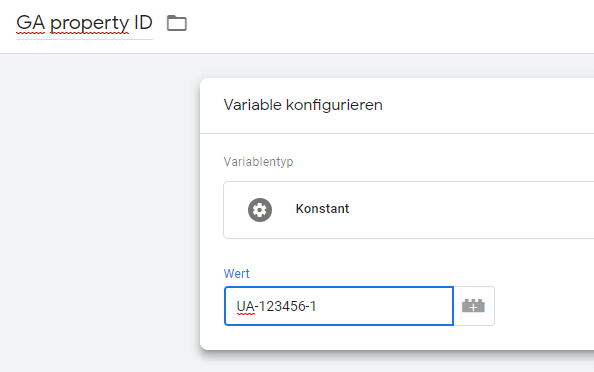
The corresponding variable is then selected in the individual analytics tag using the Lego brick instead of entering the ID directly. At least you don’t have to look up the property ID for every new day and any change to the property can be implemented quickly.
The settings for the analytics request are no longer applicable. The requests are sent automatically with anonymized IP addresses, but the URL cannot be set manually, which means that virtual or sanitized page views cannot be implemented.
The only way to modify the page view is to add custom dimensions and metrics. The sources for custom dimensions are very limited. JavaScripts are not available and with it all the valuable information that we already send to the dataLayer for HTML tracking. Cookies cannot be read either.
Instead of the dataLayer, the tracking of AMP pages knows AMP variables. These must be passed when calling the GTM:
In the GTM there is then a variable type AMP variable with which this information can be read out in a similar way to the dataLayer variables in the web container:
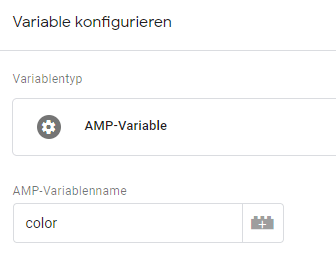
You will probably choose an All Pages trigger for the page view, and if not, then a URL type trigger in which you define the desired pages. It is noticeable that AMP Container no longer distinguishes between the GTM events pageview, DOM ready and window loaded.
Distinguish between AMP and HTML traffic
If we want to evaluate AMP and HTML calls separately, there are several options:
1. URL
If your AMP pages are created by a module of your CMS, they will usually receive a URL in which amp appears somewhere. The AMP version of the URL
www.example.blog/10-reasons-for-amp-tracking/
could then look something like this:
www.example.blog/10-reasons-for-amp-tracking/amp/
or
amp.example.blog/10-reasons-for-amp-tracking/
The first variant with an additional page path layer is easily visible in the side view. For the variant with the subdomain you still need a secondary dimensionhostnameadd.
2. Custom dimensions
Another way to differentiate between HTML and AMP calls is with a Custom Dimension with the scopehit. Using the GTM, we provide this dimension with information for each page view and event as to whether this interaction was carried out on an AMP or HTML page.


3. Custom data views
Regardless of whether it is a URL or a custom dimension: both can be used as filters for your own data views. For example, you could create a data view for the AMP pages, one for the HTML pages, and a common data view. This URL-based filter can then be used for the AMP data view:
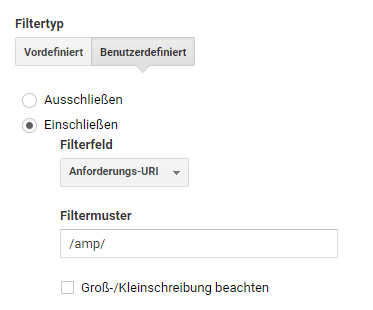
Another option is to filter on the custom dimension from variant 2 instead of the URL.
You then simply choose the HTML-only data viewExcludeinstead ofInclude.
If we have an AMP identifier in the page path, then it makes sense to remove it at least in the shared data view. We use one for thisFind and Replace-Filter in the data view:
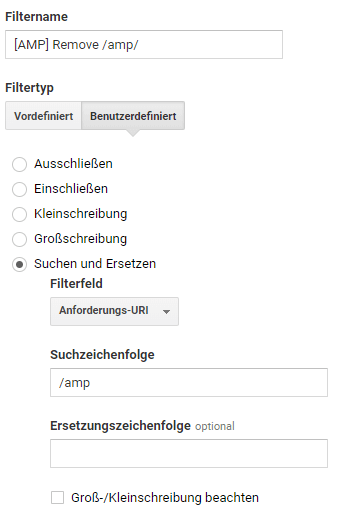
This means that both the HTML and AMP views of the page appear under the same page path and can be easily evaluated together. For the separate evaluation we have our own data views, the user-defined dimensions and possibly the host name.
And what about App+Web properties?
They are currently in a public betaWeb+App properties,Analytics properties in which data from websites and apps can be combined with each other. Unfortunately, there are currently no predefined tags in AMP GTM containers and, due to the lack of a JavaScript tag, the gtag code cannot simply be used. Unfortunately, we currently have to forgo recording AMP pages in Web+App properties. As soon as there is news here, you will find out here on the e-dialog blog.
Also look forward to Part 2 of the series: Event Tracking for AMP Pages.




