
Tracking In The Instagram 038 Facebook Shop

Management Summary
Shopping features, like we already have on Facebook, Instagram, Pinterest & Co., have now become an integral part of the social world. New features and options are currently being presented on a continuous basis to enable brands and companies to present and therefore sell their products even faster, more efficiently and even more easily.
On the one hand, the end consumer takes on an exciting journey into the world of…Social CommerceOn the other hand, for companies, this means that the performance of such measures should also be tracked in the sense of reporting and analysis.
Which now leads us to the core question: Is it technically possible to track organic measures in the Facebook and Instagram shop? And if so, how does it work?
Before we address this question in detail, here is a short excursion into the functionality and a description of social commerce in order to better understand and get to know the big picture and the technology behind it.
Facebook/Instagram Shop
In order to be able to use products on Instagram and Facebook for the platform’s own shopping function, a so-calledProduct catalogRequirement. This is ultimately a data feed that is connected to a shop system. All product-relevant information such as title, description, price, stock status, product images, etc. are uploaded at regular intervals and displayed in the shopping area of the respective Facebook or Instagram page – if this has been set up in advance.
An effective measure to make potential buyers aware of your products, to provide them with all relevant information and to positively influence the purchase decision.
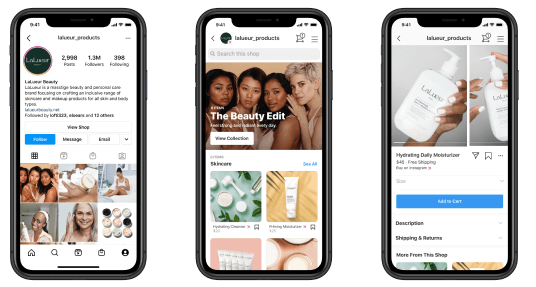
Shopping experience in the Instagram shop, source:Facebook
Product tagging
In addition to the presentation option via an Instagram or Facebook shop, there is also the option ofProduct links in posts. It works super easy, is super effective. Simply create a post and insert relevant products using so-called product tags. Product tags are used to mark and highlight products from the product catalog. They should enable the user to directly view an item that is shown or pictured in the post by clicking on the product tag in the respective company Facebook or Instagram shop and, if interested, to purchase it.
That’s about it. An Instagram / Facebook post with a product link is ready.
It’s simply great how versatile and, above all, efficient it is now possible to present your products to your target group outside of your own website and to prepare them for purchase using this new online shopping experience.
Now that all sounds wonderful, but to get back to the actual topic: How can you track this type of interaction with the products via the Instagram and/or Facebook Shop, as well as via posts with product tags?
Tracking in social commerce
First of all, there is currently no solution for this in Facebook Business Manager. Instead, we found a way through an external third-party social tool. We will now explain which steps are necessary and which additions need to be made in the data feed:
Adjustment in the data feed
As a rule, the URLs of the products presented in the Facebook and Instagram Shop do not contain any tracking parameters. By connecting to the data feed, all product information, including the URL, is crawled directly from the website and imported into Facebook.
If a user clicks on a product in the Facebook or Instagram shop, they will be redirected directly to the corresponding product detail page in the web shop via the standard URL (from the data feed). The problem is that it is not possible to understand exactly how the user got to the online shop. Maybe via the website link in the profile or via a highlighted product in a post? In short. You just don’t know.
In this respect, it is a black box, especially for marketers who use social shops and their functions as additional e-commerce channels.
For this reason, the next step is:Edit the standard URL from the feed and add the desired tracking parameters.
As the following example (screenshot) shows, the standard product URL has been enriched with relevant parameters such as Source, Medium, Content and Campaign. In order to enable measurability or reporting at channel level, in our case Instagram, the corresponding information is now included via the parameters utm_source and utm_content.
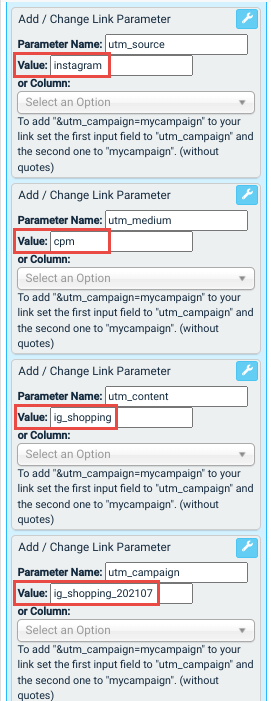
Define tracking parameters directly in the data feed, source: e-dialog
It is important to check the functionality of the URL after making adjustments in order to avoid possible incorrect redirection.
If you have done everything correctly, the link will work with the new parameters and link to the corresponding product detail page. All the work has already been done and you can sit back, relax and watch the incoming data with interest.
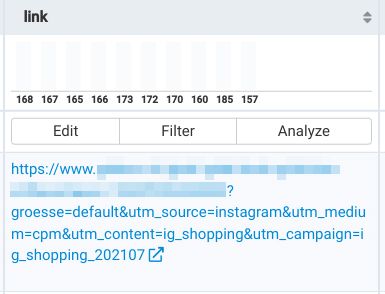
Final URL with added UTM parameters, source: e-dialog
But be careful: What if the data feed is also used for dynamic product ads on Facebook, for example?
Will this product link with the predefined parameters also be used automatically?
Since the data feed is the main link to the corresponding product and the parameters are always attached, a clear YES.
Every time this feed / product catalog is used, the UTM parameters would also be transferred. Since the parameters are not relevant for dynamic product advertisements in the case mentioned, they should theoretically not be automatically appended to the URL – this would distort information such as source and content.
We have also found a way to do this and have already successfully implemented it for well-known e-commerce customers – through further adjustments in the data feed, in the product mapping and corresponding measures in the campaign setup.




