
Traffic Peak And Server Side Gtm

Management Summary
You often read that a certain number of minimum instances is recommended for a server side GTM setup using Cloud Run or App Engine. The reason for this is traffic peaks, which could lead to data loss if the instances are scaled slowly. The running costs caused by unused minimum instances speak against this approach.
Server Side GTM Test Setup for Traffic Peaks
With the following test setup I wanted to check whether the Auto Scaling of Cloud Run and App Engine can actually keep up with traffic peaks.
- Onhttp://localhost/A Web GTM and GA Universal were implemented
- Using the JavaScript function setInterval(), as many page views as possible per minute were triggered and sent via the dataLayer.push() function
I repeated this test several times, but the result was always very similar.
Attached is the result of the last test.
| service | Cloud Run | App Engine |
|---|---|---|
| Instances | 0-100 | 1-100 |
| Length of time | 179 sec | 171 sec |
| hits/minute | 23,464 | 24,561 |
| Requests sent | 70,000 PVs | 70,000 PVs |
| Requests arrived | 69,956 PVs | 69,804 PVs |
| Requests arrived | 99.94% | 99.72% |
With Cloud Run it was possible to set a minimum number of 0 instances. When setting up Server Side GTM via the App Engine, the Flexible Environment is used, which always has a minimum number of 1 instance.As you can see in the table, almost all page views sent arrive, even though a traffic peak from 0 hits / minute to over 23,000 hits / minute was simulated. Very few website operators probably have such traffic peaks.
Auto scaling during traffic peaks
The two graphics show in detail how the instances of Cloud Run and App Engine scaled automatically.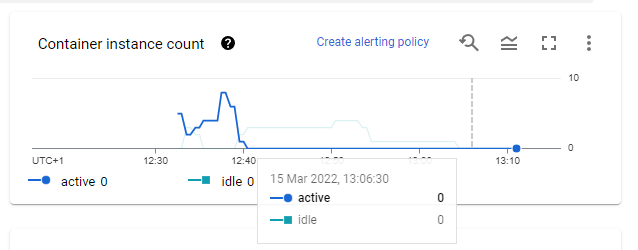 Automatic scaling of Cloud Run instances
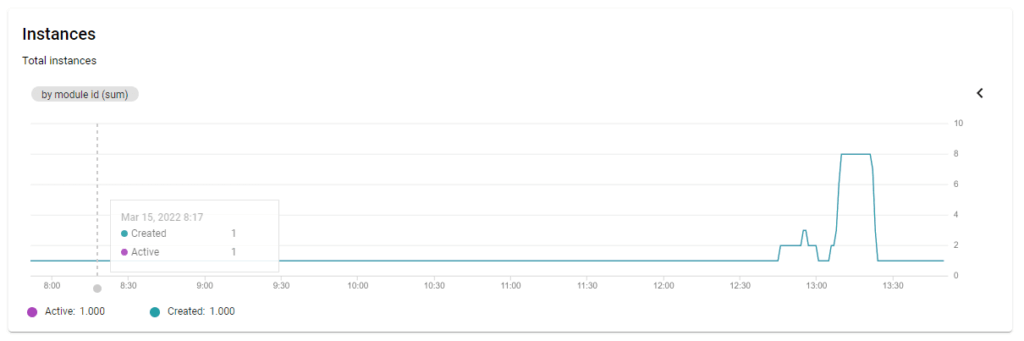 Auto-scaling of App Engine instances
Conclusion
Unfortunately, the question remains open as to where the limit is and at what point auto scaling will no longer be able to comply. Unfortunately, with this test setup it was not possible to send more than 23,000 – 25,000 hits per minute. The browser simply needs a certain amount of time to send and the GA tracking library also throws an error if you increase the frequency too much. Another test in which the hits are sent from a server may follow.




