
Use Content Security Policy With Google Tag Manager

Management Summary
How a content security policy works
The Content Security Policy is basically a text sent from your website to its visitors. This text defines which resources may be loaded on your website. You can decide very granularly on a domain basis which 3rd party domains are allowed to provide content on your website. But you can also very roughly block or allow all scripts or style properties.
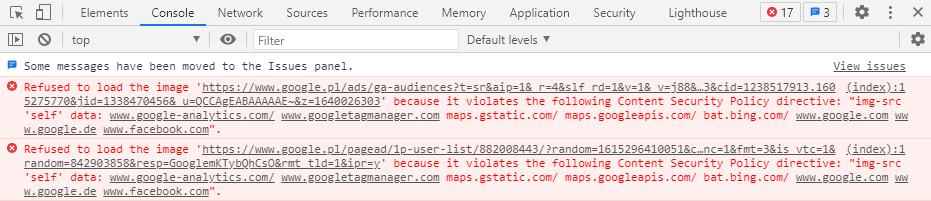
Technically speaking, the server must inform the browser that only certain resources may be loaded. For this purpose, the so-called “Content Security Policy” is set in the HTTP header. When this is sent from the server to the browser, the browser analyzes its content, follows the rules and blocks content if necessary. If a browser is too old or does not support CSP, the HTTP header will be ignored by this browser.
The reason for introducing this methodology is the numerous attacks that have occurred in the past, especially on dynamic websites. Suppose you have a forum where users can post content. A user could use the following trick to transmit third-party code to other users of the forum and use it, for example, to read passwords or user data:
Example bulletin board code that I post for the fictional experiment on exampleforum.tld:
[a href=”https://www.beispielforum.tld/index.php?search=”]I found this! Be sure to take a look![/a]
In this example, this code is converted into a link by the forum and displayed to users as a link in a forum post.
Assuming someone clicks on the link and comes to the URL https://www.exampleforum.tld/index.php?search=… which is a search results page from the forum, the malicious code https://boeshaftesscript.tld/script.js will be loaded from the “search” parameter if the forum wants to display the search term from the “search” parameter and has no security mechanisms. If the forum had used CSP, no resource could be loaded from evilscript.tld.
Content Security Policy & Google Tag Manager
When setting the content security policy on a website, an audit of the tools currently used should be carried out (as long as they will also be used after the CSP has been set).
Danger:The use of a CSP without corresponding activation of the respective domains can, for example, completely block Google or Facebook Pixel (and thus tracking and remarketing).
The use of Google Tag Manager (GTM) must also be approved in advance by the Content Security Policy (CSP). However, if you want to use Google Tag Manager to its full extent, it is not enough to just activate the Google Tag Manager domain (i.e. www.googletagmanager.com).
Simply unlocking the GTM’s domain means that user-defined settings such as custom JavaScript variables or GTM templates do not work properly.
For example, with Custom JavaScript variables, the CSP prevents so-called script evaluations (the eval function), which means that the Custom JavaScript variables always return an undefined value (undefined).
This can be remedied by adding the following addition to the Content Security Policy:
script-src: ‘unsafe-eval’ ‘unsafe-inline’ https://www.googletagmanager.com
img-src: www.googletagmanager.com
This ensures the correct execution of your GTM container. At the same time, no attacker who has gained access to your GTM container can execute scripts that query external resources or want to supply them with data.
Conclusion
The Content Security Policy is a useful tool for increasing control over content on your website.




