
What Happened To Do Not Track

Management Summary
Have you ever wanted to implement a setting on your PC or in the browser so that you would no longer be tracked? In principle, the “Do Not Track” (DNT for short) was the idea behind it. But what is DNT or what does it do? Am I really no longer being tracked? And how do I make this setting? All of these questions are briefly explained in the following sections.
What is “Do Not Track”?
DNT is a setting in the browser that allows the browser user to decide whether they want to be tracked or not. Technically speaking, an HTTP header field is used, which accepts three states:
- 1 = User does not want to be tracked
- 0 = User agrees to tracking
- “null” = user has not made any settings, header is not sent – therefore not taken into account
Almost all browsers, at least the common systems, support this setting. Anyone who knows this feature can decide for themselves whether to allow tracking or not.
How do I set “Do Not Track”?
In the previous section it was already clarified that all common browsers support DNT. In order not to go beyond the scope, only the setting in the browser of the market leader, Google Chrome, is shown here. In the other browsers it is very similar and the search function can be used in the settings.
- Open the setting in the browser
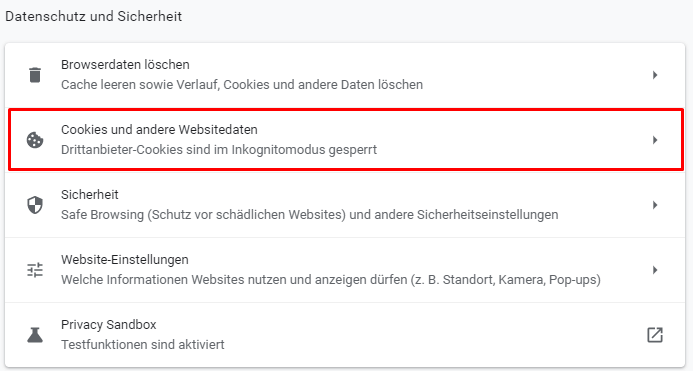
- Click the “Privacy and Security” tab
- Then click on the 2nd point from the top “Cookies and other website data”
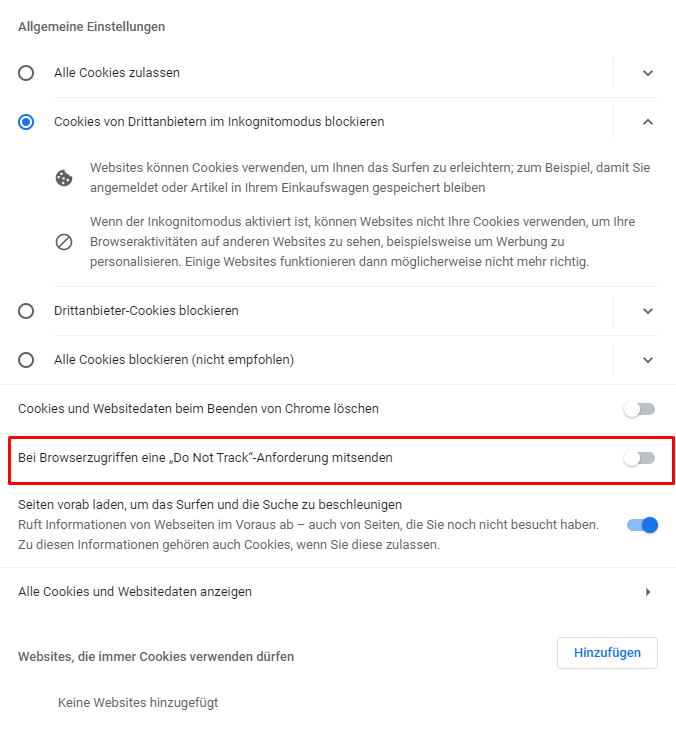
4. In the last point, all you have to do is look for the correct setting called “Send a “Do Not Track” request when accessing a browser” and activate it.
I have activated “DNT”. Why am I still being tracked on almost all websites?
Website operators are under no obligation to honor DNT requests. There are neither legal requirements nor any sanctions if the DNT status is ignored. In short, website operators can decide for themselves whether they want to respect DNT.
Since companies and website operators rely on their users’ data for their marketing, very few adhere to it and support the DNT status.
For this reason, the DNT status also has an expiration date if nothing changes. And that’s how it was: Although most browsers still allow the setting, many experts say that DNT is dead and you can’t rely on it under any circumstances.
More ways to block tracking
Since, as previously described, you cannot rely on the DNT status, other ways have been developed to block or circumvent tracking.
- Browser extensions and AdBlockers include Ghostery, Privacy Badger and AdBlock.
- Special browsers such as the “Tor” or “Brave” browser block tracking activities and advertising.
It should also be mentioned that a new standard is now being worked on, which should be very similar to the “Do not Track” standard. Several publishers, tech companies and civil rights organizations have formed a coalition and are trying to do so“Global Privacy Control”(GPC for short).
This browser signal is intended to work via a browser setting and prevent or prohibit the trading of data. This includes both the sale and the transfer of personal data. The initiators of the GPC are currently working on getting more supporters on board and strengthening the acceptance and position of the GPC. There is currently no legal basis for this and opponents of this initiative would like it to stay that way.
It therefore remains exciting to see how the situation with the GPC will develop.




