
What Is Piggybacking And Is My Website Affected

Management Summary
As nice as their name sounds, piggybacking tags can pose a real threat to the privacy and security of your website data. However, the danger can be averted if you take the right measures. But let’s start from the beginning and see what exactly piggybacking tags are.
What is a piggybacking day?
Piggybacking tags are tags that are called from another tag (often called a container tag). Any tag that acts as a container for other tags therefore uses piggybacking. For example, one form of container tag you are probably familiar with is the GTM container snippet. This is usually not taken into account in the context, but in reality there are piggybacking tags behind it.
Piggybacking tags are the most common in the ad serving community. As ad servers tags, they offer the advantage that they can call up tags from other servers. This allows you to collect data from multiple tags without having to implement them individually.
So in reality, these piggyback tags are very common and they can be very useful if used properly. However, they get out of control if handled incorrectly.
What are the dangers of piggyback tags?
Piggybacking tags give third parties access to your website data. And this is exactly where the danger lies. If these tags are also chained and used in multiple containers from multiple providers, there is a risk of a chain reaction that could result in data leaks and reduce the performance of your website.
As piggybacking tags are chained with more and more tags, the likelihood of the following threats increases:
Data leaks
A data leak is the transmission of website data to an unauthorized person. As more and more tags appear on your website, more and more parties have access to your data, increasing the chances that your data will fall into the wrong hands.
Slow loading time
Each piggybacking tag means an additional server request. The result of too many requests: loss of site speed.
Compliance issues
Particularly for compliance with the GDPR, it is important to ensure that data collection complies with all legal requirements. Non-compliant data collection, tags and cookies are more likely to occur when the website uses too many piggybacking tags.
Find piggybacking tags on your own website – analysis tools
Piggybacking tags are difficult to detect because most free tools only show which tags are loaded, but not in what order/tag hierarchy.
In our experience, we can recommend the following systems for a detailed analysis:
Paid analysis tools for piggybacking tags:
TagCommander by Commanders Act
The TagCommander from Commanders Act offers integrated tag performance reports, which, among other things, show the tag hierarchy:

Built-in protection measures such as audit trails, tag rollback, customizable user consent, and black and white listing also help prevent costly errors.
Link to the tool:TagCommander
Tag Hierarchy Tool from Observe Point
Observe Point’s Tag Hierarchy Tool also provides a well-structured representation of the built-in tags.
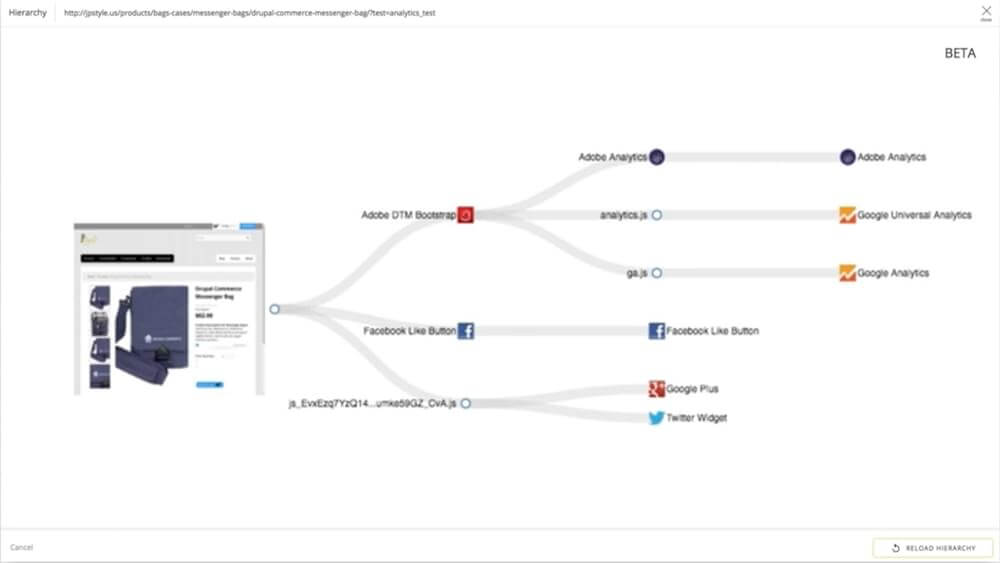
The Tag Hierarchy Tool illustrates the relationship of existing analytics and marketing technologies on a website. Duplicate or missing tags are displayed and unauthorized technologies (loaded outside of your tag management system) are identified.
Link to the tool:Tag Hierarchy Tool
Datatrue
datatrue also offers extensive tag hierarchy reporting. It helps to understand who collects what data on your website and visualizes the relationship between the tags on the website. Datatrue also identifies the sources of piggyback tags.
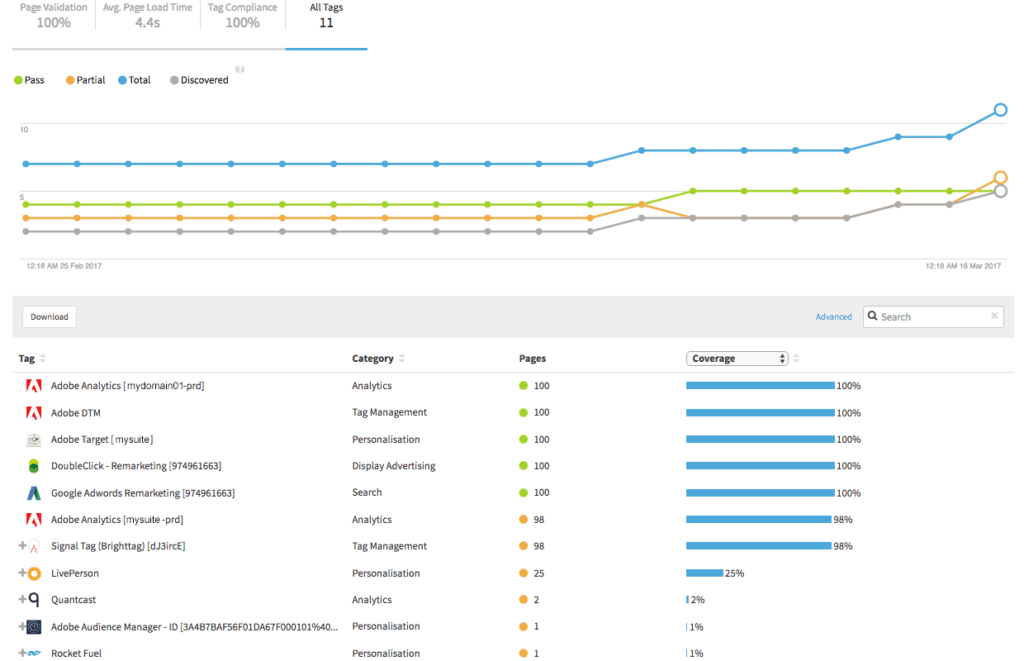
Link to the tool:Tag hierarchy tool
Usercentrics
Usercentrics is a provider of a consent management platform from Germany. 2 tools should be highlighted in this context, the audit tool and the GDPR check.Audit toolThe current audit tool from Usercentrics is currently in the beta phase but is already delivering great results. It shows at a glance which data is processed when you visit the website. It also analyzes which technologies are behind the data processing and which data protection measures have been taken.
Link to the tool:Usercentrics Audit ToolGDPR checkAdditionally, Usercentrics offers a very detailed GDPR website audit. This can be requested by potential customers during the quotation phase.
More information:Usercentric’s GDPR Check
Free Piggybacking Tag Analysis Tools:
Lightbeam
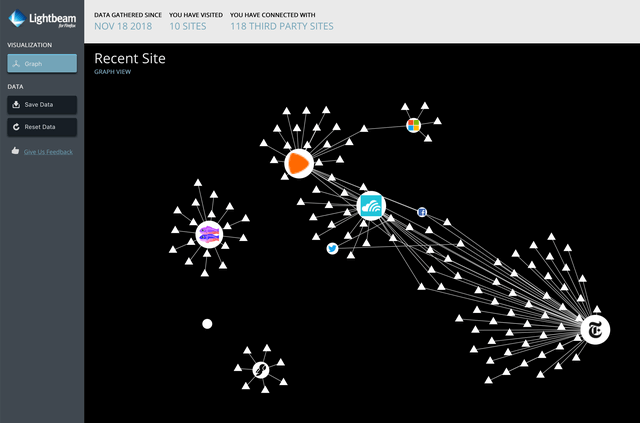
A beautiful and simple visualization of tags can be achieved with the Mozilla Firefox add-on Lightbeam. It doesn’t show piggybacking, but it does show where data is being sent. The graphical network expands to reveal how data is shared between pages. Unfortunately, it is no longer officially supported by Firefox.
Webbkoll.dataskydd.net
A quick check on the data protection measures of websites can be carried out here. Webbkoll checks the data protection functions of websites and helps to find out which data is passed on to third parties when you visit the website. The website also contains some recommendations on how the sharing of data can be prevented.
Link to the tool:Webbkoll.dataskydd.net
sendsdata.to
Currently in maintenance mode, but the site will definitely be back online soon.
Link to the tool:sendsdata.to




