
What Looker Studio Pro Can Do

Management Summary
Tired of searching for reports from the confusing list using the search function in Looker Studio? Or losing reports because an owner left the company without sharing the reports? Then check out Looker Studio Pro.
What is Looker Studio Pro?
Looker Studio Pro is the paid premium version of Looker Studio.
The enhanced version of Google Looker Studio offers additional features and support. The Pro version offers, among other things, expanded management options, team areas, access to technical support, etc., which makes it particularly attractive for larger companies and complex data requirements.
For those who don’t know Looker Studio, here’s a quick description:
Looker Studio is a free business intelligence and data visualization tool from Google. It allows users to connect, analyze and present data from different sources in interactive reports and dashboards. The tool is particularly useful for creating visual reports, the data can be presented in an easy-to-understand manner and this helps to draw conclusions and make decisions.
What Looker Studio Pro offers: A feature overview
Pro reports and data sources are owned by your organization
In Looker Studio Pro, reports and data sources are owned by your organization, not individual users. This means that when an employee is deleted, unshared reports and dashboards are not lost. But other ownership-related problems can also be prevented. With the Pro version you can ensure that all important data and analytics are retained even if a user is removed.
You can find details about this in this blog article.
Team areas
Looker Studio Pro offers the possibility of shared workspaces. Users can organize access for individual users and groups at the workspace level, for example for projects or specific departments. This eliminates the need for long searches in the “Owned by me” or “Recent” area, as all content in the team workspace can be clearly organized with folders and found quickly. Access rights can be set depending on the role of the team members (Manager, Content Manager or Contributor).
You can also find further information in the following blog article.
Report dispatch: plan and send efficiently
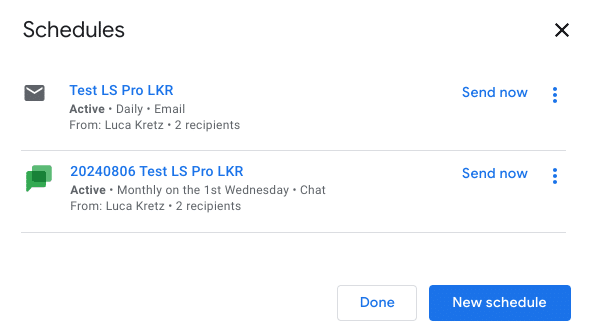
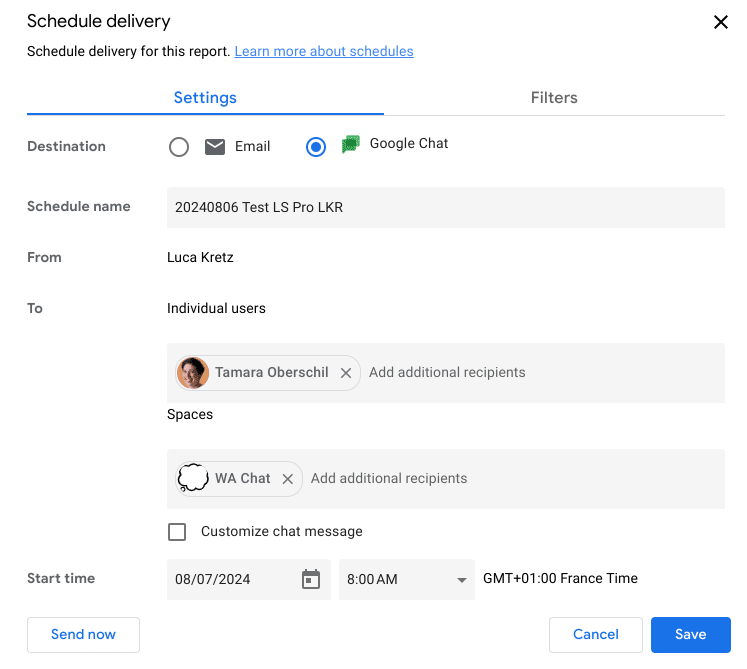
With Looker Studio there is only one schedule for sending the report via email on a regular basis. The Pro version can do more! With the advanced reporting functionality, up to 20 separate schedules can be created. Reports can be sent via email as well as via Google Chat. In Google Chat, sending to both individual people and spaces is available.
Danger!Your administrator can restrict recipients. If the restriction applies and you try to add this recipient, an error message will be displayed.
Overview of shipping planning:
Interface shipping setting chat:
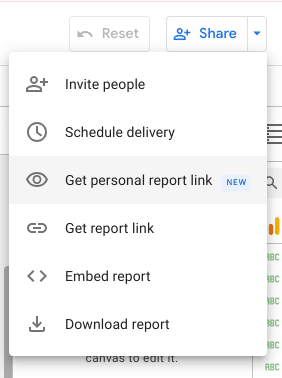
Link to individual report (= report copies for individual people)
People often want to customize standard reports or analyze them in more detail, here the “Link to individual report” function is useful.
This link will create a copy of the report. When a person (with a Pro license) opens the link, they receive their own copy of the report that can be viewed and edited. Changes to the copy do not affect the original, and vice versa. The prerequisite is that the person has a Pro license and has access to the original report.
This Pro function is located in the Share section and is called “Get personal report link” in English. If you open this link, the report name contains the date and time the link was created.
Looker Studio app for Pro users
The Pro version can be used to use the Looker Studio app. This allows reports to be accessed while on the go. Classic report interaction, such as navigating reports, selecting or changing built-in filter values, tapping on data points to see details, and sharing reports with other users is possible.
Danger!Editing reports is not possible.
In principle, you can choose between the original view and the view optimized for mobile devices. Some report details may be missing in mobile view. This can occur, for example, in the following cases: Reports that contain lines, mind maps and/or flowcharts, as well as overlapping elements.
Additional support from Cloud Customer Care
Looker Studio Pro customers benefit from Google Cloud Customer Care’s 24/7 support service. Processing takes place via the ticket system in the Google Cloud Console.
Danger!Both a Google Cloud support tier and a Looker Studio Pro subscription are required to receive technical support for Looker Studio Pro issues.
For a better overview, the support options for Looker Studio and Looker Studio Pro are listed here:
| Looker Studio (Free) | Looker Studio Pro | |
|---|---|---|
| Help Center | ||
| Looker Studio developer page | ||
| Community Forum | ||
| Feature requests | ||
| Report a problem | ||
| Google Cloud Customer Care |
More pro settings and functions
In addition to the functions listed above, there are many other “extras” behind Looker Studio Pro.
Some are already firmly integrated and others are still in the trial phase (preview mode), where it is unclear whether the features will remain an integral part of the Pro version.
Here we want to give you insights into other pro features:
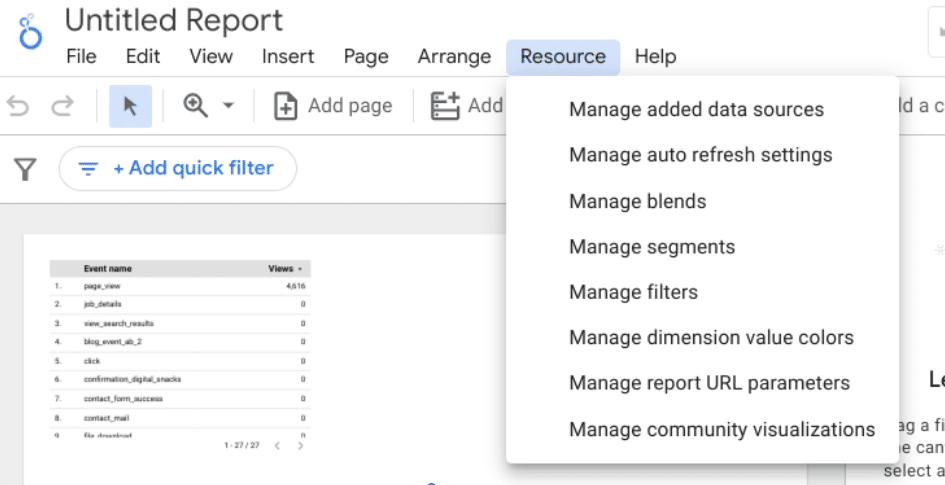
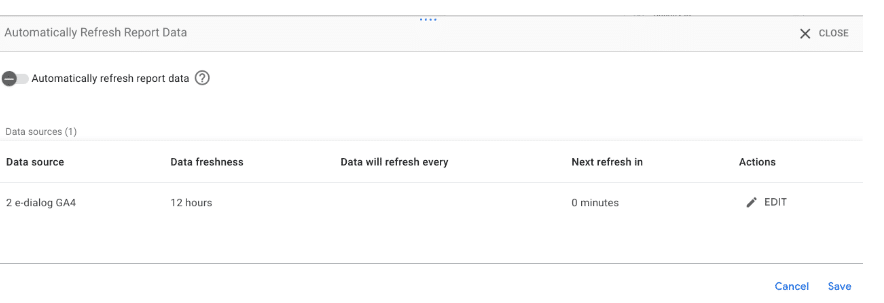
Automatically Refresh Report Data
If Looker Studio Pro is used, under the Resources menu item there is a Pro feature called: Manage Auto refresh settings. If you enable this auto-refresh feature, Looker Studio will periodically reload the data in the report. Depending on the update setting, this loading from the underlying data connection is carried out more frequently or less frequently. This means that the data in the dashboard is updated while it is open.
Alerts in charts
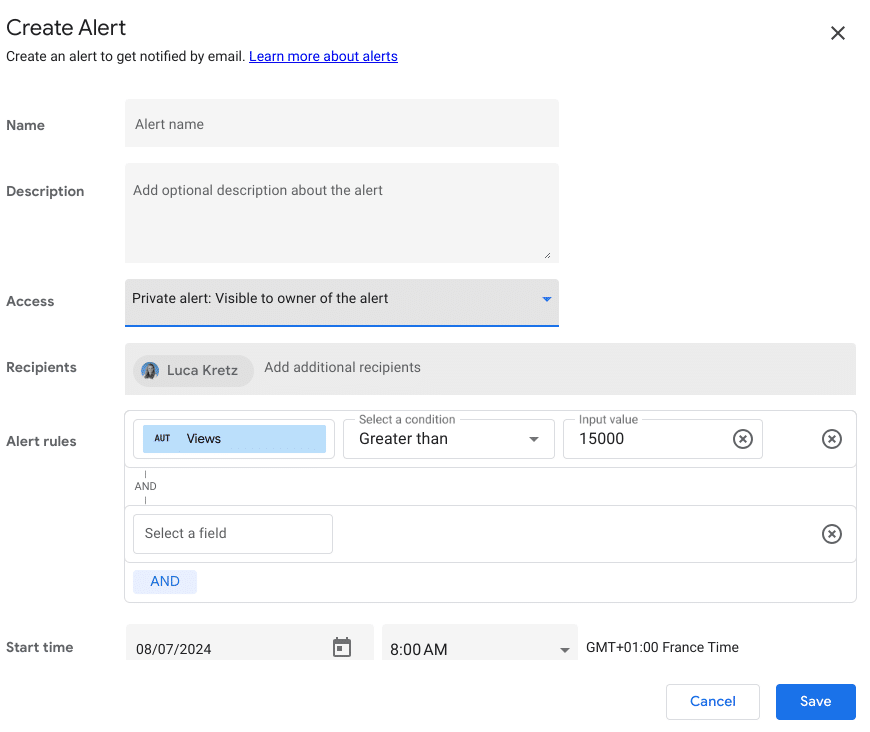
Alerts can be set up to inform stakeholders when a chart in a Looker Studio report meets specified criteria. The alert notification includes a link to the original report. Danger! People must all belong to their own organization so that alarms can be sent to them, but they do not necessarily have to have a Pro license.
This is how it works:
The function is well hidden. It is important to be in view mode; alarms cannot be created in the editor area. Hovering over a chart reveals a bell symbol with a plus. It is located right next to the usual three dots in the top right corner of the diagram.
You can choose between private and public alerts. Depending on whether the alarm should be created for all viewers of the report or just for the report owner. The exact rules for the alarm can then be stored based on the dimensions and metrics of the diagram.
Danger!If the Looker Studio Pro subscription is canceled, all notifications will be disabled and cannot be restored or enabled without a Pro subscription. There are also some limitations, for example alarms are not available for calculated fields and data tables.

Preview: Gemini in Looker Studio Pro
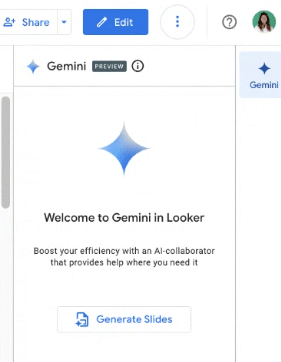
Gemini is just a preview feature in Looker Studio Pro for now and it’s unclear if the feature is here to stay.
Gemini gives access to Google AI and is, so to speak, the successor to Google Bard. Gemini is an AI model that can capture, understand and combine “text, code, audio, images and video,” according to Google.
These features are currently available:
- Use Gemini to automatically create Google Slides from your dashboard.
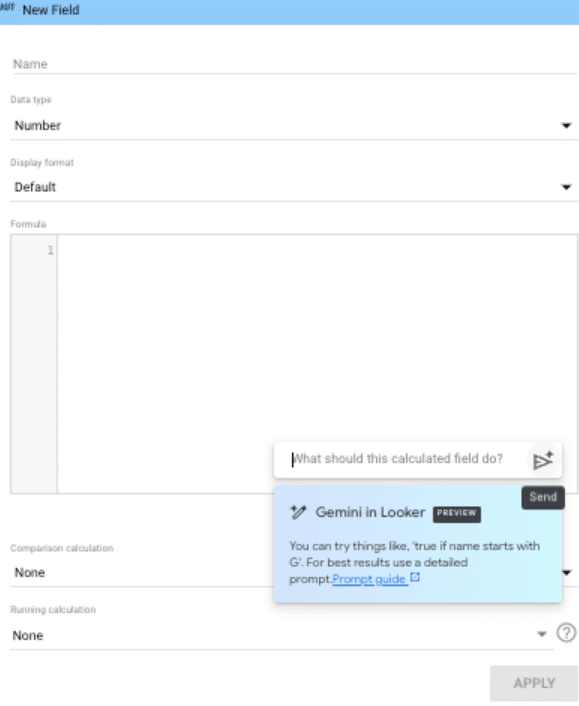
- Use Gemini to create calculated metrics.
- Conversational Analytics, Analytics understands your questions in natural language
Dream of the future is becoming reality: Even if the new functions are still in their infancy, they can save some time and help make work more efficient. When it comes to presentations, they make the work process easier. It is a foundation with which to start so that you don’t have to build the presentation from scratch. The AI-generated summaries in the presentation may reveal trends that you would not have recognized yourself. Nevertheless, it is important to carefully revise and check the interpretations and compilations created. Unfortunately, the links in the presentations only link to a PDF image from the dashboard.
The situation is similar with support for creating calculated fields. One should thoroughly understand the features generated by Gemini and ensure that they meet the desired requirements. Nevertheless, sometimes the desired regex or if functions are quickly created by Gemini with the right wording.
Thanks to artificial intelligence, Conversational Analytics understands your questions in natural language and searches your data (BigQuery, Google Sheets, CSV, Looker) for the relevant information. The results found can be displayed directly as visualizations and integrated into a new Looker Studio report.

Danger!In order to access the Gemini Preview features, the correct authorization must be stored in GCP. Otherwise the feature is not visible.Hereyou can find the Google Support article on the topic.
Conclusion
Looker Studio Pro offers a full range of advanced features and support that are particularly useful for larger organizations, complex data projects or specialized requirements.
A significant pro feature for businesses is that reports and data sources are owned by the organization. This prevents reports or data sources from being lost. In combination with the team areas and the ability to use folder structures, the Pro version is a real added value. For this reason alone, it makes sense to evaluate whether the Pro version is worthwhile for your company.
The preview features with Gemini are not yet fully developed, but they can make work easier and thus save resources. The alarms and better report sending features are practical and are definitely among the highlights. The alarms in particular supplement the often inadequate alarm options in GA4.




