
Youtube Ad Sequence Campaigns

Management Summary
Are you interested in storytelling and want to get more out of your YouTube campaigns? Would you like to get to know YouTube as a performance channel? Then read on!Many advertisers use YouTube in the upper funnel because they assume that YouTube is purely an awareness measure. However, few people know that the platform is constantly evolving and that performance-oriented formats are also available. A popular and successful strategy can be to use sequencing, which can be used for storytelling.
What exactly is sequencing?
As the name suggests, sequencing is the display of ads in a specific order to present the story of the product or brand to users. A sequence consists of at least 2 videos, whereby the interaction (either impressions, view or skip) with the first video decides whether and when the next episode is played to the user. Advertisers can either choose from predefined sequence formats during setup or play the videos in any order.
The following templates are available to the advertiser:
- Introduce and Reinforce: You introduce your brand with a long video ad and then reinforce your message with a short video ad.
- Encourage and Inspire: Engage viewers with a short video ad and then inspire them with a long video ad.
- Engage and guide: You engage viewers with a short video ad, inspire them with a long video ad, and then encourage them to take action with another short video ad.
- Motivate and differentiate: You run four short video ads to break your brand message into multiple steps or present the same content from different angles.
What is important to understand when playing out is that if a video from a sequence is also part of another line item and the user sees this video, he will still see the next video from the original sequence the next time.
Here’s an example to understand: You have Video 1, Video 2 and Video 3 in a sequence. If Video 2 is also used in another line item and was seen by a user via this alternative line item, the user can immediately be shown Video 3 in the sequence.
If you use frequency capping for your sequences, the videos will only be presented to the same user once in the time period you specify. (Source: Google)
Setup in DV360
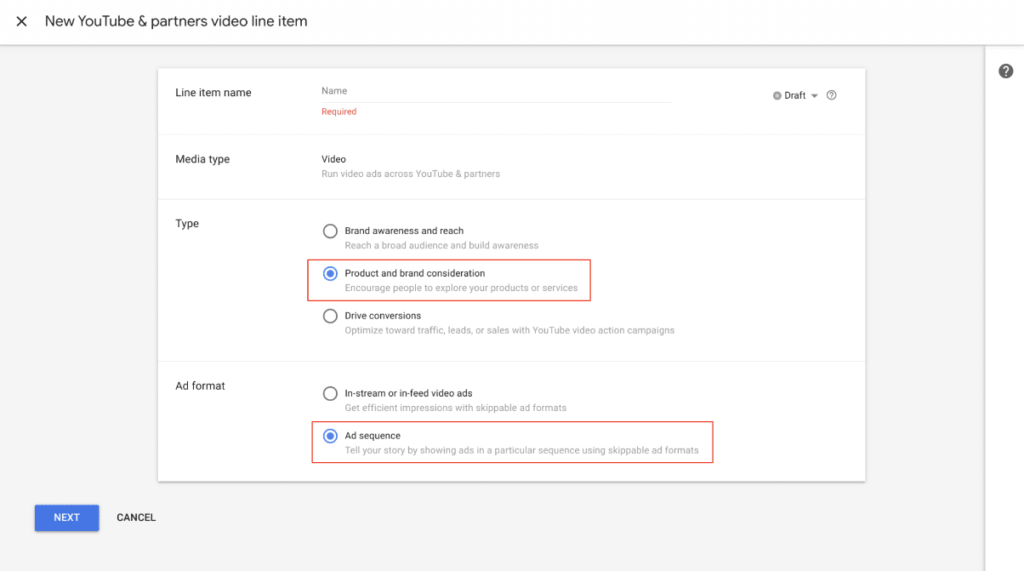
The structure of a Youtube Sequencing Line Item is slightly different from the normal Youtube Line Item setup. However, the line item can be created either in an existing insertion order or in a new one.When creating the line item, the following settings must be taken into account:Ad Sequencing Line Items are only compatible with the following 2 line item types: “Brand awareness and reach” and “Product and brand consideration”. For the 3rd type (“Drive conversions”) the setup cannot be selected.The difference between the first 2 types is this:The line item type “Brand awareness & reach” uses “Target CPM” as the bidding strategy. And for “Product and brand consideration” “Maximum CPV”. Accordingly, you should decide before setup which type you want to use.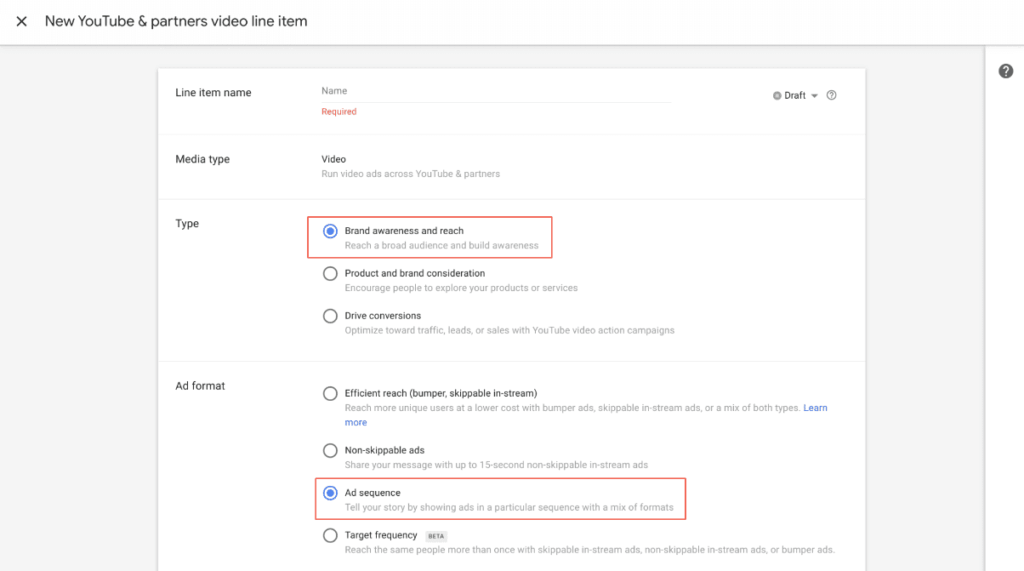
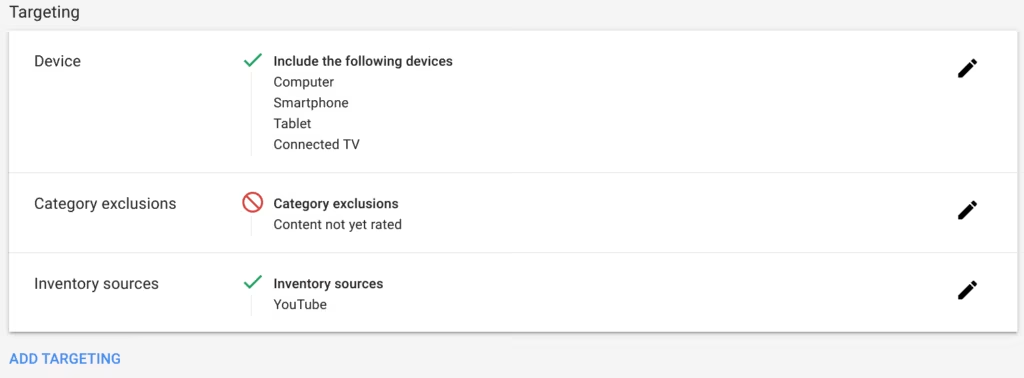
 In the next step, the targeting settings can be made. However, these can also be edited at a later point in time after the line item has been created.
 After this area you come to the settings regarding duration, budget and pacing as well as bid strategy and frequency capping.
It is important to mention that the area“Budget and pacing”cannot be changed after the line item has been created. This is also the case with normal YouTube line items, not just with sequencing. The bid strategy can no longer be edited here; it was already set in the first step. In order to edit this again, the setup must be started again.There are only 2 options for the frequency cap:You can either vote once in 7 or 30 days. This setting ensures that a user will not see an entire sequence more than once in 7 or 30 days. He will also not see a video of the sequence more than once in the specified period.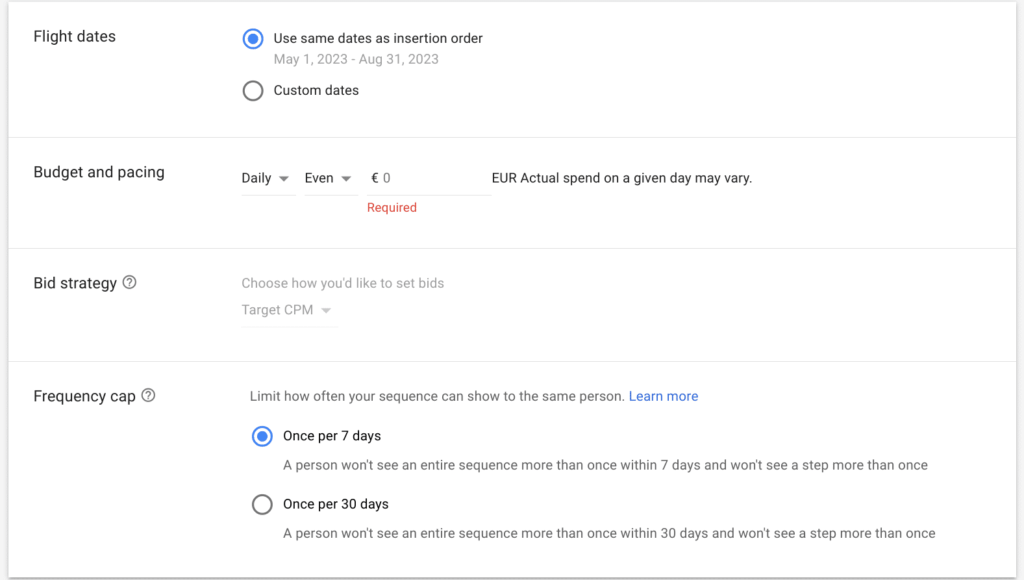 Related videos can then be added as needed to increase engagement; this is optional.
At the end, the conversion tracking can then be filled with all the important floodlights that can help you with campaign optimization.After these settings you get to the actual setup of the sequence.Here you can select the different templates or upload a self-determined order of videos. It is important to note that only one type of sequence can be selected within a line item. So if you want to create multiple sequences, you have to create the same number of line items.
When you select a template, you get setup recommendations, and when you hover over the templates, they are explained again.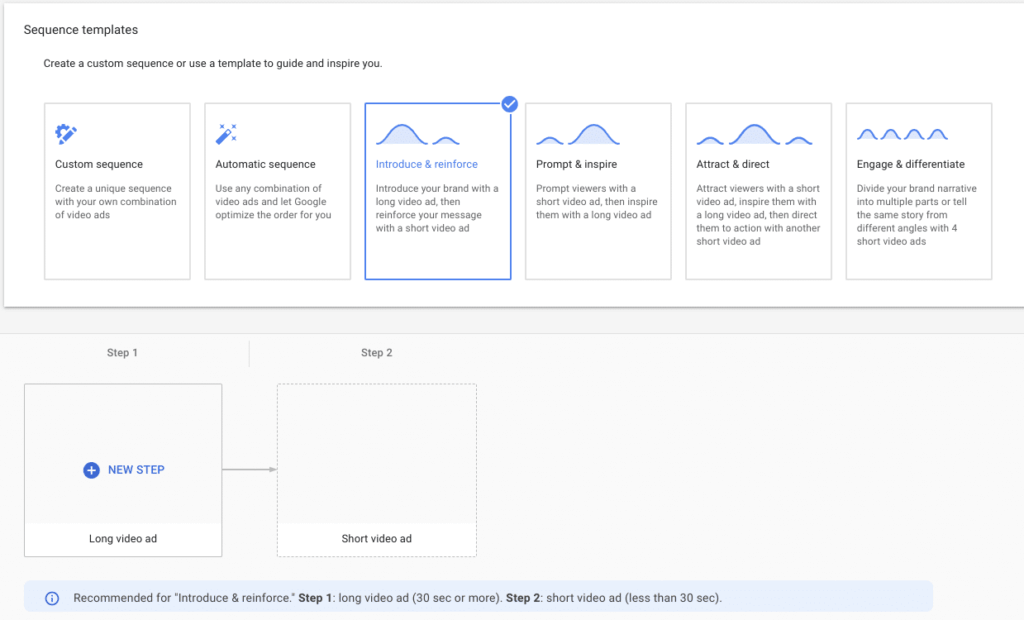 When you click on “New Step” you will be redirected to the ad group page. For each sequence step, one ad group must be created that can contain exactly one ad (the video).
The setup looks similar to normal ad groups/ads.Here DV360 gives recommendations again as to which formats (skippable, bumper or non-skippable) would be suitable for the selected sequence type.In the next step (2nd video), you have to specify what kind of interaction has to happen so that the 2nd video is played: this is where the 3 options already mentioned come into play: impression, view or skip.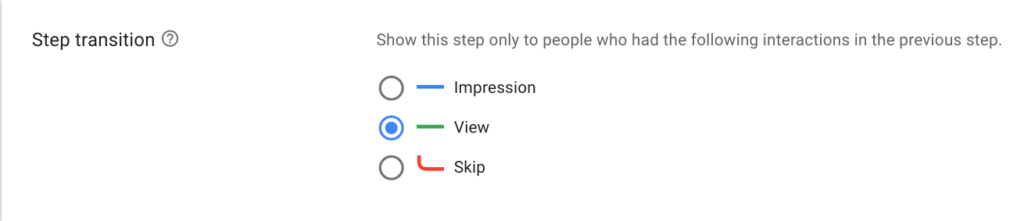 Once the sequence has been set up, the campaign can start.
You can find even more detailed step by step instructions on GoogleHelp article.
Limitations
The following restrictions must be observed during setup:Targeting
- Ad sequence line items are only available in the YouTube video inventory source.
- You can exclude, but not include, keywords, categories, and placements at the line item level.
- Ad group-level targeting is not available for ad sequence line items.
YouTube videos
- You can only use videos from YouTube channels that work with your display & Linked to Video 360 advertisers.
Miscellaneous
- Reach predictions are not available for ad sequence line items.
- Ad sequence line items cannot be edited in bulk or with structured data files.
- Product feeds are not available for YouTube ad sequence campaigns.
Conclusion
YouTube Ad Sequencing enables advertisers to present their brand in a creative format and promotes user interaction. Experience has shown that sequencing can increase the view-through rate of longer videos, and the format can lead to significant performance improvements. However, the performance is of course very dependent on the video material – it is recommended that the videos are coordinated with each other and tell a story as comprehensibly as possible or at least fit together.




