
Landing Page Tests In Search Ads 360

Management Summary
Landing page testing in Search Ads 360
Testing different landing pages helps create the optimal experience for the user and potential customer post-click. The extensive post-click data from landing page testing in Search Ads 360 determines the pages that are most valuable for ROI (return on investment) for e-commerce stores. For all other customers, landing page tests can be used to identify the pages that best contribute to achieving goals or deliver above-average engagement values.
This can help determine whether a detailed product page, a topic page, or a category page is more suitable as a campaign landing page. Numerous tests have shown that the homepage for product-related searches on Google is rarely the best landing page. With Search Ads 360’s landing page testing feature, traffic can be split evenly or by percentage across multiple landing pages and A/B or multivariate testing can be performed. Using Floodlight pixels orAnalytics 360 (formerly Google Analytics)The conversions and engagement values on the different target pages are measured and displayed in a common report.
Landing page testing requirements
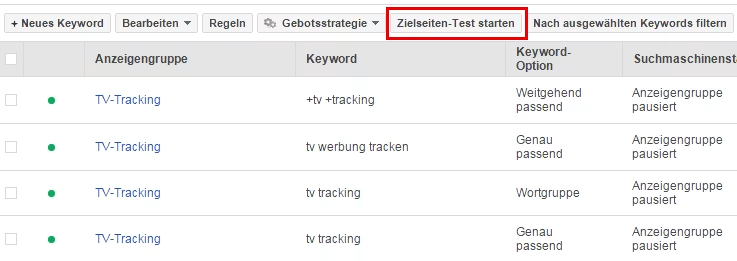
First, the keyword set for the landing page test needs to be determined. It’s easiest when keywords are within a common campaign or ad group. However, testing keywords in different campaigns is easily possible. After the keywords have been set, simply click on “Start landing page test”.
Tip: First assign a label to the keywords that you want to use for the landing page test. Filtering according to the assigned label makes it easier to set up the test in the second step.
Implementation of landing page tests
Once a keyword is added to a landing page test on Search Ads 360, it is given a control landing page URL and a test landing page URL. Typically, the control landing page URL is the original landing page URL specified when the keyword was created. Additionally, one or more test landing page URLs must be defined.

Finally, a control page and at least one or more test target pages are determined. These should then be given a suitable name so that it can be seen at a glance which is the control page and which is the test page. The splitting of the traffic must then be determined. Traffic can either be distributed evenly across all landing pages or split according to specially defined percentages.
TIP: If you are unsure about selecting the experimental landing page, the control page could be weighted higher with 2/3 or 3/4 of the traffic instead of 50%. The test is therefore initially carried out on a smaller target group.
Once you have made all the settings, the landing page test is ready for use and can be saved.
Interpreting landing page test reports
After the test has been running for a certain amount of time, the first conclusions can be drawn. The duration until meaningful data is available depends on the respective traffic volume and can range from a few hours/days to weeks or months.
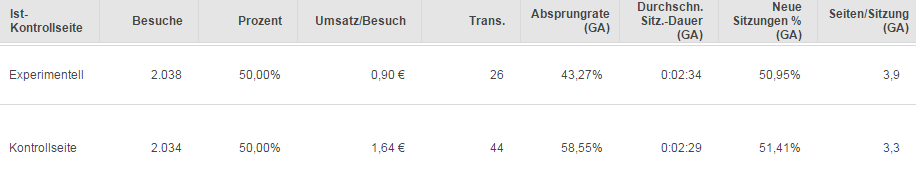
The test result could, for example, look like this:
Each landing page test should be interpreted depending on the specific business goals. By linking to Analytics 360, the engagement values are also available in the landing page tests. For example, a high bounce rate is not always bad, as in this example, significantly more transactions and higher sales/visits were achieved via the control page.
The result of the landing page test can then also be checked using aSignificance calculatorbe interpreted.
Device-specific landing page testing
The landing page testing process described above can also be applied to users who access the website via a mobile device, for example. The same is of course possible for non-mobile devices.




