
Perfect Seo Copy Writing Guide Tips 038 Examples

Management Summary
Customize existing collections:
This statement raises many questions. Who are my readers, what are they interested in and what are my readers looking for? Tip: Certainly not a keyword density of 2.435% → that dates back to the dark SEO Middle Ages and has never had any added value for the user!
To find out and then create a perfectly optimized text, I created this 11-step guide.
- Topic definition
- Search synonyms
- Benchmarks & User intent
- Determine keyword suggestions
- Define text structure
- Define title
- Research
- Write
- WDF/IDF with a difference
- Text correction
- Text styling & publication
- Measurement of success
By the way, this is the shortened version. My personal checklist has over 22 steps. But the most important things are covered.
01. Topic definition
Before you get started, you have to define what it’s all about. I will use the topic “Polyphasic Sleep” as a case study for this guide, as I have already written an optimized article on it.To the article >>
02. Find synonyms
Before we start keyword research, we need to find out all possible terms for our topic. The keyword planner is not always completely complete, so we take a short detour into the Google search results.
The following synonyms can be derived from the titles alone:
- Polyphasic sleep
- Power napping
- Uberman sleep
I will need these synonyms later for keyword research, because Google Adwords usually only suggests keyword variations and not synonyms. For example: Polyphasic sleep / Polyphasic sleeping is a keyword variation. Power napping, on the other hand, is a synonym.
03. Benchmarks & User Intention
The top 3 results should serve as your benchmark. Later, when creating the text, the task will be to deliver better content than the existing results. This means not blindly writing more text, but writing better text.
I also pay attention to the following features:
information– Are all questions answered? Is there any information missing?
Writing style– Is the text pleasant to read and easy to understand? Does the writing style suit the target group?
Further links– Are there any useful further links and sources?
Pictures & Infographics– How many images are there? Are they thematically appropriate and high resolution?
Subheadings– Can I assign H2 headings more sensibly and appropriately?
Jump marks– Is there a useful jump label menu?
Tables & Infoboxes– Can I make tables and info boxes more useful, more manageable or more data-rich?
author– Is the author of the text obvious and trustworthy?
With this information in mind, it is much clearer what level of text you have to deliver in order to get into the top 3.
04. Determine keyword suggestions
Now it’s time to do keyword research. In this case, this does not have to be too precise. A rough overview of user questions and the definition of the 2-3 largest keywords is enough.
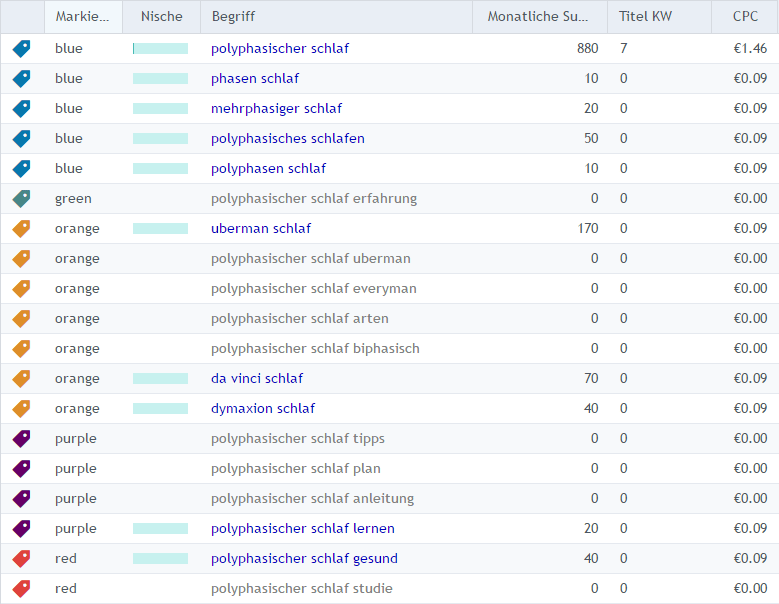
I then try to categorize the keywords found according to user intent. For this example, even with tags, which I would otherwise save for time reasons.
Info: While researching, I saw that the keyword “power napping” is not the same as polyphasic sleep. In this case, I will save the topic of “power napping” for a separate article.
05. Define text structure
By categorizing the keywords, I automatically got an outline. Ideally, I sort the points by search volume or number of keywords. In this case, “Experiences” has the lowest search volume and therefore comes at the very end.
[Blue] General
[Orange] species / the different cycles
[Purple] Learning / Instructions
[Red] Is that healthy?
[Green] experiences
06. Define title
You can also define the title at the end. But if I have all the keywords in front of me, why not right away. The title should fulfill 2 functions:
1. The most important keywords are included
2. The most important user intent is visible

“Polyphasic sleep” and “Uberman” are the most important keywords, with the highest search volume. The keywords “instructions” and “experience” are user intent, i.e. what people want to know.
Tip: In order to be able to use the maximum length of the title and description, I use thisSistrix serp generator.
07. Research
Now comes the most time-consuming point – the research! As already mentioned at the beginning, good SEO texts should contain better and, above all, more information than the competition. I call this “Info-USP”, i.e. information that can only be found in my text.
Your own experiences and current studies are ideal (see e.g.Pubmed), books or expert interviews.
08. Write text
When enough information has been collected, it’s time to write. What is good or bad writing style is clearly beyond the scope of this article! And there is already a book that describes this topic perfectly:
German for Young Professionals: How to Write Well and Lively – By Wolf Schneider
A MUST for every SEO copywriter!
09. WDF/IDF with a difference
WDF/IDF stands for “within document frequency” and “inverse document frequency”. If you don’t know the WDF*IDF, you can watch the following video. Merlin from Onpage.org explains
https://www.youtube.com/watch?v=uTVdd31ZqQ4
I also want to check which words the top 20 documents in Google use. Not necessarily to include the same keywords “blindly” in my SEO text, but to check whether my text is still missing information.

If you implement steps 2-5 conscientiously, the WDF*IDF analysis will be positive in 90% of all cases anyway. That’s why everything is in the green in this case.
If the analysis would show that keywords like “REM” or “Dymaxion” are missing in my text, this is an indication that my text is missing this information. In this case, I wouldn’t just write the keyword somewhere in the text to get a “green tick”, but I would explain and explain the terms separately.
10. Text correction
Unfortunately, spelling mistakes and strange or overloaded sentences always occur. This makes it all the more important to have a second pair of eyes read over the finished text. In order to find the worst spelling mistakes or “typos”, I use the Duden spell checker. Spelling errors are also a good indicator for the search engine as to whether a text is serious or not.
11. Tips for Text Styling & Publishing
Nothing is worse than a gray “text sausage” in 8.5 pt font size that has probably never been read without subheadings, paragraphs and images. That’s why you should consider for every text whether it would make sense to incorporate the following elements into the text.
| Styling idea | Useful for SEO texts? |
|---|---|
| Subheadings & paragraphs | always makes sense |
| Pictures | always makes sense |
| Pleasantly readable font | always makes sense |
| Enumerations | mostly makes sense |
| Jump marks | mostly makes sense |
| Info or answer boxes | mostly makes sense |
| Further links | mostly makes sense |
| Social buttons | mostly makes sense |
| Helpful icons | mostly makes sense |
| Tables | sometimes useful |
| small infographics | sometimes useful |
| Video integration | sometimes useful |
| dividing lines | sometimes useful |
| Text columns | sometimes useful |
| Quotes | sometimes useful |
| Emojis / smilies | sometimes useful |
| Tabs/Content Toggle | sometimes useful |
After publication, we now have to be patient until the article appears in Google results. If you have the article rendered in Search Console and then pass it to the index, it will be faster.
Whether a text is good or not can be measured by 2 factors: How or where the article is placed in Google and whether the article is actually read extensively by visitors.
Success factor: Ranking
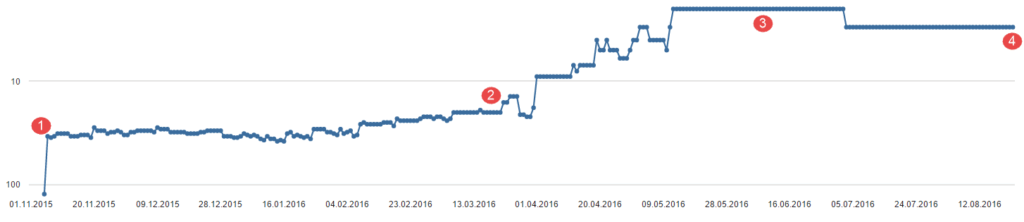
The domain was completely new at the time of publication, with ZERO backlinks! The article still ended up on the third page of results (1) and spent a few months there until I put a backlink to the article (2). As a result, he rose to second position.
After a month in second position, I removed the link again to see whether this affected the ranking or whether only user data counted in second position. Even without a link, the position remained for almost a month until the article moved to third position. He is there to this day (08/22/16).
Success factor: user data

The user data is 1A! On average, the article is read for 9:26 minutes and only has a bounce rate of 22%.
Conclusion
An article that has been optimized according to these rules has a much easier time ranking. Although it wasn’t possible without backlinks, it was significantly less than the competitors have! However, creating such a text is a lot more complex than 300 words with a keyword density of 2.x%.




