
Deal Troubleshooting 8211 A Guide To More Enjoy Programmatic Deals

Management Summary
First things first – the requirements
Your RTB deal is not working at all. So there is a good chance that the worm is in the setup. If the deal did not come through Google Ad Manager (formerly DoubleClick Ad Exchange), i.e. the publisher uses a different SSP, check the data you entered for accuracy: deal ID, floor price, SSP, assigned advertisers. It is also important to check whether youthe right kind of dealhave selected.
If everything is set up correctly on your side, you should contact the publisher and ask them to check the installation on their site. If both parties have done their homework, a more detailed look at the campaign needs to be taken.
The heart of debugging – the Deal Troubleshooter
The setup is correct, the frustration increases. Why doesn’t the deal work? Google provides a great tool here: the Deal Troubleshooter. This analyzes the entire deal and compares the specified targeting with information that can be read about the deal. You can access it in the corresponding line item.
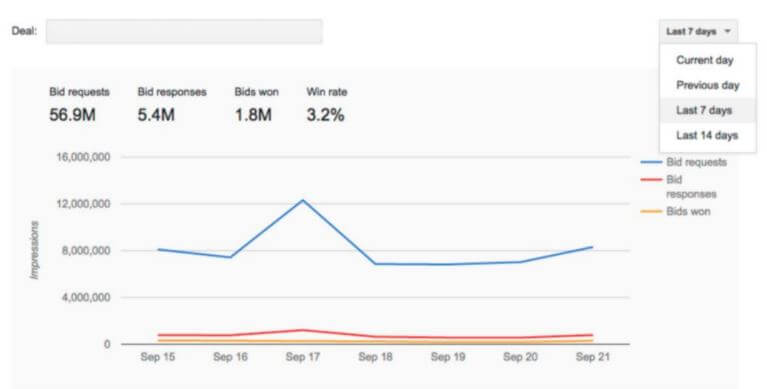
If you select the deal, you quickly get an overview of how the deal’s traffic was/is. The blue line shows how many bid requests the publisher sent and how much inventory was available. The red line is the indicator of how many bids we actually bid on. The difference here is usually very big – unless you have an unlimited media budget. What is particularly exciting is the orange line: how many bids were won. Analysis helps us interpret the chart.
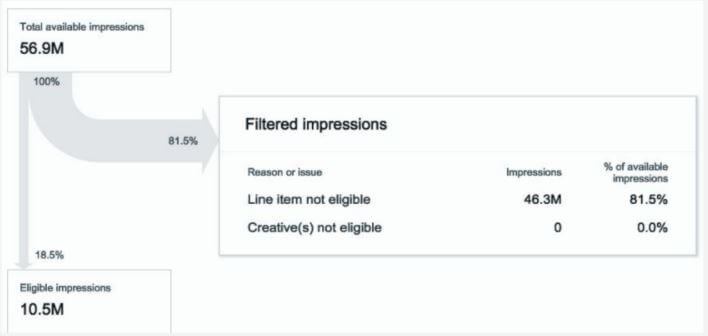
Now the picture is slowly becoming clearer. In this example we didn’t bid on 81.5% at all. The reason for this is that the line item is not eligible. Clicking on it opens a separate window that compares the targeting setting with the information from the deal.
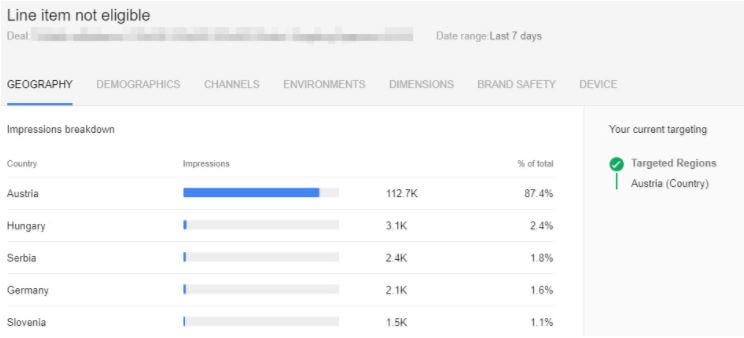
For example, is AT targeting set but the publisher mainly delivers DE traffic? Or have I selected gender targeting and the publisher is not passing on this information? There can be a variety of reasons, but the problem can usually be solved quickly. If the creative is not eligible, it is often because the publisher does not allow certain things in the creative, such as VPAID, 4th party calls, special pixels, etc.
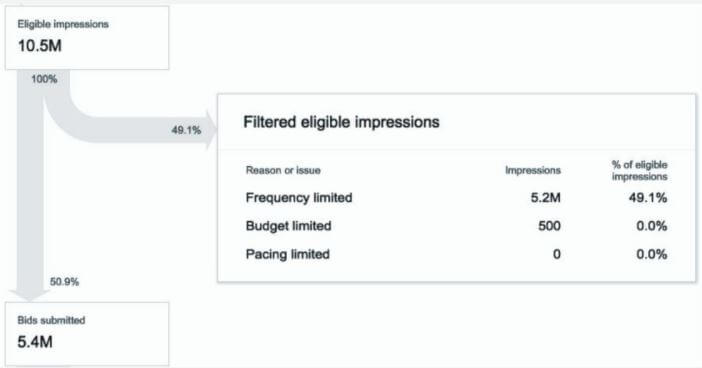
Now we know which bids would have been suitable. However, you can find out why you didn’t bid on all of them in the next step. This may be due to limiting factors such as frequency cap, budget or pacing.
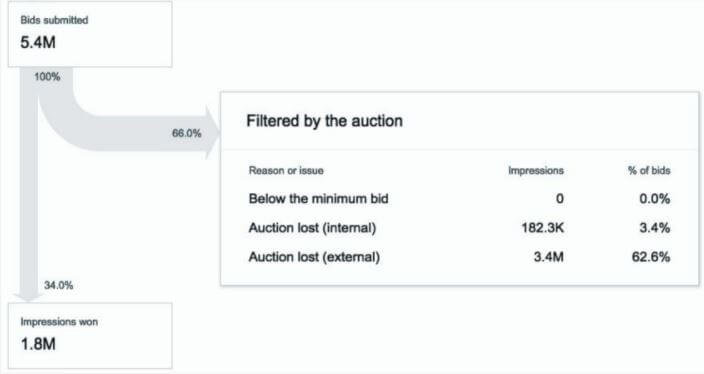
Now you can see what was actually bid on. If an auction was not won, there could be three reasons.
| Below minimum bid | The bid was below the reserve price. |
| Auction lost (internal) | The auction was lost due to another DBM campaign. |
| Auction lost (external) | The auction was lost in the Exchange due to another DSP. |
The first stumbling block, “below minimum bid”, can be easily solved by increasing the bid.
Lorem ipsum dolor sit amet, consectetur adipiscing elit. Ut elit tellus, luctus nec ullamcorper mattis, pulvinar dapibus leo.
The top 5 deal recommendations – DSP independent
As a rule, you should be able to solve all problems with this. Here are our top 5 tips for RTB deals:
- Check whether the publisher is passing user IDs. Without this, neither frequency capping nor the use of additional 1st and 3rd party audiences is possible.
- Always bid above the floor price, as bidding processes often take place in a different currency and this allows you to avoid price fluctuations and any tech fees are taken into account. The rule of thumb is to offer 10-20% above the floor price anyway.
- In principle, use fixed bids and do not use bidding algorithms for deals: these optimally need the freedom to bid very high or very low to users – a prerequisite that does not exist in a deal.
- Best practice is to create a separate line item for each deal, so you can quickly get an overview of which deals are working well.
- Avoid too many targeting, otherwise delivery difficulties can easily arise. If a deal doesn’t work, first delete most of the targeting and turn it back up little by little – this way you will quickly find the no-go criterion. (Attention to the budget,-)
Now you are well equipped to optimize your deals. But if there are still problems and before you completely lose your nerve and want to go back to shopping for media inventory in the classic way, ask us :)




